Tag: thoughts

  • Dubai Diaries: Staying active via VR

    Dubai Diaries: Staying active via VR

    The second device (the first was of course the gaming laptop that has been doing double duty as a GenAI device) that I purchased in Dubai after relocating in 2022 was the Meta Quest 2 VR headset.

    Picking it up towards the end of the year has its advantages as the apps and games are usually discounted due to the Christmas sales. In fact I got Beat Saber as a freebie with my purchase. This was the game that sent me down the Meta VR App store rabbit hole where I found a bunch of sports games like:

    There are also games for boxing, fishing, shooting, Star Wars (becoming Darth Vader’s apprentice) among others. They are a big departure from the typical computer, mobile or console gaming as they require you to move around and give you a decent workout.

    I also picked up some accessories like the hard case to store & transport the device in a safer manner, along with the head strap replacement. The head strap in particular is a big upgrade and almost necessary if you want to use the headset for even a moderate amount of time.

    Most have been around for several years now and have gotten a boost in terms of features & quality thanks to the renewed focus on AR & VR with the launch of the Apple Vision Pro and the Meta Quest 3 over the last year or so.

    Here’s my experience with some of these apps that have helped me stay more active, especially during the Dubai summers when it gets pretty difficult for outdoor activities. One thing to note is that most of these apps/games require some dedicated space – typically 6″ x 6″ – to play safely, though some can be played standing in one place.

    iB Cricket

    This game has been developed by a team from India, and you can see that they have done their share of partnerships with some of the mainstream cricket events over the years. It is mainly a batting simulator where you can play as a bunch of teams at varying difficulties and it also has multiplayer options & leagues if you like to compete against other players.

    They sell a bat accessory that can be used with the Quest 2 controller to give you an easier and more authentic experience. This was in fact something that I picked up during one of my India trips and it really makes the gameplay much better.

    VZFit

    This year, I also picked up a subscription to the VZFit app which can be used with an indoor bike to stay fit. By default they have a fitness experience that you can perform using just the controllers, but the virtual biking is what piqued my interest. The app allows you to bike around different locations in Google Maps using the Streetview images in an immersive form.

    Here’s a sample from one of my rides along the Colorado river:

    There are a bunch of user curated locations that can be quite scenic. Some even come with voiceover to direct your attention to places of interest. They also have regular challenges and leaderboards if you like to compete, and integration with a bunch of online radio stations to keep you entertained. You also have a trainer who can accompany you on a bike and guide you with the workout.

    You mainly need to connect a compatible bluetooth cadence sensor to your Quest headset so that it can detect the bike activity. As for the stationary bike, you can get your own or use one in the gym. I got the Joroto X2 spin bike which seems to be pretty good value. A battery powered clip-on fan can also be pretty handy to keep you cool and also simulate a breeze when you are virtually biking.

    Beat Saber

    Beat Saber is possibly one of the most well known VR games. After all, it’s not every day that you get to dual-wield something akin to light sabers and chop things up with a sound track to match.

    It is basically a virtual rhythm game that has been around for several years where you wield a pair of glowing sabers to cut through approaching blocks which are in sync with a song’s beats and notes. This can give you a really good workout as it also involves ducking and dodging in addition to the hand movements.

    Eleven Table Tennis

    Given the size of the Quest controllers and in hand feel similar to a TT bat, table tennis feels like a natural fit. This was one of the first sports games that I picked up on the Quest, and I have seen this game evolve within a few months of my purchase. Currently it has a host of options ranging from practice to multiplayer with different levels of difficulty.

    The multiplayer part is also pretty interesting and immersive as it can use your Meta avatar for the in game player. It also has voice chat so you can talk to your opponent. The in game Physics is also very realistic due to which you sometimes forget that there is no actual table in front of you.

    Vader Immortal Series

    This is a 3 episode game on the Quest, and doesn’t actually need you to move around as much as the other sports games that I have mentioned. However, if you are a Star Wars fan, this is pretty much a must try game as it gives you your fill of light saber fighting sequences starting a training involving with those mini floating droids and leading up to enemy fights standing beside Darth Vader.

    If you loved the Jedi Knight series on the computer or one of the recent Star Wars games involving Jedi, then this is pretty much a no brainer to try out. Oh, and you do get to use the force push/pull powers as well.
  • Gearing up for the last teenage year

    Gearing up for the last teenage year

    The blog turns 19 next year, and this seemed like a good time to give it an updated theme with a more info dense home page. Ended up selecting the Twenty Twenty-Five theme by WordPress which has a pretty clean look and offers the current design trends.

    I also upgraded to the Premium plan which offers Google Analytics connection and ad free browsing experience for the visitors. Followed it up with some back-end admin activities to fix the search engine indexing and adding domain verification with Facebook, Pinterest and Bing to go with the Google verification.

    As I shared earlier, I will be posting more frequently on the site and also experimenting with some additional formats like streaming, podcasts and video. If you have any suggestions for topics for me to cover or want to collab, do drop me a note or leave a comment below.

    Do subscribe to keep up with the posts.

  • Dubai Diaries: The Dubai move and Golden Visa

    Dubai Diaries: The Dubai move and Golden Visa

    It’s been exactly 2 years since I joined my regional role in Boehringer Ingelheim in Dubai. I rarely blog about my personal life, but I thought now would be a good time to share some of the experiences around this move.

    The move to Dubai was in itself fairly straight forward as it was through an internal move. I started off with a regular employment based residence visa valid for 2 years. My family also relocated in the middle of last year, and their visas were completed through the office pretty quickly.

    Since my visa was due for renewal this year, I decided to opt for the UAE Golden Visa for salaried professionals which has a relatively easier qualification qualification criteria than the others:

    • Monthly gross salary of AED 30,000 or higher (that seems to be the current consensus, as I have also read of it being the basic salary without allowances in the past)
    • Bachelor’s degree or higher
      • Getting the equivalency certificate for this is typically the most time consuming process

    While my application was managed by my office in DIFC which definitely helped with the clarity around the process, I did find this recent Reddit post by the Amer Centre quite helpful and along with this article in Khaleej Times that explains the process and documentation requirements. I am sharing a simple guide to get the necessary documents ready based on my experience.

    Step by step guide

    The overall process took about 2 months for me, out of which the first 3 weeks went in getting the degree equivalency certificate, followed by 2 weeks for the degree physical attestation and about 2 weeks for the actual visa application, health checkup & Emirates ID issuance.

    You need digitized versions of the following key documents for the application (some like the equivalency certificate require additional documents for the verification) in addition to other documents from your employer:

    • Degree equivalency certificate
    • Bank statement showing the salary credit each month
    • Attested degree certificate (UAE Embassy in university country and MOFA in UAE)
    • NOC from company
    • Current passport and visa
    • Current passport sized photo (white background, no glasses – you can tell the photo studio for the Emirates ID or visa version)

    The equivalency certificate

    Getting the degree equivalency certificate is usually the bottleneck in this process, based on the experience of my colleagues and those who have shared their experience online.

    The process is as below with details on the Ministry site here (they also have a useful document checklist that you can refer to):

    Typically you would need your original degree certificate, the final transcript (official stamped marksheet for the entire duration of the course) and your passport copy. You need to choose one of the official partners (Dataflow or Quadrabay at the moment) for the verification and share these documents with them. It costs around AED 350 for this part of the process.

    The turnaround time is slated to be 30 days, but is completely dependent on the response time of the university. Here are a couple of tips to help speed up the process which worked for me:

    • Keep the details of your university alumni association and key academic departments handy.
    • Once the initial documents have been verified by the partner and sent to the university, if you do not get any update within a couple of weeks check in with the customer support for details regarding the communication with the university.
      • I managed to get the details of the email subject line and the department to which they had mailed this way.
    • Contact the alumni association or academic department with the details you got regarding the verification communication to nudge it along.

    Once the verification process is successfully completed, you will get the notification to complete the application on the Ministry site with the appropriate link. There is another payment involved, and the certificate is generated almost immediately. This completes the most time consuming part of the application.

    Degree attestation and next steps

    The next few steps are quite straight forward, and you could even get the degree attestation done while you are waiting for the verification to happen. You will of course need the physical degree certificate for this, and use an agency like VFS (they have an attestation helpline that you can mail here) to get this done in 2-3 weeks with doorstep pickup and drop-off.

    Once you have these documents you can go ahead with the actual visa application. A few additional tips:

    • In the bank statement (an online statement download should be fine), highlight the salary deposits and make sure that your name & account details are there on every page & highlight those as well.
    • If you are immediately transferring your salary to another account after the deposit, you may need to provide the statement from the other account as well.
    • The photo you submit will be used in the visa and Emirates ID, so you can ask the photo studio to take it accordingly.
    • You will probably be given a slot for the health checkup, but depending on your location you may be able to walk in for the checkup much earlier.
    • Ensure that you are setup on UAE pass so that the authentication on the partner sites is easier.
    • Setup your ICP app as well do that you can access the digital versions of your visa and updated Emirates ID. This uses UAE pass as well for login.
    • Depending on how you have applied, you may need to get the new Emirates ID re-issued.
    • You will need to transfer your dependents’ visas at some point in time as well.

    Hope this helped you, and wish you the best with your Golden Visa application! If this gets a good response, I’ll share some of my experiences and learnings around the Dubai relocation.

  • Mixing Digital Transformation with Culinary Adventures

    Mixing Digital Transformation with Culinary Adventures

    This time I’m looking to mix things up a bit with some posts from my experience over the last few years in the field of digital transformation to go with the usual eclectic musings with a dash of cooking thrown in for good measure.

    Do subscribe via email or the feed to stay in touch.

    Subscribe

    Enter your email below to receive updates.

  • Building a stock market game in 2008

    Building a stock market game in 2008

    This is a post I meant to write almost 13 years back, on how I built a stock market game using Ruby on Rails for our B-school flagship event Quadriga (I did release the game source code on Rubyforge, but the site is no longer operational). Like they say, better late than never :). Below is a short screen capture of the game in action from the beta run I had organized, showcasing the different features to give you an idea of what it entailed:

    The game itself was a very simplified version of a stock market designed to be played as individuals or as a team with the following features:

    • Simple buy and sell transactions without any short selling, futures or options .
    • The trading would be spread across a period of 12 sessions with the prices changing before the start of each. Each user would get a fixed set of shares for each of the stocks at the beginning of the game so that selling activity can be initiated from period 1.
    • There was an element of randomization in the stock price movement from period to period partially influenced by a set of pre-defined events.
    • A user login feature with public leaderboard to give everyone a view of how they are performing against the competitors.
    • A transaction & stock price history section to view the changes over time.

    I have fond memories of this game as it game me an opportunity to try out Ruby on Rails in a real world scenario (this video from 2005 was the inspiration). I had a lot of fun coding the game and consulting classmates & seniors on how the stock market should be simulated. Even more fun was the beta testing round we did over the hostel LAN (the video above is from the test run as you can in the message on the login screen), with most of my classmates participating. We have come a long way on the technological front, and one of the things I do find missing in the game is an element of visualization in the form of graphs. Mobile support was of course not relevant back in 2008, but today it would be a no brainer.

    As for the actual event, we brought in an element of security/standardization where we had the competing teams using laptops borrowed from my classmates. To ensure that their personal files were not affected, we setup Linux virtual machines on top of the Windows environment, and the teams were using browsers to access the game running my laptop through a Wi-Fi network we had setup on a router borrowed from another of my classmates (it was 2008 after all).

    This nostalgic post would not have been possible had I not backed up the files to an external hard disk and to OneDrive eventually. So, here’s a bit more of throwback with the event posters & other collaterals:

  • iOS to Android [P1]: Perks outside the walled garden

    I had never used Android as my exclusive daily driver, and my last proper Android phone usage on the Mi 4 was in parallel with my iPhone 5s around 6-7 years ago. A lot has changed in this time, and a lot has also remained the same especially when it comes to the customizations possible.

    Here’s a quick rundown of the key new features I’ve recently (re)discovered on this side of the fence.

    Ad blocking with Blokada

    Ad blocking apps are of course nothing new on the iOS side, but are largely limited to browsers & webviews at best. This is where Blokada for Android comes in. It sets up a local VPN on the device and does local DNS filtering a la Pi-hole to block ads across apps. There is going to be a slight performance & battery life penalty, but you get ad blocking on the go. You can sideload the full featured version, or just get the Slim version from the Play store. It’s also available for Android TV, in case you do not want to use Pi-hole.

    You can get similar functionality on the iPhone side of things, but need to use cloud services to get similar features which add on subscription costs & connection latency.

    SMS Organizer

    Custom launchers, dialers & SMS apps have been around from the very beginning on the Android side and have also been one of the biggest attractions of the platform. That said, the way we use SMS has changed a lot and it has become more of a platform to get transaction notifications, esp. for OTPs. This of course means that you have to be really careful in which custom apps you choose as a rogue app could easily siphon off your identity or bank balance.

    That said, the SMS Organizer app from Microsoft Garage is a really smart app that makes life much easier and feels like a breath of fresh air after having used the iPhone Messages app for the last several years.

    Transaction messages don’t just get a separate tab, but the notifications are also designed to highlight the key portion. Promotional & personal messages get their own tab as well. Then there’s the tab for reminders, finance & offers – each of which intelligently parse the messages and put the key information in a usable or actionable form. So, you can glance your bank, credit card, EPF, PPF & other such accounts including a transaction list (not completely accurate at times due to duplicate messages), get a reminder of your upcoming bills & travel plans and also surface the coupon codes that get sent in umpteen promo messages.

    Then there’s the simple but great QoL improvement due to the ability to mark all messages as read and delete old OTP messages after a certain period. It also backs up the messages to Google Drive in case you want to restore later.

    I’ve also been using the Microsoft Launcher which neatly integrates with Outlook and makes it easier to glance upcoming work meetings.

    Windows integration

    Yet another point around a Microsoft feature for Google’s OS. When I had switched to iPhones in 2014, it was from a Lumia 720 and Microsoft was still making Windows Phones at that time. Now, Microsoft seems to have embraced mobile devices & the cloud and their apps have features to further this vision. The Microsoft Phone Companion app on Windows makes it easy to connect to any Android phone, and in my case, the Samsung Galaxy S20FE has the required apps pre-installed.

    Microsoft’s Phone Companion app in action along with the Swiggy app running from the mobile on the laptop

    While it is not quite the kind of integration between macOS & iOS devices, there are many ways this is more fully featured as you can not just control basic settings like volume but also access your phone’s notifications, messages, photos & apps right from a Windows machine. This makes it quite easy to stay tuned to a single device, unless you are a Mac user, or are using a work laptop where this feature is restricted.

    Working on large screens

    This is a perk of Samsung devices with DeX support where you can connect to a larger screen like a monitor or TV (USB to HDMI dongle required) or to a PC (wirelessly or through a USB cable), and then get a desktop like experience.

    I got a USB-C to HDMI adapter which also has a USB A port & USB C pass through charging, which allows me to connect a key + mouse combo along with the monitor to access the DeX mode. This mainly comes in handy when you need a larger screen to edit audio/video/images taken on the phone, or just want a larger screen to view content.

    Also a quick mention of the split screen & hover apps feature on Samsung devices that has been supported since the earliest Galaxy Note devices, and has been available on iPads for a while but not on iPhones.

    Automation

    iOS devices have made great strides on this front with the Shortcuts app which started off as Workflow before being acquired by Apple. This largely pales when one compares to Android veterans like Tasker & Llama that have been around since the early days. Services like IFTTT & Zapier can also do more on Android than iOS. Then, there are the Shortcuts contemporaries like Google Assistant & Bixby routines which provide an easier interface.

    Most of my automations deal with silencing & unsilencing the phone based on different conditions like location & time of the day. This is where the iPhone’s hardware mute switch gets in the way as automations can’t alter its state.

  • Coming out of blog hibernation & moving to Android

    It’s been over 16 years since I started this blog, but I have not posted anything in the last couple of years. So, taking another shot at reactivating it by restarting my linkblog posts through Pocket & IFTTT, and a bit of a tweak to the theme as well.

    As for my gadget journey, quite a lot has happened in the last couple of years, starting with iPhone 11 Pro that I got to replace my iPhone 7 Plus. I also added the Homepod & Homepod mini towards the end of 2020 along with the Apple Watch 5, Airpods Pro & iPad mini the same year.

    I was getting more & more entrenched into the Apple ecosystem till about a couple of months ago when the iPhone 11 Pro died (no damage – just refused to wake up). I ended up getting a Samsung Galaxy S20 FE 5G along with the Galaxy Watch 4 for the same cost as a replacement for the 11 Pro. The rock solid reliability of Apple hardware seems to be faltering for me, with the Airpods Pro also developing an issue on the left ear piece. I’ve also had different issues with iOS over the years ranging from failed updates requiring device resets to crashing home screens, so the OS side of things is not overtly different from Android in terms of stability.

    That said, it has been quite refreshing to get into the modern Android ecosystem, with my last proper usage being Android 6 on the Mi 4. Quite a few things seem smarter on the Android side thanks to the openness of the platform, despite the flexibility Apple has introduced in the last few years with Shortcuts & the likes. Microsoft has also done quite a bit to enable integration with Windows. The link to Windows feature is quite handy to get notifications on my laptop in addition to being able run Android apps from the phone on the laptop as well. Then there’s the DeX mode on Samsung phones that comes in handy when editing videos or creating content using a monitor + keyboard + mouse combo, and of course the split screen & floating apps on the phone that have been around since the early Galaxy Note days.

    The camera on the new phone is about on par with the 11 Pro with the telephoto having a longer focal length which I prefer, but the ultrawide is not as wide. The camera app performance is not as smooth, especially on the shot to shot performance when using the on screen shutter. I did try a few Google Camera ports, and their shot to shot performance is better but image quality is on the iffy side.

    Either way, I’m in the Android ecosystem as my daily driver and the performance has been perfectly fine. Plus, the flexibility in using smarter apps for SMS & the likes is a more than worthwhile tradeoff for the camera performance.

  • Down the memory lane with Digit

    Down the memory lane with Digit

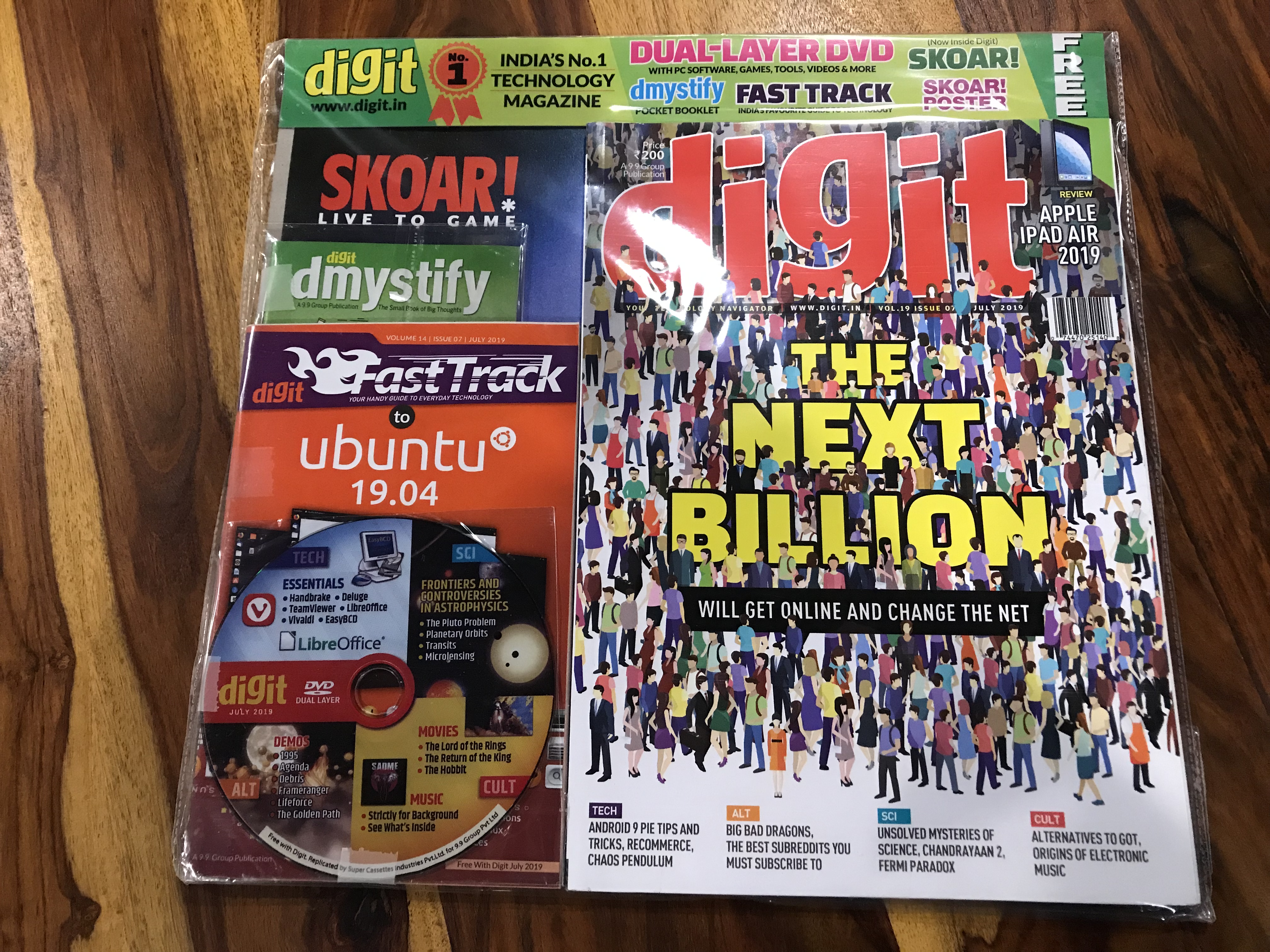
    My tryst with the modern PCs started in the mid 90s when the internet was almost non existent in India. At the time, software and games were not easy to come by and magazines like Chip which have away trial versions and freeware in CDs along with their copies were quite sought after. Chip later became Digit in India but the freebies continued.

    Digit magazine July 2019

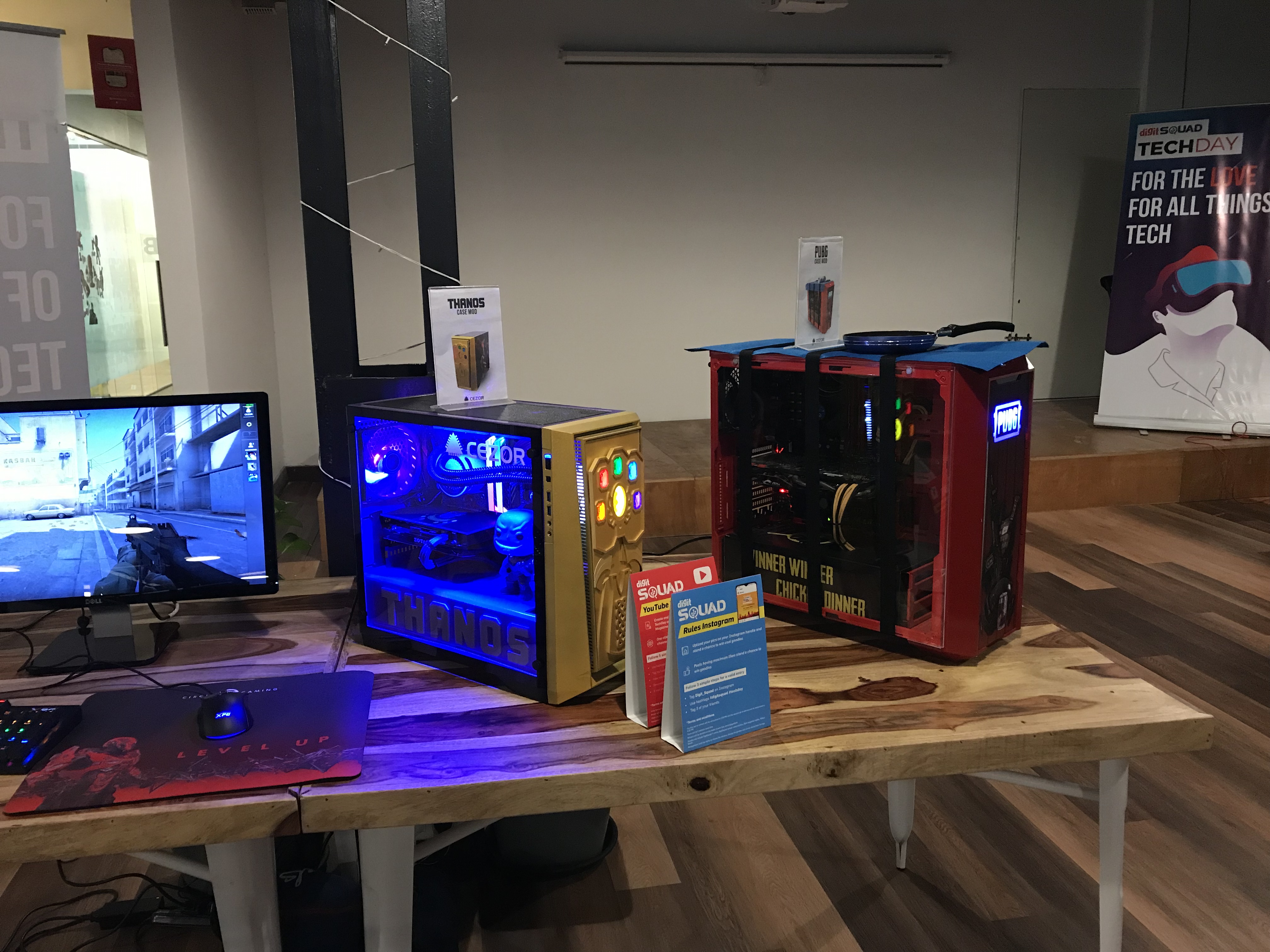
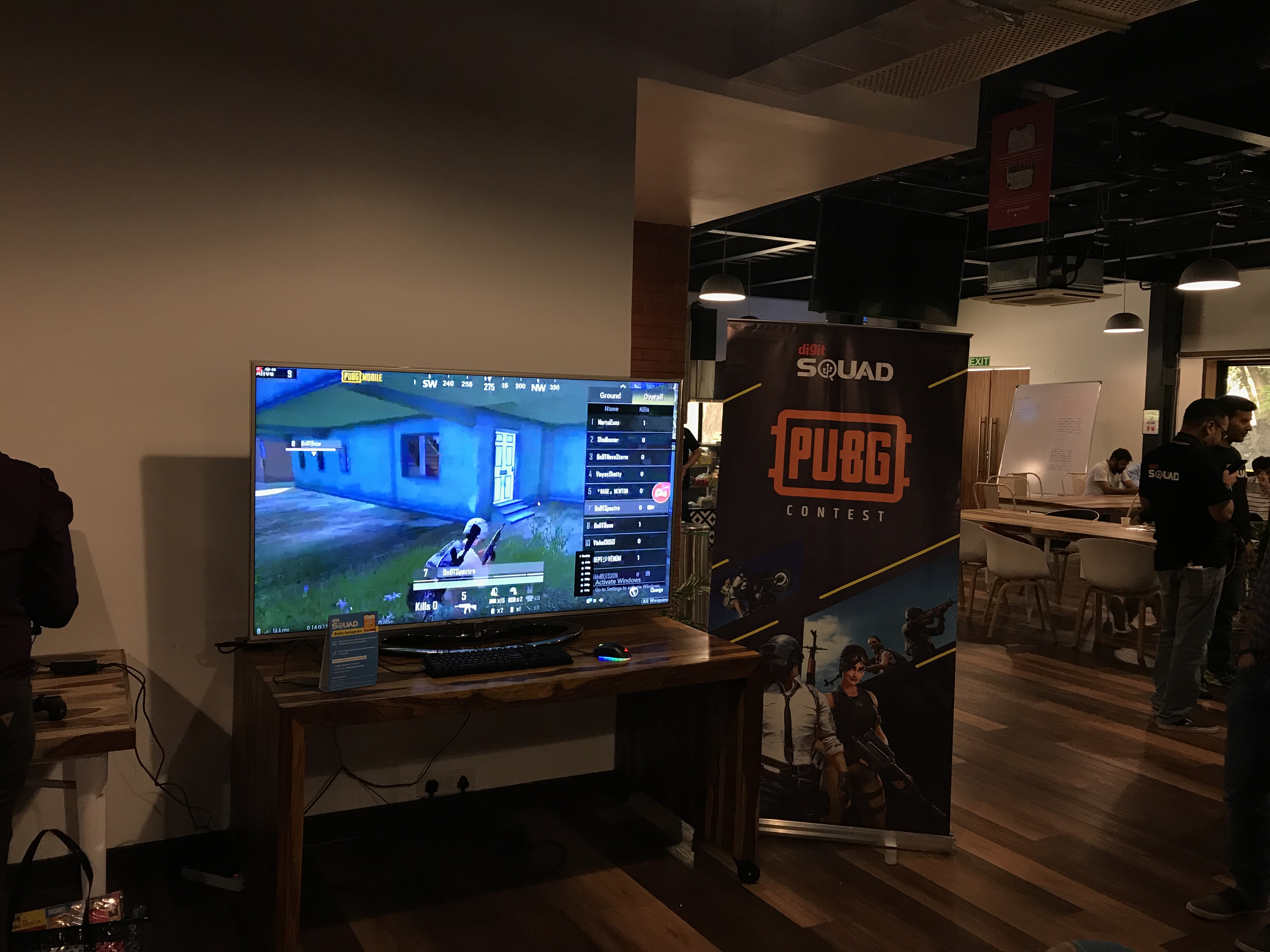
    It was with this thought that I attended the Digit Squad Tech Day in Mumbai today and it was fun to see all the colourful assembled desktops, consoles and mobile phones placed around the venue and fellow Digit Squad members participating enthusiastically in the different contests. Felt quite nostalgic to soak in the geeky environment.

    Didn’t sit around idle of course and instead captured a few videos of the front camera fall detection in action for the smartphones on display. You can catch the video here.

    OnePlus and Oppo seem to be catching on quite soon and they flash a dialog on screen while Samsung seems to be partially retracting their module. The Redmi K20 pro is similar in terms of responsiveness to Oppo and OnePlus but it closes the camera app instead of showing any alert. The Asus Zenfone 6z provides an interesting experience where you can see the arc on screen as the module rotates to its resting position.

    And here are a few more shots from the event

  • First impressions of Spotify in India

    The service launched yesterday in India in the midst of the Warner music conflict, but it seems to have a pretty decent catalogue in India. The recommendations engine is also top notch as I experienced it first hand by feeding in my preferred artists across different genres and it right away created a bunch of playlists with some of my favorite songs. Definitely the best experience of all the music streaming services so far for me.

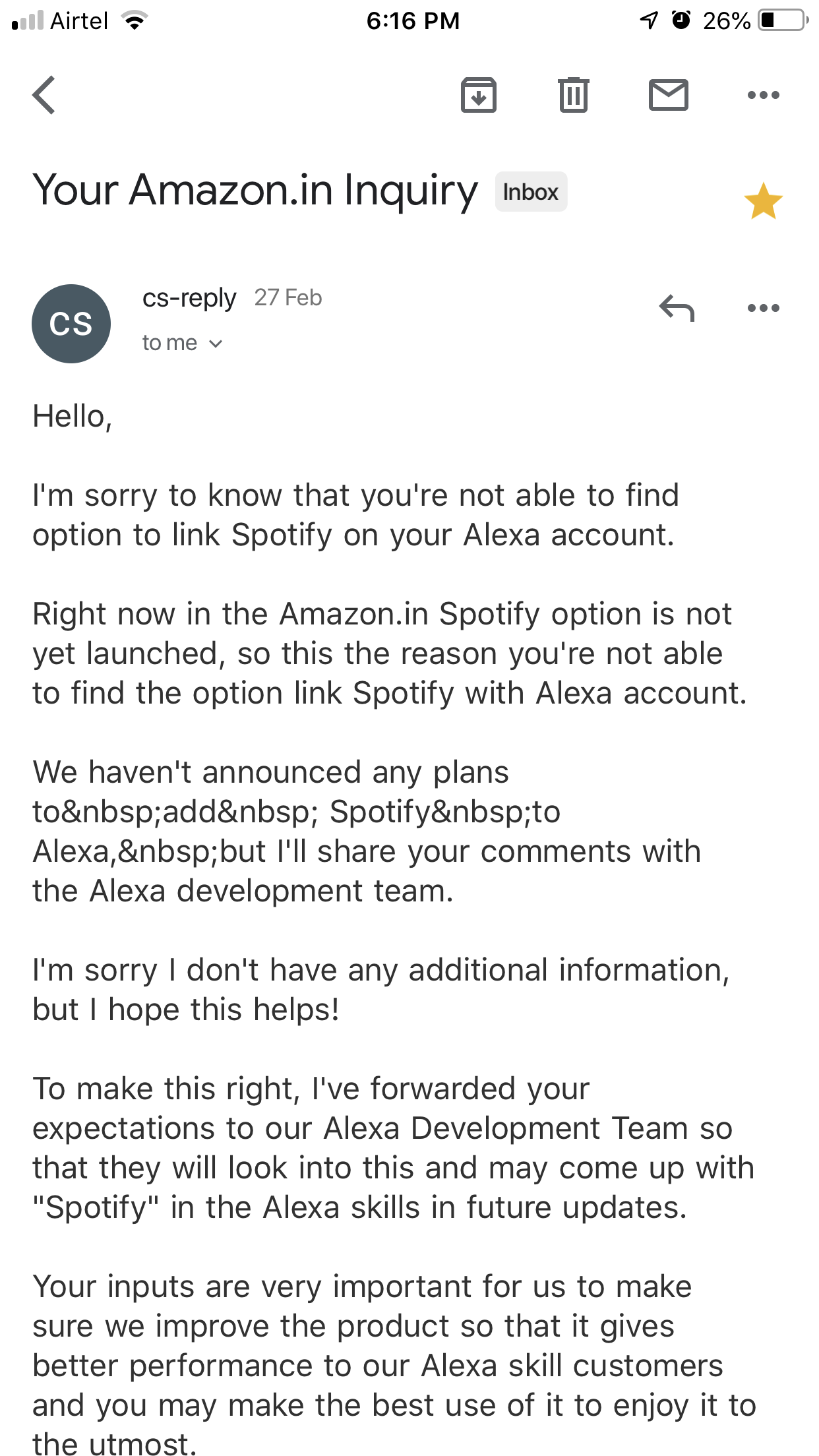
    I’m currently on the free tier which doesn’t lose out much other than the highest audio quality and offline storage. The ads are bearable for now. It also seems that Amazon is holding back with their Spotify support on the Echo line in India as seen in this mail from customer support.

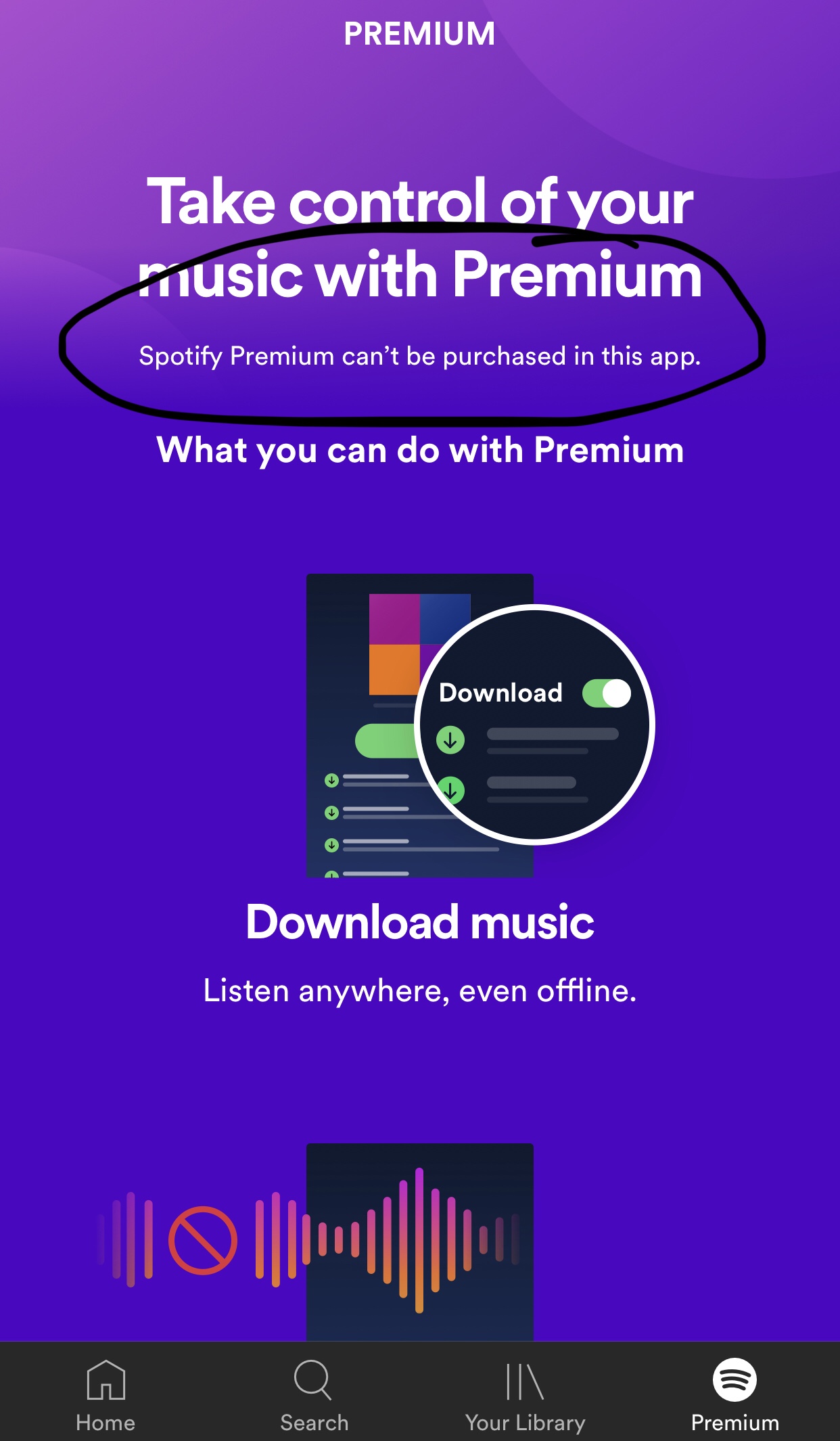
    The premium pricing is also in line with Apple Music though quite a bit more expensive than the Indian services like Wynk or Saavn. It also doesn’t seem to support in app purchases on iOS as evidenced below.

    I’ll probably go for the premium subscription once the Echo support kicks in or I require the offline access. For now, happy with the free tier of Spotify and making do with Amazon Music on the Echo.

  • Amazon Echo Plus in India – first impressions


    Got my first smart speaker, the Amazon Echo Plus yesterday and it seems to be nicely Indianised. It seems to be using the Raveena voice based on Indian English or a variant thereof from Amazon Polly (AWS’s text to speech service). The Alexa app itself is also pleasantly adapted for India with the appropriate command suggestions and services available.

    Some of the India specific commands to try

    I had pre-ordered the device and it was delivered within a day of the dispatch. The setup process was quite smooth and once done, I promptly went about installing a bunch of skills ranging from the utilitarian to the time pass ones.
    As a music player, the sound quality is decent but nothing spectacular as many reviewers have noted. As for the music catalog, it seems to be using Saavn exclusively though it does Amazon music as one of the options in the app. Saavn itself has a decent catalog and Alexa has again been Indianised sufficiently to understand some Hindi song names. I  tried “Play the song ek main aur ek turn” and it actually started playing the song from Saavn though it did pronounce “main” the English way.

    Alexa understands Hindi!

    The flash briefing skill is quite handy to get a quick bulletin of your areas of interest once you have set it up with your desired sources. It can also give you cricket score updates without any skill installation as I tried out during today’s India – New Zealand match.


    I installed the Uber and Ola skills to check the overall utility factor. While Alexa seems to be able to book an Uber including picking up your location, the payment mode defaults to cash which is a dealbreaker for me. Then there’s the Zomato skill I installed and tested. It seems to know your last 3-4 orders and you can reorder as well but didn’t go beyond browsing for the moment.

    The alarms and timers work pretty well too and I conveniently set a sleep timer to stop playing the music while going to bed.

    Then of course there’s the whole reason why I got the plus instead of the regular model which is the smart home hub built into the device. A solo Philips hue bulb is what I ordered next and setup today. It was again a pretty simple process with the Echo detecting the bulb in a few seconds. Controlling the bulb by voice is also quite easy right from switching it on and off to changing the colour and brightness. The app however has just the on/off switch and brightness control at the moment and as many reviewers have noted, the functionality of the smart devices using just the Echo Plus is considerably limited when compared to using the devices with their respective hubs. This is definitely one area of improvement and given the kind of coverage you see for smart homes on the Amazon Alexa pages, it should improve sooner rather than later.


    Apart from all this you can also use the Echo as a Bluetooth speaker and pairing it with my iPhone was quite simple. That said, all the sounds from the phone start getting carried over to the speaker and this interrupts any song or speech playing on it directly. Due to this, I ended up keeping the phone disconnected unless I wanted to play something from my phone.

    One thing I couldn’t find is the voice profiles option that lets Alexa identify the person speaking and customising the responses accordingly. Possibly a feature not yet rolled out to the Indian market as it seems to depend on the Amazon app that didn’t seem to have this option in my case.

    A smart speaker is a family device but my wife is not very enthused by the idea while my 4 year old daughter would like to play with Alexa but hasn’t yet gotten out of her initial shyness phase to begin talking freely to her. It didn’t help that Alexa couldn’t answer many of her queries and also the fact that she was trying to get Alexa to identify the colours of the crayons she was holding in front of the device – a perfect case for Google Lens and Assistant.

    This is of course just what I’ve been able to check out in the first 24 hours with the Echo Plus and I’m sure there’s lots more already available and also coming in the near future.