Author: Aditya
-
Activity tracking with Misfit and Pebble Time: OneHandedReview
It’s been over 2 weeks since I got my Pebble Time, and one of the main things I wanted to try with it was the activity tracking functionality. I’ve been using the Misfit app for this purpose for the last 2 weeks. I prefer to wear watches on my left hand as most right handed people do, but having my left arm in a sling has forced me to wear the device on my right hand. This has given me some interesting perspective on the way the app and device work.
Step counting
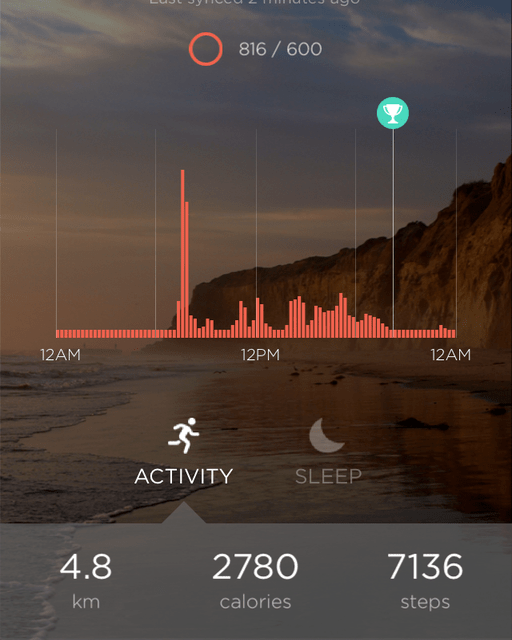
Brushing teeth can be really vigorous Wrist worn activity trackers do have some limitations particularly when it comes to step counting accuracy as elaborated in The Wirecutter fitness tracker recommendation, and my experience has been no different. I found that I was hitting the goal of 600 points (approx 6000 steps) just sitting at home with my arm in a sling, all thanks to the app failing to reject mundane activities like brushing teeth from the count. Granted that I was wearing the device on my dominant hand, but the iPhone 5s is a much better step counter in this regard. The whole purpose of using a wrist worn device rather than a smartphone for step counting is to cover those times when you don’t have your phone with you, but the accuracy in this case leaves a lot to be desired.
Sleep tracking
This is one area where the Misfit app seems to do quite well, particularly since the detection is automatic and you don’t have to worry about forgetting to switch to the sleep mode. Since the Pebble Time does not have any sensor to detect whether it is worn, there were times when I removed the Pebble from my wrist and the app thought that I was sleeping. These false activities can of course be deleted from the Misfit app on the phone. There were also times when I got up for a while and then decided to sleep in and the app handled these activities quite gracefully.

Right hand tracking 
Left hand tracking I also did a mini experiment over the last couple of days by wearing the Pebble on my left hand which is bound in the sling at bedtime, and found that the awake periods came down significantly over my previous recordings using my right hand. I wonder whether it will make a difference if I put the Pebble in the pillow cover which should be a similar scenario as my sling bound arm.
Conclusion
The Misfit app for the Pebble is pretty decent overall and particularly good for sleep tracking. The battery life is also pretty decent at 3-4 days, when compared to dedicated fitness trackers and miles ahead of other smartwatches. However, if step counting is your primary objective or you want to use it with Android (only the iOS version of the Misfit app supports the Pebble), then look elsewhere. That said, I have found the app pretty useful though I plan to try out some of the other activity tracking apps for the Pebble like Jawbone, FitCat and Morpheuz.
-
Apple Music in India: First impressions
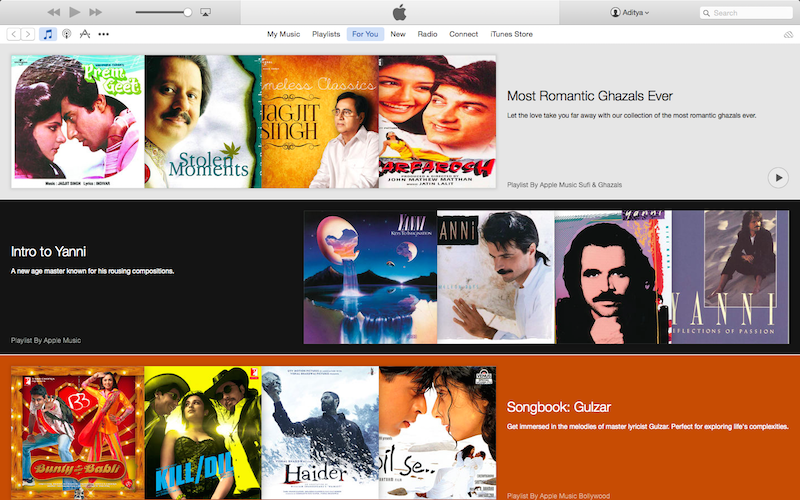
I updated my iPhone 5s and iPad mini to iOS 8.4 this week, and with it came the much anticipated Apple Music. I promptly signed up for the free trial, and have been trying it for the last couple of days. The service seems quite promising, but the Indian catalogue seems to be quite limited at the moment. The iTunes store has a ton of Indian music ranging from Bollywood tracks of different eras to regional ones. However, most of the tracks seem to be missing from the streaming service.
The interesting aspect is that if you try searching for a particular track that’s not currently available for streaming, you are presented with results of the artist likely indicating that it’ll show up eventually. The new Music app on iOS is also a big overhaul and relegates your music collection to the last tab. I’m already a subscriber of iTunes Match and was able to see my uploaded and matched tracks listed there and also in the search results when applicable. In fact artist pages in the Music app also show tracks from your library in a separate tab when available.
The Music app also seems to be a bit unstable at the moment and it has crashed on me quite a few times already while streaming music. There were also times when tracks were listed in the album or search results, but when you try adding them to the Now Playing list, they disappear. Looks like it’ll take some time for the service to stabilise in India.
The only other streaming service that I’ve used at length was Mix Radio thanks to the complimentary subscription that had come with my Lumia 720. That definitely had a very extensive catalogue and I’d augmented my music collection considerably during that 6 month period. I’m sure the other Indian streaming services like gaana, Saavn, Wink etc. have an equally extensive collection. However, Apple is taking on these services head on with their Rs 120/month pricing that’s a fifth of what they’re charging in US. This is of course consistent with their pricing for iTunes Match and the tracks on the iTunes Store. Apps are the only area where there’s price parity between regions it seems.
Either way, it is a good option for the consumer. The value of iTunes Match priced at Rs 1200 per year in India has become a bit questionable though, as the price difference with Apple Music subscription is just Rs 240 per year. I’m yet to check out the difference between the iCloud music library and iTunes Match. If equivalent, then it’ll be pretty clear as to which service to go with for me.
-
Revisiting the taxi fares in Mumbai
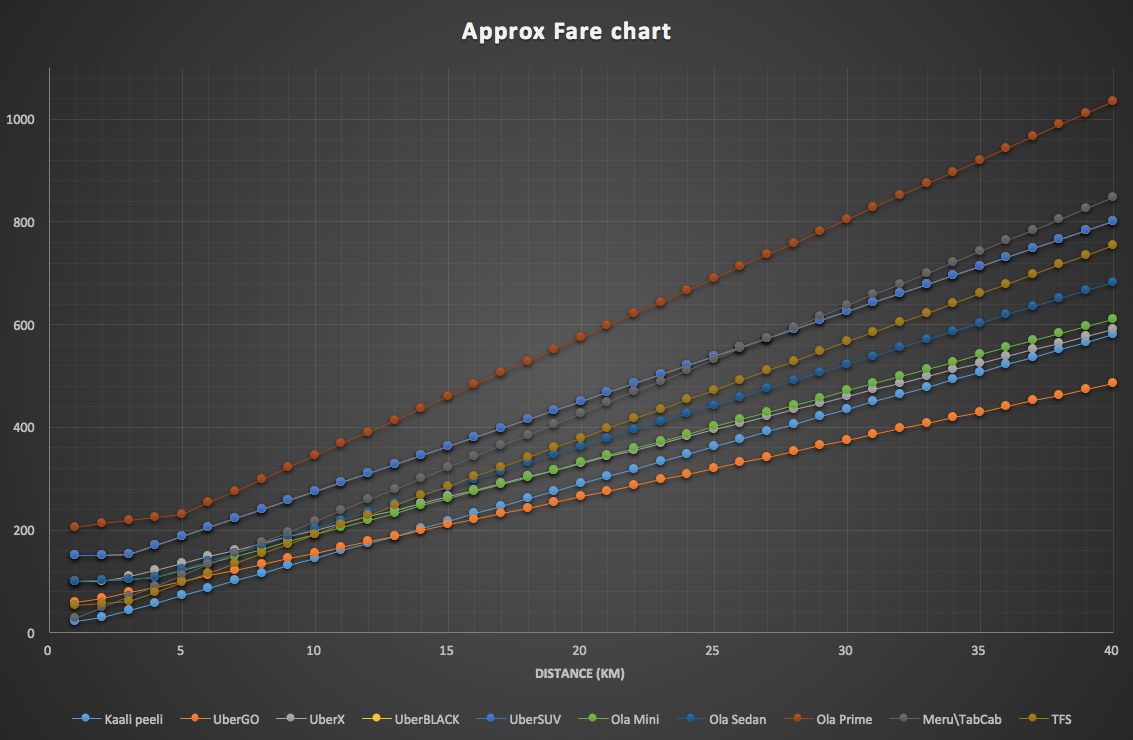
Ola announced a series of price cuts to their Mini and Sedan services to better compete with Uber and also added the Taxi for Sure hatchbacks to their app in the last few days. This calls for an update to the fare chart that I had made for the various taxi services in Mumbai ranging from the traditional kaali peeli and Meru\Tab cab to the new entrants like Ola and Uber. So here it is:

Taxi fares in Mumbai The equation hasn’t changed drastically, but the Ola Mini service is now pretty much comparable to UberX, while UberGo remains unchallenged. Ola Sedan also becomes significantly cheaper than the Merus and Tab Cabs while the newly added Taxi for Sure service (for the Ola app) slots in between these two. TFS seems ripe for a round of price revisions as the cars are effectively equivalent of the Minis, i.e., hatchbacks.
The recommendations are quite simple:
- For short distances (<10 km), kaali peelis are the most economical
- Beyond 10 km, UberGo reigns supreme. In fact, unless you are doing very short distances (sub 5 km), they are the best option. They’re definitely not sustainable for Uber and that possibly explains their relatively limited availability. However, for taxi commuters like me they’re the perfect kaali peeli replacement.
- Since you are unlikely to get an UberGo, your next best bet is to settle for an UberX or an Ola Mini. For that matter you could go with any of the other options barring the SUVs or Uber Black for distances around 10-15 km without too much fare difference.
- For distances longer than 15 km, the newer lot comprising of UberX and Ola Mini & Sedan pull away from the Rs 20/km crowd of Meru, Mega, Tab Cab etc.
Either way, this is a good time for the commuter though the rates are unlikely to be sustainable in the long run. So, enjoy for the time being and hope that the day of pleading with taxi drivers and autos never returns.
-
Getting rid of those pesky MTNL Ads

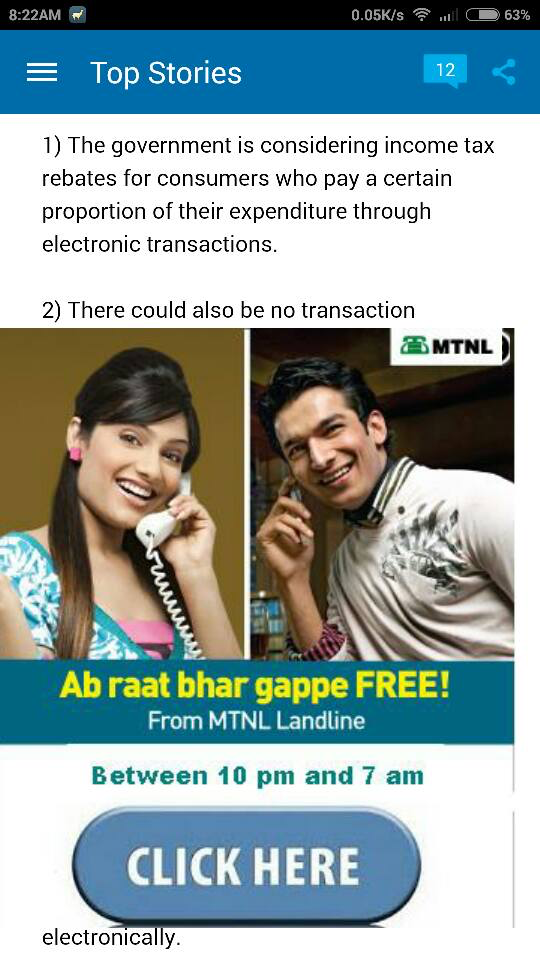
In the NDTV app on Android That’s the article view that greeted me when I tried to read one of the news articles on the Android NDTV app. MTNL has been doing this for the last few weeks in Mumbai, and I’d noticed it earlier while browsing sites on my iPad, laptop and phones as well. I finally gave up and decided to block the IP serving these ads – 203.94.227.140 – at the router level itself so that I wouldn’t be bothered on any device.
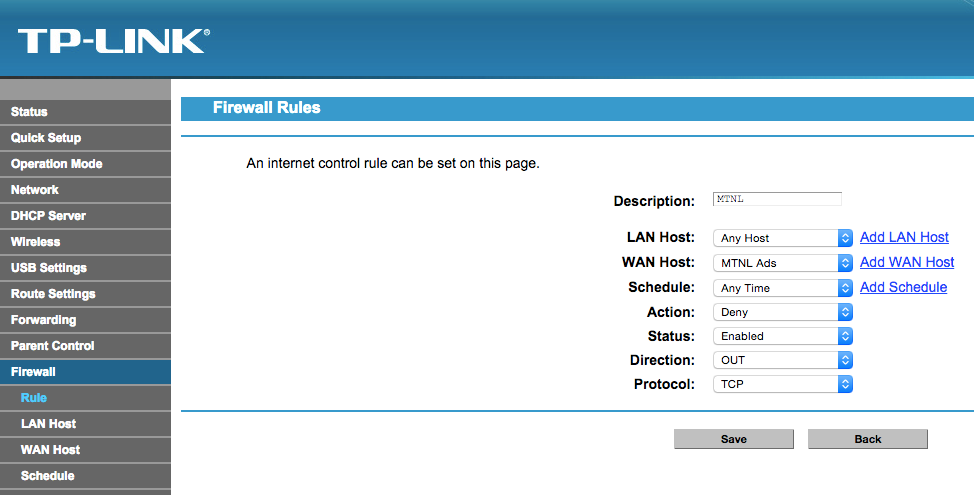
In fact this doesn’t seem to be the first time MTNL has done this given Yogesh’s similar post from over a year ago which also contains instructions to block the ads in greater detail (maybe first time in Mumbai though). If you want detailed instructions, check out his post, and use the IP- 203.94.227.140, as his IP seems to be for MTNL Delhi. It is also possible that they start using other servers, so if you come across any MTNL ad, right click and check out the source server IP, and then add it to your router blocklist. In my case, I found the IP this way, and then enabled the firewall on my TP Link router and added a rule to block this IP (use add WAN host to add the IP).

TP Link router firewall If you check out the user posts on the MTNL Mumbai facebook page, you’ll find similar complains from other customers as well. Airtel drew its share of flak sometime ago for similar behaviour, but the MTNL shenanigans have gone almost unnoticed with hardly any mainstream coverage.
This is a very poor way to treat customers and it really gets in the way on mobile devices. Of course, this kind of injection only works on non secure sites only, so HTTPS sites like Google, facebook etc should be problem free. Here’s to hoping that MTNL stops being user hostile.
-

Pebble Time: In hand and First impressions
I was one of the late backers of the Pebble Time smartwatch, and finally received it today. I backed it after the Apple watch event in early March and deciding that the first gen Apple watch was a bit too expensive for me. I also got lucky with the Pebble Kickstarter campaign and managed to switch my initial pledge of $169 to the early bird $159 when people had started backing out towards the end of the campaign.
The shipment was delayed by nearly a month, but that’s not too bad by Kickstarter standards, and as I had opted for the expedited option with prepaid duties and taxes, I received my package within a week of dispatch. I did have to stay in regular touch with the DHL support, first for the KYC documents and then for the description letter to the customs team. There was also the currency goofup on the invoice with labels in EUR though the payments had been in USD. This was something many of the Indian backers who received their packages before me had observed on the campaign portal. Fortunately for me, the DHL team seems to have managed to sort out these issues with the customs to ensure that I received the package just a day later than their estimate.
Anyway, coming to the Pebble Time, it is definitely quite lightweight and pretty comfortable to wear. The silicone strap seems quite comfortable as well and the material feels just like those silicone cupcake moulds and other similar kitchen accessories that one sees in stores. As for the display, it is fairly colourful, but a bit dim even with the backlight as many reviewers and users have observed. It is especially problematic in the current monsoon season with cloudy skies most of the time. That said, I’m sure app and watchface developers will start optimizing their products for the display in the coming months to improve readability. The double bezel is also on the thicker side by modern gadget standards, but haven’t found it to be very distracting so far. As for the coating on the steel frame, I suspect Pebble might be facing the same durability challenges as Apple did with the iPhone 5 black version, given the scratch reports from early users.
I opted to pair the Pebble Time with my iPhone 5s instead of the Mi 4, and loaded a bunch of apps and watchfaces on it including the PebbUp watchfaces that I’d backed on Kickstarter. The notifications have been trickling in since the pairing as well and the vibration is fairly gentle. I’d already done some notification management on my iPhone, so haven’t been getting flooded thus far, and even cricket scores are showing up thanks to the ESPNCricinfo app alerts.
I also did a full charge of the Pebble while installing the apps though it was well over 60% when I got it. It charged up pretty quick even from a laptop USB port. Also, no faulty cable.
Some of the other things I’d like to test in the coming weeks are Android support and voice replies, fitness tracking (already installed some apps), usage at work (currently working from home with a broken arm) and of course the battery life. In the meantime, checkout the unboxing and initial setup photos below.
-
Taking photos of X-ray slides at home
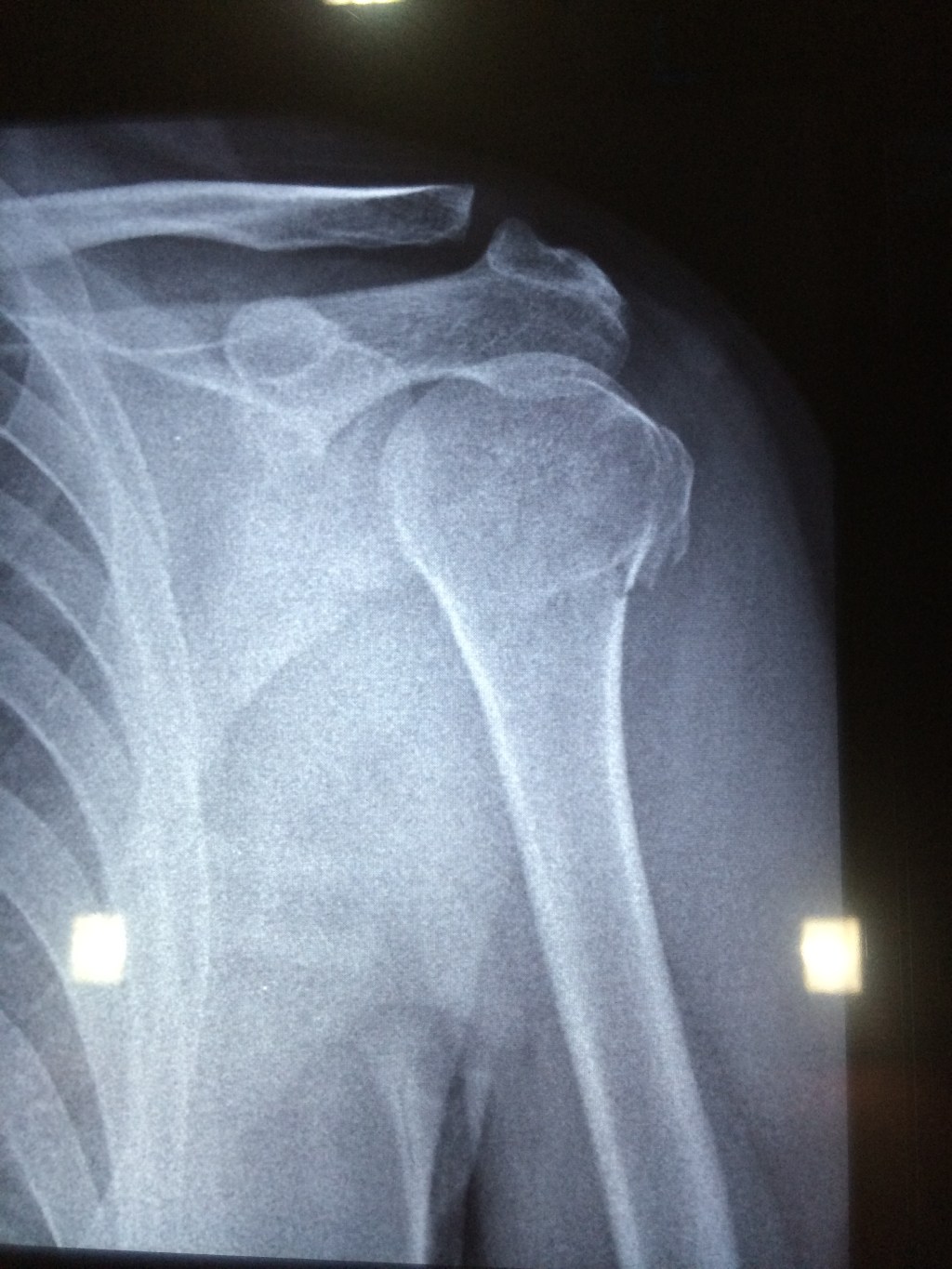
Well, I broke my left arm last week and as expected got some X-rays done. Hospitals and clinics have their well lit setups for viewing the X-ray slides. Ideally you would want to take photos from these setups, but it may not always be possible to do so. In such cases there are a few options for you to snap the slide at home:
- Use a flashlight app on an iPad\tablet to get a full white screen set at full brightness and use this to light up the slide. I used this technique for my slide pictured above. You may not get full coverage, but it is good enough if you know which section of the slide you need to click.
- The next option is to use a laptop screen with a white wallpaper or a blank text editor to get a white background. You will need to hold the slide in place with this technique, but it should give you greater coverage.
- The last option would be to use the largest screen at home, i.e., the TV. It may not be easy to get a fully white screen on the TV unless you can connect your tablet\smartphone\laptop to it and mirror the white background, but this is probably the only screen large enough to cover the slide completely.
So, there you go a few simple ways to light up that slide.
-
How Uber’s shaken up the pricing structure in India
I’ve been using Uber quite frequently over the last couple of months and today’s Mumbai taxi strike to protest such services ironically forced me to opt for Uber at a 1.8x surge price. While I’ve had my share of ups & downs with Uber, the flexible pricing model has been one aspect that I’ve been impressed with compared to the competition like Ola.
Uber managed to create quite a buzz offering single digit per km rates which was almost half the rate others were offering at that time, but the pricing model which included a per minute charge on the trip ensured that the overall fare was not unsustainably low. This has also allowed them to go after the local taxi & auto services in the different cities and they also end up being cheaper for medium to long distances.
The Uber pricing in India is typically a low per km rate coupled with another per trip minute rate on top of a fixed base fare, with the overall fare subject to a minimum amount and of course the surge factor. Putting it simply:
Fare = Surge factor x (Distance x Rate per km + Trip time in minutes x Rate per minute)
Ola which had started off in India with a conventional pricing model of rate per km and a waiting time rate has pretty much overhauled their pricing to mimic the Uber model. They have in fact abandoned their initial method of applying a fixed peak time price during 2 slots on weekdays in favour of a surge factor. The other taxi services like Meru, Tab Cab, Easy Cab etc. have thus far stuck to the traditional model, though they’re trying to stay relevant through special offers.
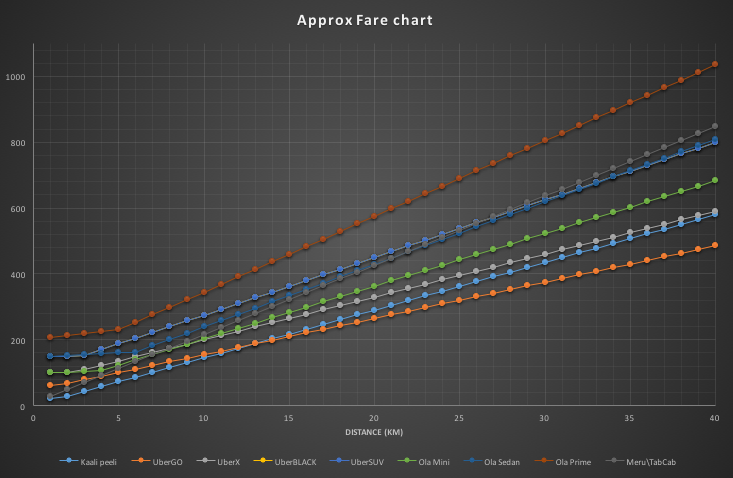
I also did a simplistic analysis of how the different services compare in terms of the trip fare in a city like Mumbai (Google Sheet here). I’ve assumed a trip time of 3 minutes per km and waiting time of 1 minute for every 4 km, so the results are going to be quite different in heavy traffic.
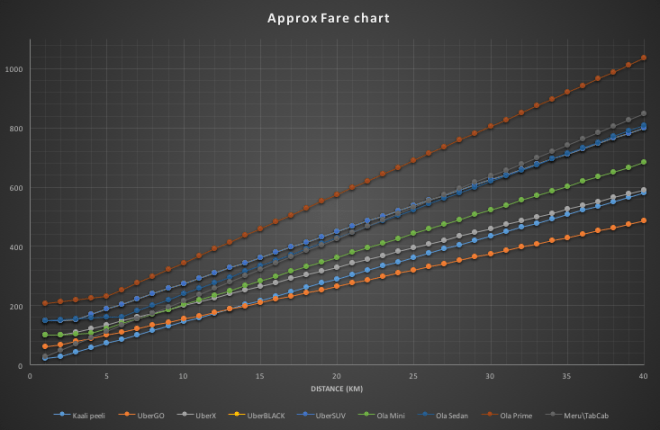
Approx fare comparison (corrected) For short distances, the local kaali peelis are of course the cheapest, but for distances above 10 km, UberGO ends up being a better deal.
The next cheapest is the Ola mini which starts getting pretty competitive with kaali peelis after the 20 km mark.This is of course disregarding the non-AC nature of the kaali peelis. [Update] Ola Mini and UberX are pretty competitive till the 10 km range, but separate pretty quickly after that as the near 30% higher charge per km for Ola starts making a mark.The older generation of Meru, Tab Cab etc manage to remain competitive with the newer lot, matching
the next best Ola SedanUberX and Ola up to the 10 km mark, but the higher cost per km quickly multiplies beyond that point. And then we have UberBLACK and UberSUV which have the same rates but different capacities. They can actually offer a better deal than Meru and the likes for long distances over 25 km. Of course if you have 5-6 people travelling, then these 6 seaters are the way to go. Lastly, we have Ola’s version of the SUV with its Prime service that’s the costliest of the lot. Again, if you are in a group of 5-6 people, this can actually be cheaper than the taking two 4-seater vehicles, unless of course you manage to get a couple of UberGOs.I haven’t considered the surge pricing in the above comparison, and that is a scenario where the older lot turns out to be cheaper. However, such scenarios are rare as Merus and the likes can be pretty hard to find for immediate travel. The interesting thing to see now will be the role that regulators play in toying around with these pricing models.
Update (16 Jun 2015): Found a major miscalculation in the trip time. I have corrected the graph and updated the text accordingly.
-
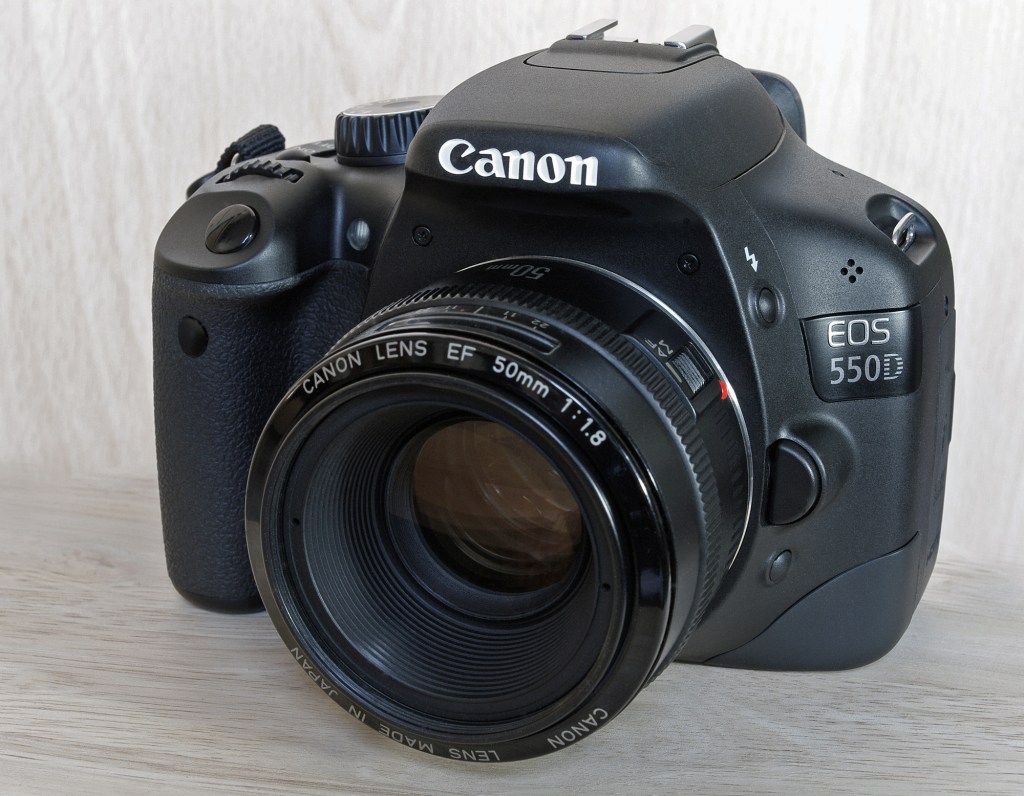
The camera that’s taking over from my DSLR aka a year with the iPhone 5s
I ended up with a broken screen on my beloved Nokia Lumia 720 over a year ago, and thus began my search for a new phone. After lots of deliberation and the delayed launch of the Lumia 930 with its mixed reviews, I ended up with a 16 GB gold iPhone 5s that had just received some price cuts thanks to the iPhone 6 launch. It’s been a very satisfying photo taking journey with the iPhone thus far barring some hiccups. It is a very versatile shooter that gives amazing results even in its auto mode. Then of course, there are the manual controls introduced in iOS 8 that hand over the reigns to the photographer. Plus the entire photography workflow from shooting to editing to publishing and backing up can be performed on the same device.
The iPhone 5s has been my primary camera for nearly a year now, and there have been only a few occasions like stage shows that I’ve used my Canon EOS 550D. I carried the DSLR with the 15-85 mm lens on my Goa trip in March but hardly shot with it, and then altogether skipped it on my last trip to Kolkata. In fact, I’ve been giving away some of my DSLR accessories that I rarely use over the last few months.
In terms of reliability, the iPhone series easily beats its Android counterparts as the camera app launches in a jiffy and the focusing speed and shooting latency are top notch. These parameters have been thoroughly tested in the last one year thanks to my daughter who’s 2 1/2 years old now.
Processing and sharing photos is also a breeze with the numerous apps, and this is one part of the workflow that has been completed integrated with the photo taking effort unlike in a standalone DSLR. Then of course there are the automatic backups through iCloud, Dropbox, OneDrive, Google Photos, Flickr et al that ensures that the memories remain intact. It’s only natural that Microsoft and Google are trying to automate the album creation and tagging process on their photo storage services given the huge volumes we’re shooting.
The only fly in the ointment has been the storage space as 12 GB of usable is barely enough to hold all the photos after you’ve loaded a few apps. Then of course there are the videos which are all full HD and pretty enormous in size. I’ve managed to make do thanks to the iCloud photo library introduced in iOS 8 that automatically backs up and removes old photos from the device. In fact, I have gone beyond the 5 GB free tier and upgraded to the 20 GB one.
Then of course there’s the loss of variable focal lengths and being stuck with a wide angle lens. I do have a personal preference of shooting medium telephoto lengths with the 50 mm prime being my DSLR favourite. Cropping manages to take care of some of these issues when the lighting is good, and I like to think of the iPhone 5s as a camera with a wide angle prime lens.
When it comes down to image quality, I’ve found it good enough compared to my DSLR except in very low light situations. The focus speed can be a bit slow compared to the DSLR as well and this is one aspect that’s been upgraded in the iPhone 6\6+. Video quality is of course superb and the electronic stabilization makes a real difference, but the storage space gets in the way for longer videos.
There are of course other features like slo-mo 120 fps videos that are just not possible on the DSLR, and shooting time lapses or hyperlapses is a breeze compared to the elaborate setup required with the DSLR.
So, do you want to buy a DSLR? Please don’t – just get an iPhone (or even one of the Android flagships like LG G3\G4 or Galaxy S6)
-
A few seconds
This post would’ve been titled “Uber-ing around in the City of Joy” had it not been for an incident that changed my life. Recall those accidents in movies where people get run over or smashed up by speeding cars? Well, I just got a front seat experience complete with the glass fragments. Here’s how things transpired.
I had gone for a trip to Kolkata with my family last month and we touched down in Mumbai on time thanks to Indigo last Sunday. Being the last Sunday of May, the airport was busting at the seams with all the families returning from vacations and there was the usual shortage of trolleys. The luggage also took its own time to come around as expected. This also meant that the taxi booking counters were stacked with long lines and vehicles were in short supply. Since we’d been using Uber quite extensively in Kolkata, I decided to book one for the airport pickup as there was no surge pricing on.
I had the regular location and pickup time exchange with the driver and we finally managed to step out towards the pickup point. I informed the driver that we had reached the point and he came over to pick us up. The place was packed with cars and we tried to get to the car and load our luggage as quickly as possible since there’s a 5 minute cap on the time allowed. As luck would have it, the security at the exit point stopped us and demanded Rs 110 as we had apparently exceeded the allotted time by a minute. There was a heated exchange with the driver, and I finally gave up and paid the amount so that we could head home in peace. Little did we know that these few seconds would have such a large impact.
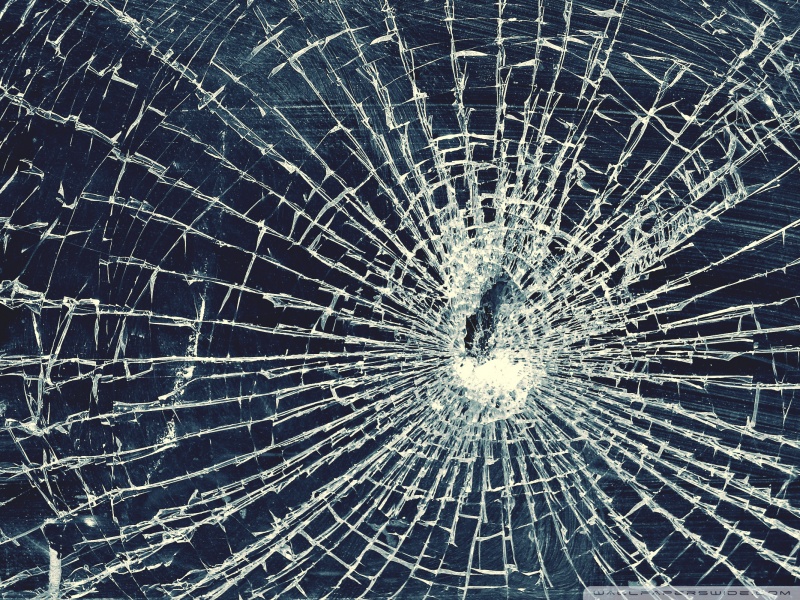
The driver was in a bad mood, and we entered the Western Expressway from the airport. The road was quite clear and he hit the gas and we were speeding along towards home. And then it happened. An old man with a packet in hand was running across the road just before one of the numerous flyovers, and our driver going at 70-80 kmph tried his best to avoid the man, but all too late. He hit the old man head on and he was flung onto the windshield, his head shattering the glass in front of me and finally ending up in a small pool of blood behind us.
The driver managed to stop and a large crowd gathered around us. The driver and I got down while my wife, 2 year old daughter and her nanny stayed inside. Our first task was to try and get the people to attend to the old man, lying unconscious on the road. Some of the people in the crowd got the man to the roadside and managed to get him to a hospital in some vehicle as the car was not in a fit state to be driven, and this was the most critical thing to do. Next was to attend to my family as we were all covered with glass fragments. My wife was in a state of shock, while my daughter was too young to really understand all that was happening. I also discovered minor scratches on my arms from the glass fragments with blood trickling out. We got the driver to pull the car over to the roadside while the people directed the traffic.
I managed to convey to the crowd that I was not driving and it was not my vehicle but just a taxi that we had taken for an airport pickup. I didn’t mention Uber to the people as this might have had a bad effect given the current state of affairs. The crowd was quite cooperative and even managed to get us a regular kaali peeli taxi and I promptly asked my family to switch vehicles as I transferred the luggage. Once I was sure that the old man had been attended to and there was not much for me to do, I boarded the kaali peeli and headed home with my family. I left the driver to attend to the aftermath and the people in the crowd to take care of things. Had this happened in Kolkata, it is very likely that the outcome would have been very different.
Aftermath
We managed to reach home safely though our kaali peeli driver also seemed to be pretty keen on causing another accident the way he was driving. I also checked out the Uber app, cancelled the trip and got hit with a Rs 100 cancellation fee. I went ahead and reported the accident on the trip feedback section. We also discovered quite a lot of glass fragments on our person and clothes and had to do quite a bit of cleanup to ensure the safety of our daughter. Later in the afternoon I got a call from the apparent owner of the car who seemed to be trying to understand what had happened. He tried to tell me that the old man was allegedly drunk. We were not in a state to really dig around the matter which was probably what he wanted to check.
I got a reply from Uber in the evening for my feedback, but no refund. So, decided to reply with a bit more of detail, making it a point to ask them to check up on the victim. That prompted another reply from their Hyderabad support centre the next morning followed by a phone call to ensure that things were ok. They finally refunded the trip charges, but I haven’t heard anything about the victim so far.
It’s time Uber added a speeding control in their fleet a la Meru and their audible warnings. They can surely do this through the GPS tracking built into their app. And of course, self driving cars can’t come soon enough.
A week on, I’m still haunted by images of the shattered windshield, the semi-conscious old man lying in a pool of blood and his packet of spices strewn on the road.
Update (8 Jun 15): Received a mail from Uber Mumbai that should hopefully put some of the lingering images to rest:
Our investigation has revealed that after the victim receive some first aid help, he was able to walk and make his own way, possibly to his home. Unfortunately though, he was allegedly inebriated and did not leave any contact details and did not go to the hospital. The first aid seemed to have sufficed.
We have not been able to find any further details. That said, if we do, I will ensure that you’re kept informed.