Category: Tips

  • How to change your airtel corporate mobile plan

    I have a corporate airtel postpaid mobile connection and the plan was not very cost effective for my usage pattern. However, trying to change the plan by giving a call to their 121 call centre was of no use as the support staff seemed to lack the access to change corporate plans (in fact they didn’t even seem to have proper visibility to my eligible corporate plans). In fact, the phone support told me to visit an airtel relationship centre for a plan change. The website wasn’t of much help either as corporate plans can’t be switched online, and the airtel website is seriously lacking in any kind of details on postpaid corporate plans.

    Email was a different story, and their response time is pretty phenomenal with replies coming in within 4-5 hours even on weekends and nights. And this was the route that ultimately got me success. So here go the steps:

    1. Log on to the airtel account management site (if you know your registered email ID, jump to step 3).
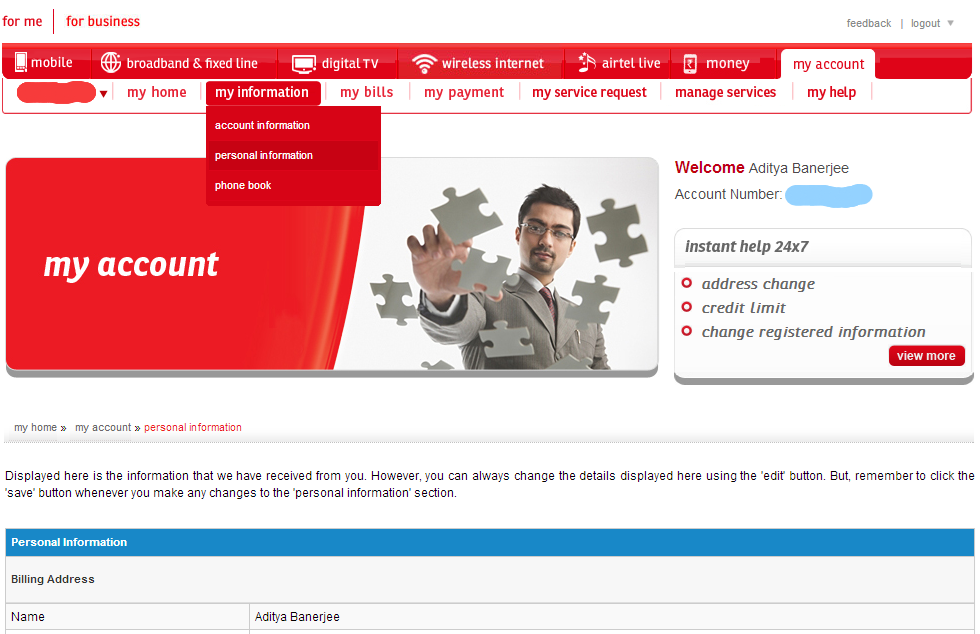
    2. Check your email address under the personal information section and update if not active (you can also sign up for an ebill under the bills section).
    3. Send a mail to 121@in.airtel.com from your registered email address with the name of the plan you want to switch to, and your mobile number as the subject. In case you are not sure of the plans you can switch to, drop them an email first asking for the available plans. Word of advice: keep your message short, simple and to the point.
    4. You should receive a confirmation mail and voila, you’re done!

    If you are curious on the plan I got, it was the Alive Net CUG 375 Combo Plan with 600 minutes of local & STD talktime and 1 GB of 3G data as part of the package. There are similar combo plans available that are tuned for local usage if you are interested, and they are quite economical when compared to your usual subscription of a call plan with a separate data plan.

  • Going from Amber to Update 3 Preview on the Lumia 720

    I updated my Lumia 720 to Windows Phone 8 Update 3 Preview last week, and the device seems to be running quite well so far. I had the Amber update for 3 weeks before that and most of the earlier issues seemed to have been fixed in that release itself.

    There are a few noticeable new features in the Update 3 Preview:

    • Ability to close open apps from the task switcher (long press the back button to bring up the task switcher and then use the close button)
    • Driving mode when using selected Bluetooth devices – it can start automatically based on your movement speed
    • Screen rotation lock

    The update does not seem to have affected the battery life for me, and the device seems to be pretty stable over the past week. The screen freeze issue still happened at times, but it seems to be triggered by the Facebook App. I uninstalled the Facebook App a couple of days back and the screen freeze and random typing issue seems to be gone.

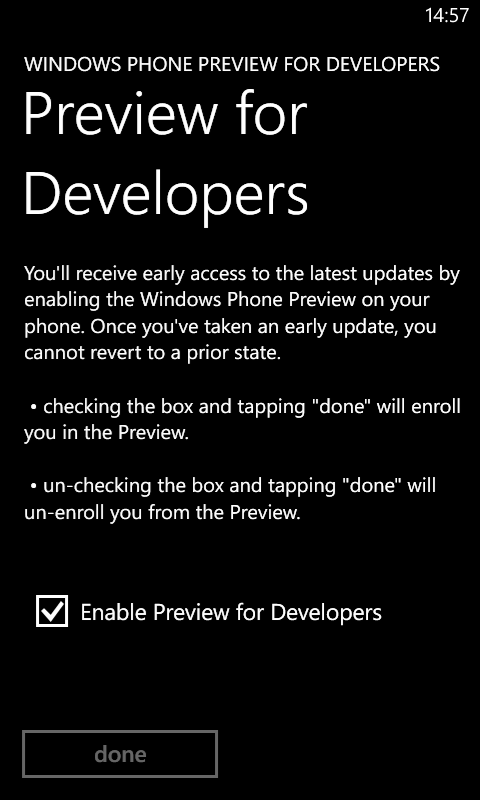
    Instructions on how to install Update 3 Preview on your phone for free without a developer account:

    1. Sign up for App Studio
    2. Download the Preview for Developers app on your device
    3. Run the Preview for Developers app and Enable the option
    4. Go to the phone update section of Settings and check for updates
    5. Update 3 Preview should be automatically detected and installed

    image

    Note that the update cannot be rolled back and Amber\GDR2 update is a prerequisite.

  • So you really want to buy a DSLR?

    Now that you have made up your mind on buying a DSLR and have hopefully allocated a budget, let me present you with what I think are your best options to spend your money based on my experiences over the last 3 years. I have kept the recommendations as platform agnostic as possible and tried to present options that will give you the most value in the long term. To start off, you’ll need to DSLR body and a lens to go with it. You can then add on other lenses and accessories over the course of your photography journey. You also need to choose the company whose platform you want to buy into as this will determine not just your initial options, but also your upgrade roadmap.

    It makes sense to split your budget into two in order to choose the lens and body. A 50:50 or 60:40 split (lens:body) should give a good balance. The table below is based on Indian market prices, so if you decide to get the equipment from abroad, you should be able to get them 15-20% cheaper at the very least.

    Body

    Choosing the right DSLR body is an important first step, and the cost can range from around Rs 20,000 to a few lakhs. We are already in a situation where even the starter bodies give excellent results. However, investing in a higher end model gives you more room for growth as you get accustomed to the DSLR system. Typically, the starter models have the least capable sensor (about sensor formats), while the mid-range to pro\semi-pro models have similar ones. While megapixels should not be a driving force in Point & Shoot or Smartphone camera buying decisions, they still have some value in the DSLR arena. The images you obtain using a DSLR are of a much higher quality and more megapixels give you more cropping room.

    Higher end bodies also have better construction quality with the pro models being weather sealed when paired with a suitable lens. Of course, this also means that higher end models are heavier. Apart from this, higher end models have a lot more controls in the form of buttons and dials. This makes it easier to access a lot of the advanced functions that a DSLR offers, but you will appreciate this only later on. In fact, buying a higher end body can seem intimidating if you are not used to tinkering with camera controls. The camera manual is something you should be prepared to read if you want to make the most of your new purchase.

    Auto focus performance is an area where a higher end body will have a big leg up on the lower end models. This can make a tangible difference in the images you capture, particularly for moving subjects. Of course, the lens also plays a major role in this area.

    A few other features to consider are touch screen capabilities, tilt & swivel screens and wireless flash control capability. While the first two features can make your life easier while using the camera and composing images, the third option is something that you will need a capable external flash to appreciate. An external flash is one of my recommended accessories, and this feature will help you use it even better (explore the Strobist blog on this topic, though you will appreciate it a lot more down the line). This feature is available on most of the mid-range bodies and higher up. Some OEMs (Sony, Olympus, Pentax) also offer image stabilization built into the camera body and this can make for cheaper lenses while making the feature available at all times.

    My recommendation is to invest in a mid-range body (unless you can get a relatively recent pro\semi-pro model second hand) as they offer a good set of controls. Also, it is better to buy the model from a year or two earlier as the price will be a lot more reasonable, while offering similar image quality and features to the current year’s model. Starter models, while cheap will begin to feel limited in a couple of years once you get used to the system.

    Lens options

    First thing you need to do is to make yourself familiar with the terms like aperture and focal length as these are the basic parameters based on which you will be choosing lenses. Secondly, you need to understand that lenses do not come down in price unlike the DSLR bodies. So, it is better to either buy the lens that you want right now or save up for it rather than buying a lower quality lens and upgrading later. Thirdly, lenses are made not just by the companies that manufacture DSLR bodies, but also by other companies like Tamron, Sigma and Tokina for these DSLR platforms. Their lenses are usually cheaper than the OEM versions and can be a good deal on a limited budget.

    The lens choice might seem pretty simple to begin with as most DSLR bodies come bundled with a lens or two (usually called kit lens). However, lenses can make the biggest difference in the type and quality of images you can take and it is typically better to skip the kit lens keeping the photography journey in mind. You could go for the kit lens in a few scenarios:

    • Constrained budget (option 1 of the table) – the kit lenses still give you really good images, way better than any Point & Shoot can offer. Plus you get 2 lenses covering a long focal length range (the lenses by themselves would cost over Rs 20,000).
    • 6 figure budget in which case the bundled lenses are actually premium ones
    • You will be shooting a lot of videos in which case going for the silent and smooth focusing kit lenses (Canon uses the STM moniker) makes sense

    Other parameters to consider when choosing a lens (apart from focal length and aperture) are availability of image stabilization and the kind of focus motor being used. The former can help when shooting handheld while the latter can make for faster and silent focusing. If you plan to use circular polarizing filters with the lens, it also helps if the front element of the lens does not rotate when focussing or zooming.

    My recommendation for a starting lens is to go for a general purpose zoom as this will let you shoot images in different scenarios. A lot of people suggest to start with a prime lens (fixed focal length, i.e., no zoom). While it does help you become a better photographer, a prime lens will make it difficult a lot of images as there will be situations where you won’t be able to move close enough or far enough to compose your shot. However, a prime lens makes for an excellent second lens and my recommendation is to get one of the 50mm versions eventually, unless you have gone for a wide aperture (f/2.8) zoom lens.

    Even in general purpose zooms, you have quite a few options – starting from third party zooms like 17-50mm f/2.8 costing around Rs 20-25K to premium first party models like the 24-70mm f/2.8 costing around a lakh. Here’s a brief explanation of my recommendations from the initial table:

    • Kit lenses (normal zoom + telephoto zoom) – typically the 18-55mm f/3.5-5.6 & 55-200mm or 55-250mm f/4-5.6. These offer good value for money, but not the best possible image quality or convenience (particularly CPL filters).
    • Wide aperture zoom – typically the 17-50mm or 17-55mm f/2.8 lenses available from both OEMs and third parties. Both image stabilized and non-stabilized versions are available. While they may seem to be similar to the kit lens in terms of focal length, the image quality is considerably better due to the better quality elements used (check out the comparison image in the middle of this review). The other tangible benefit is the constant wide aperture of f/2.8 that results in a 2 stop advantage at the long end. Not only does it help in low light shooting (lower ISO or faster shutter), but it can also help you blur the background when taking portraits. You will also appreciate the constant aperture across the focal length range when shooting in manual mode as you don’t need to adjust the settings when shooting wide open.
    • Ultrazoom – typically the 18-200mm to 18-300mm variable aperture, again available from both OEMs and third parties. These may not offer very good image quality (on par with the kit lens), but make up for it with their focal length range. You are basically paying for the convenience of not having to carry around and change between two lenses. If you are not sure of what situations you will be using your camera or plan to travel quite a bit, this makes for a good choice.
    • High quality zooms – these are usually premium lenses made of high quality components giving you shaper and more colourful images. Most of these lenses have constant apertures and offer fast and silent focusing. Which lens you choose will be governed by your budget and focal length requirements.

    Accessories

    This is an area where you may not choose to invest immediately, but over time you can add on some basic equipment like a flash and filters for some interesting effects. At times in low light, you will find that even a DSLR does not give you the kind of images you had hoped for and the on camera flash makes things even worse. That will be the time to create your own get an external flash with a tilt and swivel head. Tripods are another frequently recommended equipment, but thus far I have not felt much need for it as I prefer handheld photography and image stabilization takes care of my needs. If you do want to go for a tripod, don’t bother with the cheaper models as they will not be very stable and I doubt you want your investment on the camera to come crashing to the ground. Instead, do some shooting and figure out whether you actually need one, and then be prepared to invest Rs 10-15K on a decent model.

    You will also need to good camera bag to carry around your equipment and you are likely to get a decent one bundled with your initial purchase. That should take care of your needs till you decide to buy more lenses and\or a flash.

    Which system to choose

    My recommendation would be to choose either Canon or Nikon (especially if you are in India) due to their market presence and lens range, while Sony is a distant third option. Olympus also has its DSLRs, but they use a smaller sensor and their network and lens range is limited. Pentax is pretty popular in the USA, but their presence is practically non-existent in India. There are also the mirror-less models from Sony, Canon, Nikon and Panasonic but the lens options are again quite limited and they don’t really give you much advantage over a full-fledged DSLR in terms of size or weight.

    Another aspect to factor in is which system your friends and relatives are using and choosing accordingly. This will enable you to borrow and exchange equipment, particularly lenses and open up more avenues for experimentation.

    Personally, I am a Canon user (EOS 550D), and my decision was based on having used the Canon system of Point & Shoot cameras starting with the PowerShot A300 and moving up to the A630. Plus, the 550D was the best mid-range model in 2010 (Nikon had the D5000 then).

    What you get for your money

    Today, when you buy a DSLR, you are entering not just the world of still photography, but also that of videography. It will also be your first step towards building your photography platform of choice. If you are coming from a Point & Shoot or camera-phone background, then you will really appreciate the better quality images to begin with. Over the course of your journey, you will also experience the images that were not technically possible on your previous cameras due to their limited low light capabilities and slow focus. Just remember to carry your new DSLR on your expeditions.

    The road ahead

    I hope that I have given some basic guidelines that will make it easier to choose which DSLR to buy. You can always read up more on the web and check out the current market prices of the bodies and lenses. So, do some more research, make up your mind on what to get, and go get that DSLR.

    It will be pretty tempting to spend more money on equipment once you have got the camera. However, the main area where you should be investing after getting your camera is in improving your skill (shoot as much as you can) and buying a few photography books should be a worthwhile investment.

    If you want some ideas from me on what you should do with that DSLR of yours, stay tuned for my next post in this series.
  • Relook at Windows Phone 8 quirks after Amber

    The good news is that the Bluetooth freezing issue seems to have been ironed out after the Amber update on my Lumia 720. Originally, the phone used to freeze upon disconnecting my Bluetooth headset, but after the Amber update the phone seems to behave normally (almost). The main quirk that I noticed is the screen responding erratically at times (culprit seems to be the Facebook app).

    I had initially thought that the Bluetooth freeze had been replaced with this touch issue, but some troubleshooting last night seems to suggest otherwise. The touch issue that I have been facing is that the phone does not respond to screen taps. Turning the display off and then on seems to fix the issue, but it can occur again at random. It can be especially annoying when you try to receive calls and the phone ignores your tap on the answer button. This issue does not seem to be restricted to the Lumia 720, as my mother who has a Lumia 520 also faces a similar issue.

    Also at times, the phone seems to go on a tapping spree of its own resulting in false taps akin to having a keyboard key stuck. I have faced this issue when entering the lock screen pin resulting in invalid entries, and also having emails deleted due to the phone deciding to tap on the delete button on its own. It seems that the region just above the home\Windows button has this issue. Again, a turning the screen off and then on seemed to fix the issue.

    I had initially suspected the extra sensitive touch capability of the Lumia 720 causing the problem (the Lumia 520 has this feature as well), but since I’ve never enabled this feature I ruled it out as a cause. The main culprit seems to be the Facebook app, as I had it controlling my lock screen backgrounds (same as my mother’s Lumia 520). I uninstalled the Facebook app yesterday, and gave the phone some time to behave itself. Things seemed to be ok, and I went ahead and installed the app once more. Things seem to be ok so far.

    A couple of other quirks that I noticed with the Facebook app is that the built in Windows Phone chat for Facebook messages seems to have connectivity issues with the app installed. It happily showed me as online after I uninstalled the Facebook app. Things were back to the “Can’t connect” state soon after I reinstalled the Facebook app. The other quirk was concerning the album list in the Facebook app lock screen setting. I had set the custom album option and selected a few albums from my album list. However, the album list was missing the newer albums and this got updated after the app reinstall.

    Bottom-line seems to be that the Facebook app has some issues that seem to get sorted out on an app reinstall (different issues on different platforms going by my Android experience). So, if you have the Facebook app controlling your lock screen backgrounds and are facing issues like me, try a reinstall.

  • Bluetooth and Lumia 720 crashes

    I have been quite happy with my Lumia 720 other than the Google contacts problem that I managed to solve recently. However, there is another issue that’s been bothering me – the phone freezes after I have used my Bluetooth headset with it. The sequence of events goes something like this:

    1. I turn on Bluetooth on the phone.
    2. I turn on my Bluetooth headset (Plantronics Voyager HD) and it connects to the phone.
    3. I have some voice calls on the phone through the headset.
    4. I turn off the headset effectively disconnecting it from the phone.
    5. I turn off Bluetooth on the phone and pocket it.
    6. Sometime later (a couple of hours or so) I take out my phone and find that either the screen does not turn on, or the screen turns on, but the lock screen is frozen with none of the usual information like calendar, battery status, signal strength etc. displayed.

    The only way to make the phone useable is to reset it by pressing the volume down + power keys for 10-15 seconds. I am not sure whether this issue is specific to my handset or the Lumia 720 or Windows Phone, but have faced this problem quite a few times. My research on the web indicates that Windows Phone can have some issues with Bluetooth, Wifi and Airplane mode. In fact, one of my recent resets after a freeze had the phone stuck in Airplane mode that just wouldn’t turn off. Another reset thankfully set that problem right.

    So far the only workaround I have found to this problem (not tested extensively) is to disconnect the headset from the phone through the settings before turning it off. This seems to keep the phone happy. Hope that the problem is fixed in a future OS update (Amber update for the Lumia 720 should be out soon), but till then got to keep in mind that Windows Phone does not like abrupt Bluetooth disconnects.

    Have you been facing similar issues? Let me know in the comments section.

  • Windows Phone and the Google Contacts problem

    Ever since I got my Lumia 720, I have had issues with missing phone numbers for some of my Google contacts. The same contacts showed up with all their details on my Galaxy S3. Since practically all my contact data are stored on Google this was a real downer in an otherwise excellent experience with the phone.

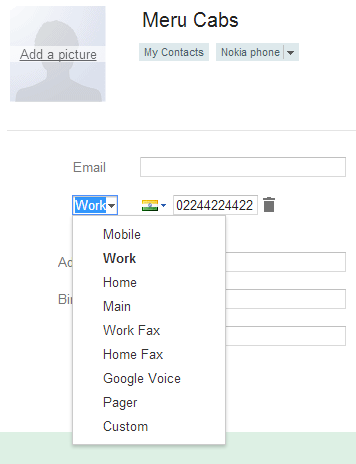
    Thankfully, a bit of research on the web along with some experimentation led me to the problem and the eventual solution. The problem seems to be phone numbers that have been categorized as Main in particular on Google contacts. These are not recognized by Windows Phone and don’t show up in the contact details. The only solution to this is to categorize the number as ones recognized by Windows Phone like Home, Work or Mobile.

    You can also see from the screenshots that while some categories are common to Google contacts and Windows Phone, quite a few are not. In such cases, you should opt for the Windows Phone option as Google contacts is quite flexible since it allows user defined categories (Android phones also seem to be flexible in this regard) while Windows Phone does not recognize ones outside its list.

    A couple of other things to keep in mind:

    1. Windows Phone does not provide you a send SMS option from the profile view unless the number is categorized as Mobile or Mobile 2.
    2. If you create a number with a Windows Phone category not available on Google contacts, it will show up on Google contacts, but may have a different label. For example, Mobile 2 ends up as Car. So, don’t be surprised.


  • Troubleshooting torrent network problems with routers

    Wondering why the wifi or LAN connection keeps misbehaving and disconnecting on your shiny new router when you try to download torrents or stream high quality movies on your local network? I was facing the same issue with my TP Link W8968 modem cum wifi router that I got recently for my home broadband connection. Some research through Google indicated that this was not specific to my router model, and was likely to be related to torrents overwhelming the NAT tables on the low end routers. This could happen for both the wireless and wired network, as my experiments.

    I finally found the solution through 2 different threads that suggested that the NAT and IGMP proxy be disabled on the router. One was for my specific router model:

    Please try to disable : 
    “Enable Fullcone NAT:” & “Enable IGMP Proxy:” 
    under : Network -> WAN Settings -> WAN Service Setup -> Advance option.
    Disabling the above option fix my TD-W8968 freezing problem.

    The other was in the Apple forums:

    *****Disable IGMP Proxy Setting from your router (Verizon Fios, etc) *****

    I tried this, and haven’t had any issues for the last 4 days with the torrents downloading comfortably overnight. Earlier, I used to set the torrents to download and find out the next morning that the wireless network had dropped off and the router had stopped responding. So, give it a shot and see if it works. After all, this is a lot less expensive and hassle free compared to replacing your existing router.

  • Modem settings for MTNL broadband

    Mahanagar Telephone Nigam Limited

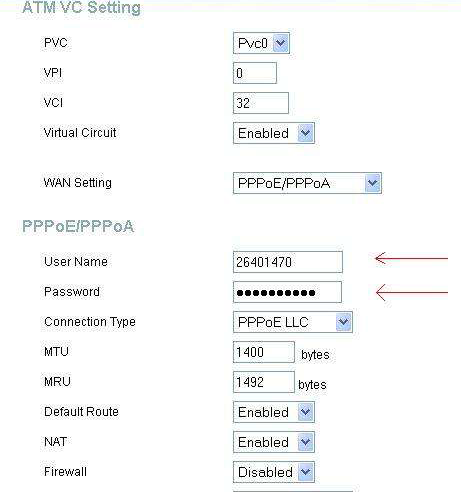
    I finally got an MTNL broadband connection at home (Mumbai). Since I decided to get my own TP-LINK modem+wi-fi router (a good value for money model that I plan to review after a couple of months of use), I had to do the modem settings on my own. The settings for some models are available on the MTNL site, but it was missing for my particular model. The modem’s default PPPoE dialer settings did not seem to work, so I decided to check out one of the MTNL documents, and here’s the configuration that I found:

    Username: <phonenumber> OR <phonenumber>@a E.g. 12345678 OR 12345678@a

    Password: <CA number> (you can find this from your bill, or by calling 1500 from the landline) E.g. 4567890123

    VPI: 0

    VCI: 32

    (The VPI & VCI settings chosen by my modem were different due to which it failed to connect & I had to change them manually to the above settings)

    Connection Type: PPPoE LLC

    MTU: 1400 bytes (another setting that had a different default on my modem)

    MRU: 1492 bytes

    Default route: Enabled

    NAT: Enabled

    Firewall: Disabled

    You can also set the DNS servers manually to point to OpenDNS (208.67.222.222/208.67.220.220) or Google’s DNS servers (8.8.8.8/8.8.4.4) which should prevent ISP level DNS blocking of sites, and most likely provide better lookup speeds.

    Below is the D-Link modem settings from the MTNL document from where I have picked the settings.

    MTNL modem settings

    As for the wi-fi settings, you can stick to the defaults – just don’t forget to secure your network using a passkey to keep away free riders.

  • Quora: During an interview what’s an appropriate answer when asked “where do you see yourself in 5 years?”

    Answer by Tom Allen:

    “That depends on where this company will be in four.”

    I’ve used this line whenever I’ve been asked this question, and it’s always gone down well. It’s honest, and it’s an opener to further questions about the company (which are vital – you should come out of an interview knowing more about the company’s trajectory than when you entered.)

    It’s also confronting.

    Some companies aren’t growing much, and so their answer is that they’ll be roughly where they are now, just a little bigger. This tells me a lot; they’re already successful so the career opportunity is more about earning than learning.

    Some companies aren’t able to answer this. If you work for them, and they don’t know the answer four years out, how on earth are you supposed to know the answer another year later? This isn’t always a bad thing however; some people thrive on uncertainty. So do some companies. The best companies I’ve worked for haven’t known exactly what the future holds, but this question has opened them up to articulate their plans and hopes. The best jobs are those where the company’s goals align with your own, and you can both profit from success. If you can discover this alignment (or that there isn’t one!) in an interview rather than only after working together for several months, then you’re in a much better position to choose your path, and in turn, to answer their original question.

    If they’ve given their response and still want you to answer theirs, then your final answer is inevitable:

    Well, now it depends on whether you’ve just given me the job…

    View Answer on Quora