Category: Technology
-
Updating iOS on an ancient iPad 2 from 4.3
Recently faced an issue when trying to update an old iPad 2 from its original 4.3 OS. Back in those days even OTAs were not supported and iTunes was the only way to update. Since Apple has switched off validation for iOS versions older than 9, the iPad was going into an “Error 9” unusable state and there seems to be a lot of frustrated users out there who seem to be trying to update to iOS 9 from 4.X.X and failing to do so.
Some Googling turned up a suggestion to update to the beta version of iOS 9, and voila it worked. Unfortunately, you most likely need a developer account to actually download the iOS 9.3 beta file as the public beta is unlikely to work with iOS 4.3. Nonetheless, if you manage to get hold of the iOS 9.X beta version then definitely give it a shot.
-
My iPhone Home Screen for 2015
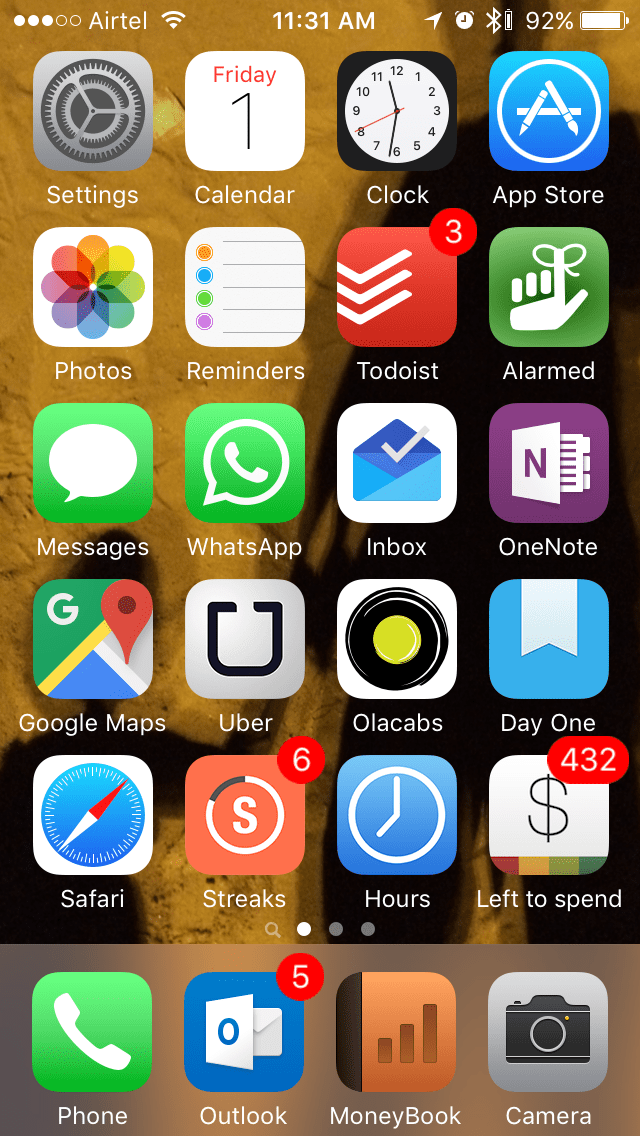
It’s the start of a new year and it’s time to review the apps on my iPhone home screen, an exercise I started last year. Many of the apps remain the same, while a few make it back into the home screen while a couple of others for replaced due to apps getting discontinued. Here goes a brief summary of the apps starting from the top:
- The first 6 apps remain the same as last year which are the Apple defaults.
- Todoist: The cross platform support including desktop apps and the convenient IFTTT channel made me pick Todoist as my preferred to do manager. This slot was occupied by the location based reminder Checkmark 2 last year, but I more or less gave up on the concept due to its relative unreliability with reminders not getting triggered in the right locations.
- Alarmed: It retains its spot as my preferred reminder and timer management app. I had briefly switched to 2Do but that turned out to be a bit of an overkill and not as easy to use for me. Moreover Alarmed finally got an update for iOS 8 notification actions towards the middle of the year to get on with the times.
- Messages & Whatsapp: The messaging apps remain the same and with more people in office getting iPhones Messages is getting a good workout. Whatsapp also got an update for iOS notification replies and other tweaks over the year to become more convenient to use.
- Inbox: Dropbox dropped a bomb towards the end of the year with its discontinuation of Mailbox and I promptly made the switch to Google’s own Inbox which seems to be the way forward for Gmail and has many of my regularly used features of Mailbox like swipe based actions.
- OneNote: This is my preferred note taking app thanks to its cross platform support and I’ve been using it even more thanks to the IFTTT integration that allows me to create stubs based on triggers from other services. E.g. I have my Office365 meetings from the calendar create stubs to record meeting notes.
- Google Maps, Uber & Ola: The must have travel related services for me. Google Maps continues to be an excellent source to monitor traffic conditions and the locations in India are a lot more up to date than Apple Maps. You can also download maps for offline use now, but that’s going to be difficult on a 16 GB phone like mine. I’ve also done my bit by editing a few places where I found inaccuracies. For the taxi services, Uber joins Ola as my go to services and I’ve been using these 2 services almost exclusively for the last 6 months for my day to day travels instead of the local kaali peeli taxis in Mumbai ever since the strikes started in June.
- Day One: I’ve managed to continue my journal habits though I’ve toned down the mundane stuff. Not much to add over last year.
- Safari: It replaces Chrome as my preferred browser on the iPhone due to its support for ad blockers introduced in iOS 9 (I’ve retained the copy of the discontinued Peace). Since I use a MacBook at work, the handoff and continuity features give me the cross platform browsing support I need.
- Streaks: I’ve been using this app to maintain some habits like hitting step targets, reading a book daily, going to bed in time, leaving office in time etc.
- Hours: A simple time tracking app for different projects. Had a bit of a buyer’s remorse when the app got a big price cut right after I bought it and then went free within a month. It’s a bit buggy as well. Still, a useful app to have to track my time distribution at work.
- Left to Spend: A simple app to track a daily budget manually. In my case I use it to track the office food court prepaid card balance.
- Phone: For voice calls, duh!
- Outlook: My preferred email client for work and the new avatar of Accompli that Microsoft acquired to create the mobile Outlook app. This retains the best of Accompli’s features like the integrated calendar view and provides better support for other services.
- Moneybook: I continue to track my expenses manually on this app. I tried a few other options briefly including switching to the Android based Mi 4 with its automated expense trackers, but end up returning to this every time thanks to the simple interface and the ability to perform simple arithmetic operations during entries. This would be the perfect expense tracker for me if only it had a search feature.
- Camera: Tried a few replacements, but stuck to this as the default.
A few of the home screen apps from last year like Camera+, Shazam and Wikipanion have moved on to the second screen while I removed Paper and Argus due to the limited developments. I also deliberately moved away the social network apps to the second screen to reduce the time spent on them (not very successful yet). Overall, not a big change in the type of apps though I see a few apps moving around over the next year. Also looking forward to the new entries this year.
-
4 Years of Smartphone use
It was a little over 4 years ago that I got my first smartphone, and a little over a month ago since I got my 7th one (I do have 2 connections so it’s not that bad). These 2 phones cost me almost the same, but in terms of specs, they couldn’t be any less similar. Here’s looking back at my many smart life companions:
Samsung Galaxy S LCD (2011)
This was my first smartphone bought in Mar 2011, well after the smartphone revolution had started. It cost me around Rs 19,000 at that time and came with a then decent 8 GB storage and the Samsung staple microSD slot. In terms of overall specs, it was just below the Galaxy S flagship of its time but the performance was pretty reasonable to start with. I loved the fact that I finally had Google Maps in my pocket. My primary usage of the phone was also for internet access as my main voice connection was CDMA based and it was on a dumb phone. The phone began to show signs of trouble around a year later when it used to require a soft reset every other morning to wake up. Plus the OS was also stuck on Android 2.2 FroYo with no immediate update in sight.
HTC One V (2012)
I finally grew frustrated with the recurring freezes and lack of OS update in my Galaxy S and decided to scout around for a replacement. Found the just launched HTC One V whose looks I liked quite a bit, plus it had the then shiny Android 4.0. I bought it without too many second thoughts at Rs 17,000 though the phone was in many ways a downgrade from the Galaxy S with its lack of a front facing camera and no magnetometer meaning trouble navigating maps. Still, I was quite happy with the phone and a few of my friends and family members even bought this model based on my recommendation. Then less than 2 months later, during an office offsite meet, it decided to die on me. It turned out that a lot of people had been facing similar issues with this model. Haven’t considered or recommended a HTC phone since.
Samsung Galaxy S3 (2012)
I bought this phone more out of frustration with my last purchase and decided to buy a phone with no compromises that’ll last me a few years. It had just been launched and so I ended up paying a hefty premium at Rs 39,000. However, the phone was a huge jump in both usage experience and quality over the last ones and I ended up using it for nearly 3 years before it finally bit the dust. It started off on Android 4.0 and went all the way up to 4.3 officially. KitKat was not released officially for it due to its 1 GB RAM, but I flashed it with Cyanogenmod last year for its unofficial KitKat upgrade. It had also begun signs of slow down around the 2 year mark, but the flash gave it some breathing room. It also became my Android gaming platform for my Humble Bundle games, and a mobile mini tablet of sorts.
Samsung Galaxy Pop CDMA (2012)
I finally upgraded my CDMA connection with this device out of barely a dozen choices as I had grown tired of having to maintain a disconnected phonebook on a dumb phone. It cost me around Rs 8,000 which was a significant premium over the equivalent GSM model, and that too for just 256 MB of on board storage. Moreover, my CDMA SIM did not support data and I actually ended up using it as a wifi only smartphone. Though it was stuck on Android 2.2, it wasn’t a bad experience overall considering the fact that I used it almost exclusively for voice calls. Overall, not the best deal but given the limited options in the CDMA space it served its purpose. This was also my first online phone purchase.
Nokia Lumia 720 (2013)
I began having network reception issues with my CDMA connection, and after a few months of bearing it, decided to move over to a GSM connection which obviously meant a new phone. Windows Phone was looking quite promising at that time with 8.0 having been launched a few months back with pretty positive reviews. I was sure that I didn’t want another flagship and so narrowed down to the Lumia 720. It cost me around Rs 17,000 and was one of the best value models of its time. The camera was the best in class and the battery lasted 2 days comfortably. It wasn’t a fast phone, but it had a smoothness that Android lacked. The OS update situation was also quite rosy with the Windows Phone preview updates trickling in without any troubles. I was very happy with the phone until I dropped it at home and shattered the screen. That of course meant a replacement of the phone and not the screen.
Apple iPhone 5s (2014)
I made some nice phone comparison spreadsheets to rationalize the different model features, and the iPhone 5s was definitely not the best value even though it had a price cut due to the imminent iPhone 6 launch. I was looking for an upgrade in the photography department as well. The Lumia 925 and not yet launch 930 were top contenders as the 720 replacement, but the app situation finally won over as I had built up a good collection of iOS apps thanks to my iPod touch and iPads. I ended up getting the 16 GB gold model for around Rs 46,000. Almost a year later, the only gripe I have with it is the limited storage, but the iCloud photo library optimization has managed to keep things going. The photography has definitely been a revelation, and I don’t see the performance of the phone becoming a limiting factor anytime soon.
Xiaomi Mi 4 (2015)
This completes the Android circle for the time being, with the 64 GB model coming in at Rs 22,000 – just a little over 10% more than my first smartphone. It has pretty much all the bells and whistles one can hope from a flagship including an IR blaster and the specs are top of the line as well. It was a long deliberation between this and the OnePlus One, but the size and IR blaster finally won out. So far, I haven’t had any reason to complain, but given that it’s an Android phone I’ll reserve the final verdict for a year down the line as that’s when the slowdown begins. For now, it is definitely an excellent phone and a big upgrade over the Galaxy S3 it replaces. Let’s see whether it matches the 3 years of service as well.
-
A Tale of 3 App Stores
I setup my company’s app store accounts for iOS, Android and Windows last year and have been managing them for over a year now. The journey has been quite interesting, starting from signing up for the accounts to switching to a MacBook Air last April for iOS development. Here are a few observations on the journey so far:
- The signup process is pretty simple for Android and Windows and the cost is also minimal. Apple on the other hand has a comprehensive process if you opt to setup a company account that allows you to have development team members. Plus they are the costliest of the lot at $99 per year.
- For all the flak that Android draws for its developmental difficulties, its app store management tools are the best. you can easily setup a decentralized account granting access on a per app basis to different team members. This makes it very convenient and easy to work with multiple development partners in case of an enterprise.
- Windows Store unfortunately is on the other end of the spectrum with no support for any kind of team members. So, the account manager is left to do all the app listings and package uploads.
- Apple is somewhere in between, allowing team members, but not providing app level access controls. So, one development partner could potentially look at the others’ work. Plus, the main account P12 certificate needs to be shared if you want to allow anyone other than the account owner to upload apps.
- Alpha and beta testing is also very simple on Android where you can just upload the package, setup a Google Group to manage the testers and setup the process.
- Testing for iOS is also fairly easy now that TestFlight is integrated into iTunes Connect. However, if you want to allow external testers then your app needs to go through a review process.
- Windows Store does not seem to offer any testing support at the moment.
- On the store management app front, Apple seems to be the only one offering an iTunes Connect app that lets you monitor your account. Nothing equivalent for Android or Windows so far.
Overall, Android or more specifically the Google Play Store seems to be the easiest to manage with a decentralized enterprise account while Windows Store involves a lot of administrative overhead, with iOS closer to the Play Store. Let’s see if the situation improves with Windows 10 over the next one year.
-
Xiaomi diversifies in India #MiFanFest
On the company’s 5th anniversary, they’ve announced additional partnerships with the 2 other Indian e-commerce heavy weights – Amazon & Snapdeal. The Amazon Xiaomi store is up and running with many products already looking sold out, while Snapdeal looks pretty much similar though the product listings don’t seem to be active at the moment. The Mi Pad is also back on sale after a hiatus on Flipkart. There are also a bunch of special offers today.
I’ve attended their 2 major launch events in Mumbai for the Mi3 & Mi4 and the difference in scale between the two was palpable. Things are also getting tighter as other Chinese mobile OEMs have also followed in Xiaomi’s footsteps and setup similar exclusive deals and flash sales strategies as Xiaomi did with Flipkart. Exciting times for the consumers for sure.
-
Microsoft one ups Google+ for photos
Just got the latest update for the OneDrive app and saw the new tags section that tries to classify photos automatically based on content. Tags range from #building to #group. It is reasonably accurate too, though I don’t take too kindly to baby photos being tagged #dog & #animal. Either ways, good to see a feature like this make it to an app rather than having a research lab project having its thunder stolen by a competitor’s published app (Hyperlapse from Instagram did pretty much this).