Category: Technology

  • 4 Years of Smartphone use

    It was a little over 4 years ago that I got my first smartphone, and a little over a month ago since I got my 7th one (I do have 2 connections so it’s not that bad). These 2 phones cost me almost the same, but in terms of specs, they couldn’t be any less similar. Here’s looking back at my many smart life companions:

    Samsung Galaxy S LCD (2011)

    This was my first smartphone bought in Mar 2011, well after the smartphone revolution had started. It cost me around Rs 19,000 at that time and came with a then decent 8 GB storage and the Samsung staple microSD slot. In terms of overall specs, it was just below the Galaxy S flagship of its time but the performance was pretty reasonable to start with. I loved the fact that I finally had Google Maps in my pocket. My primary usage of the phone was also for internet access as my main voice connection was CDMA based and it was on a dumb phone. The phone began to show signs of trouble around a year later when it used to require a soft reset every other morning to wake up. Plus the OS was also stuck on Android 2.2 FroYo with no immediate update in sight.

    HTC One V (2012)

    I finally grew frustrated with the recurring freezes and lack of OS update in my Galaxy S and decided to scout around for a replacement. Found the just launched HTC One V whose looks I liked quite a bit, plus it had the then shiny Android 4.0. I bought it without too many second thoughts at Rs 17,000 though the phone was in many ways a downgrade from the Galaxy S with its lack of a front facing camera and no magnetometer meaning trouble navigating maps. Still, I was quite happy with the phone and a few of my friends and family members even bought this model based on my recommendation. Then less than 2 months later, during an office offsite meet, it decided to die on me. It turned out that a lot of people had been facing similar issues with this model. Haven’t considered or recommended a HTC phone since.

    Samsung Galaxy S3 (2012)

    I bought this phone more out of frustration with my last purchase and decided to buy a phone with no compromises that’ll last me a few years. It had just been launched and so I ended up paying a hefty premium at Rs 39,000. However, the phone was a huge jump in both usage experience and quality over the last ones and I ended up using it for nearly 3 years before it finally bit the dust. It started off on Android 4.0 and went all the way up to 4.3 officially. KitKat was not released officially for it due to its 1 GB RAM, but I flashed it with Cyanogenmod last year for its unofficial KitKat upgrade. It had also begun signs of slow down around the 2 year mark, but the flash gave it some breathing room. It also became my Android gaming platform for my Humble Bundle games, and a mobile mini tablet of sorts.

    Samsung Galaxy Pop CDMA (2012)

    I finally upgraded my CDMA connection with this device out of barely a dozen choices as I had grown tired of having to maintain a disconnected phonebook on a dumb phone. It cost me around Rs 8,000 which was a significant premium over the equivalent GSM model, and that too for just 256 MB of on board storage. Moreover, my CDMA SIM did not support data and I actually ended up using it as a wifi only smartphone. Though it was stuck on Android 2.2, it wasn’t a bad experience overall considering the fact that I used it almost exclusively for voice calls. Overall, not the best deal but given the limited options in the CDMA space it served its purpose. This was also my first online phone purchase.

    Nokia Lumia 720 (2013)

    I began having network reception issues with my CDMA connection, and after a few months of bearing it, decided to move over to a GSM connection which obviously meant a new phone. Windows Phone was looking quite promising at that time with 8.0 having been launched a few months back with pretty positive reviews. I was sure that I didn’t want another flagship and so narrowed down to the Lumia 720. It cost me around Rs 17,000 and was one of the best value models of its time. The camera was the best in class and the battery lasted 2 days comfortably. It wasn’t a fast phone, but it had a smoothness that Android lacked. The OS update situation was also quite rosy with the Windows Phone preview updates trickling in without any troubles. I was very happy with the phone until I dropped it at home and shattered the screen. That of course meant a replacement of the phone and not the screen.

    Apple iPhone 5s (2014)

    I made some nice phone comparison spreadsheets to rationalize the different model features, and the iPhone 5s was definitely not the best value even though it had a price cut due to the imminent iPhone 6 launch. I was looking for an upgrade in the photography department as well. The Lumia 925 and not yet launch 930 were top contenders as the 720 replacement, but the app situation finally won over as I had built up a good collection of iOS apps thanks to my iPod touch and iPads. I ended up getting the 16 GB gold model for around Rs 46,000. Almost a year later, the only gripe I have with it is the limited storage, but the iCloud photo library optimization has managed to keep things going. The photography has definitely been a revelation, and I don’t see the performance of the phone becoming a limiting factor anytime soon.

    Xiaomi Mi 4 (2015)

    This completes the Android circle for the time being, with the 64 GB model coming in at Rs 22,000 – just a little over 10% more than my first smartphone. It has pretty much all the bells and whistles one can hope from a flagship including an IR blaster and the specs are top of the line as well. It was a long deliberation between this and the OnePlus One, but the size and IR blaster finally won out. So far, I haven’t had any reason to complain, but given that it’s an Android phone I’ll reserve the final verdict for a year down the line as that’s when the slowdown begins. For now, it is definitely an excellent phone and a big upgrade over the Galaxy S3 it replaces. Let’s see whether it matches the 3 years of service as well.

  • A Tale of 3 App Stores

    I setup my company’s app store accounts for iOS, Android and Windows last year and have been managing them for over a year now. The journey has been quite interesting, starting from signing up for the accounts to switching to a MacBook Air last April for iOS development. Here are a few observations on the journey so far:

    • The signup process is pretty simple for Android and Windows and the cost is also minimal. Apple on the other hand has a comprehensive process if you opt to setup a company account that allows you to have development team members. Plus they are the costliest of the lot at $99 per year.
    • For all the flak that Android draws for its developmental difficulties, its app store management tools are the best. you can easily setup a decentralized account granting access on a per app basis to different team members. This makes it very convenient and easy to work with multiple development partners in case of an enterprise.
    • Windows Store unfortunately is on the other end of the spectrum with no support for any kind of team members. So, the account manager is left to do all the app listings and package uploads.
    • Apple is somewhere in between, allowing team members, but not providing app level access controls. So, one development partner could potentially look at the others’ work. Plus, the main account P12 certificate needs to be shared if you want to allow anyone other than the account owner to upload apps.
    • Alpha and beta testing is also very simple on Android where you can just upload the package, setup a Google Group to manage the testers and setup the process.
    • Testing for iOS is also fairly easy now that TestFlight is integrated into iTunes Connect. However, if you want to allow external testers then your app needs to go through a review process.
    • Windows Store does not seem to offer any testing support at the moment.
    • On the store management app front, Apple seems to be the only one offering an iTunes Connect app that lets you monitor your account. Nothing equivalent for Android or Windows so far.

    Overall, Android or more specifically the Google Play Store seems to be the easiest to manage with a decentralized enterprise account while Windows Store involves a lot of administrative overhead, with iOS closer to the Play Store. Let’s see if the situation improves with Windows 10 over the next one year.

  • Xiaomi diversifies in India #MiFanFest

    On the company’s 5th anniversary, they’ve announced additional partnerships with the 2 other Indian e-commerce heavy weights – Amazon & Snapdeal. The Amazon Xiaomi store is up and running with many products already looking sold out, while Snapdeal looks pretty much similar though the product listings don’t seem to be active at the moment. The Mi Pad is also back on sale after a hiatus on Flipkart. There are also a bunch of special offers today.

    I’ve attended their 2 major launch events in Mumbai for the Mi3 & Mi4 and the difference in scale between the two was palpable. Things are also getting tighter as other Chinese mobile OEMs have also followed in Xiaomi’s footsteps and setup similar exclusive deals and flash sales strategies as Xiaomi did with Flipkart. Exciting times for the consumers for sure.

  • Microsoft one ups Google+ for photos

    Just got the latest update for the OneDrive app and saw the new tags section that tries to classify photos automatically based on content. Tags range from #building to #group. It is reasonably accurate too, though I don’t take too kindly to baby photos being tagged #dog & #animal. Either ways, good to see a feature like this make it to an app rather than having a research lab project having its thunder stolen by a competitor’s published app (Hyperlapse from Instagram did pretty much this).

  • My Gadgets of 2014

    A laundry list of all the gadgets I used last year:

    • iPod Touch: I’d got this 2nd gen device in early 2010, and it has been pretty much reduced to the role of a music player now. The battery does not hold up for very long, but otherwise it’s fine. It’s stuck on iOS 5, and it made for some stunning contrast when I got my iPhone later in the year.
    • Lumia 720: This was my primary phone for nearly half of the year before I dropped it and busted the screen. It was a pleasure to use and I captured lots of photos & videos using this. I continue to recommend Windows Phones to people switching to modern smartphones for the first time.
    • Galaxy S3: A phone I got way back in mid-2012, and it never became my primary phone. It did serve as my primary internet device on the go till I got my iPhone. The performance also degraded over time and with my version of the device being omitted by Samsung for the Kitkat upgrade, I flashed it with Cyanogenmod 11. This did give a much needed performance boost, but I lost most of my gaming progress and ended up installing a lot fewer apps than I had before.
    • iPad mini: I had got the 64 GB version on the day it launched in India in Dec 2012, and it has become my go to browser & gaming device at home. iOS 7 & 8 have performed pretty decently on this though some of the newer games have performance issues due to the old old hardware. Even though I got the highest capacity, I still run into storage issues due to my large collection of games, music & comics (tons of them through Humble Bundle). Apart from this, my iPhone and office MacBook Air have ensured that I have companion devices to exploit the continuity features introduced in iOS 8 & Yosemite.
    • Kindle Paperwhite: I had gotten impatient and bought the 1st gen device in Dec 2013, just a few months before the launch of the second gen in India. Haven’t regretted the purchase though as my Kindle library has a couple hundred books plus there’s a bunch of them from other sources. I have read quite a few books on it and it is definitely more convenient than the iPad mini in that regard.
    • Canon EOS 550D: My DSLR completed 4 years this August, and I do manage to shoot special occasions on it – mostly cultural shows & family trips. The Lumia 720 & iPhone pretty much took over the casual (and not so casual at times) shooting role. Plus the phones are a lot more convenient for shooting video. My 4 lens kit along with a flash didn’t see any addition this year which is probably a sign of things to come.
    • Acer laptop: This Windows 7 machine has been through a hard disk replacement due to failure but manages to trudge on. I had bought it with the intention of gaming, but it seems to be having heating issues of late when running heavier games. Its role has been pretty much reduced to that of a home server, handling the occasional download and streaming duties. Gaming & browsing have been pretty much shifted to the iPad & smartphones though it manages to hang on to the printing duties.
    • TP Link modem & wifi routers: I had started off with a 3G wifi router a couple of years back to make the most of my MTS connection. We eventually went for an MTNL connection and a DSL modem cum wifi router took over as the main connection, and I shifted the old router to the role of a range extender for my bedroom. They’ve been doing pretty well apart from the streaming issues with the Apple TV.
    • MacBook Air: Thanks to my role of managing the official mobile apps at work, I ended up replacing the work HP Windows laptop with a MacBook Air in April. It’s been a pleasure to use, and took me a few weeks to appreciate the difference between Windows & OS X. In terms of the OS both Windows & OS X have their strengths & weaknesses. The real difference in user experience comes from the hardware – the default SSD in particular. This makes a ton of difference to the responsiveness of the machine and guarantees a near tablet\smartphone like response. I’m sure Windows laptops can feel the same way, but you’d be hard pressed to find anything priced below a MacBook Air equipped with SSDs by default.
    • Google Glass: Another device that I got to use for a few weeks due to my work role. Definitely not a mainstream device, especially in its current form, but it will certainly have a major role to play in the enterprise. The hardware is almost certain to get an upgrade this year and things should be interesting once more.
    • iPhone 5s: Ended up replacing my broken Lumia 720 with a gold 16 GB iPhone 5s after lots of debates. Bought it just before the 6\6+ launch when the prices were on the way down to reduce the cognitive dissonance a bit. The storage is definitely a limiting factor and the screen a tad small now that we have the larger iPhones, but everything else is just the way I wanted. My photo shooting has increased even more after the purchase, and so has my video taking. I’ve also finally got all the apps I use on my primary phone – Windows Phone was limited that way. TouchID is of course what it promises to be and has made me quite lazy. I suspect I’m now firmly in the iPhone camp with a finger in the Android camp.
    • Apple TV: Yet another Apple device for home. AirPlay is certainly handy to have for uses ranging from photo slideshows to showing off online videos. Plus the home sharing feature allows me to stream content from my laptop a lot more reliably (my TV could play some stuff, but not all formats). The Youtube channel also got a much needed overhaul towards the end of the year and I have finally started catching up on my Watch Later list.
    • Apple Airport Express: With the Apple TV came the limitations of my routers streaming capabilities. I’d faced it before when I’d tried to stream to the iPad, but the Apple TV just highlighted the problem even more. Did some research and zeroed in on the Airport Express instead of some ac capable router since I don’t have any device with ac yet. Things have been pretty smooth since then, though the range of the router is not that different from the TP Link ones.
    • Honourable mentions: I’ve still got my Altec Lansing ATP3 speakers purchased way back in 2007 as my primary speakers. The Senheisser HD 239 headphones purchased in 2013 saw a lot more use last year, though the SoundMagic earphones have been sparingly used. I also got a JBL bluetooth speaker that’s come in handy on many occasions. My Plantronics Voyager Pro HD bluetooth headset from 2012 is also going pretty strong and sees almost daily use.

    2015 is probably too early for getting anything VR related, but I have a very strong suspicion that I’m going to end up with a wearable this year.

  • My iPhone Home Screen for 2014

    Home Screen

    2014 was the year I finally switched to an iPhone all thanks to the broken screen on my much loved Lumia 720. I got an iPhone 5s in June and my iOS app collection from my iPod Touch (2nd gen), iPad 2 & iPad mini made the switch pretty much seamless. I’m making this post inspired by a similar annual exercise by M G Siegler, and hope to study my usage over time. I do still have my Galaxy S3, but that hasn’t managed to become my primary phone in 2.5 years

    So, here goes my list of apps used on the iPhone (in the order featured in the screenshot):

    • The first party Apple icons are self explanatory as expected. That said, I also use Dropbox, Google+ and OneDrive for my photo backups in addition to iCloud.
    • Checkmark 2 is mainly for my location based reminders (Apple’s solution is pretty poor in this regard), and also for general lists
    • Alarmed (a free clone of Due) is one of my favourite reminder apps due to its extensive options for setting event repeats (x days from completion being the killer feature for me). Plus it also supports creation of timers and iCloud sync (hasn’t been updated for iOS 8 though).
    • Whatsapp is my preferred mode of exchanging online messages with my friends & family.
    • Mailbox is mainly for managing Gmail (and no, I don’t have an Inbox invite).
    • Paper for browsing facebook, though I still have the main app as lots of apps use it for login.
    • Wikipanion to look up stuff on wikipedia, an app I’ve carried over from my iPad. The history feature makes it more convenient than the integrated Spotlight search or using the browser.
    • Olacabs is pretty much the Indian take on Uber, and their recent support for the Mumbai Kaali Peeli taxis has made the app more useful than ever. Plus their mini AC cab service is a just hair costlier than the Kaali Peeli and they don’t have any premium for night time rides.
    • Google Maps is pretty much the defacto map app for India, and I use it to check traffic before leaving office every day to choose the route to take home.
    • Day One is my go to app for daily journal entries, and it is one of the reasons why my online posts (blog, facebook, twitter) has actually gone down. This is a paid app, but I picked it up during Apple’s app store celebration giveaway. That said, I did purchase the Mac version for my office MacBook, albeit at a discount.
    • Chrome pips Safari to the browser slot due to its cross platform capabilities since I do use the Galaxy S3 and a Windows laptop at home where its sync functionality comes in handy.
    • Argus is a decent fitness app, but I just use to track my daily step count against a goal of 5000 steps. I had also purchased MotionX 24/7 for this purpose and did find its idle reminder handy, but it turned out to be a bit of a drain on the battery in spite of the M7. I’ve also tried quite a few other similar apps like Move, Breeze, Human etc, and each has their strong points. With the Apple Watch coming out soon, I have a suspicion that this area is going to get an overhaul.
    • Camera+ is my secondary camera app after Apple’s, mainly for those backlighting situations, and when I want to get the horizon level.
    • Shazam has taken over from Soundhound for song identification due to its better record with Hindi songs. I still have Soundhound though, and its active lyrics can be pretty handy.
    • Accompli has taken over from Mail & Cloudmagic as my office mail client that’s based on Exchange. The integrated calendar feature is quite handy, and so is the attachment section. Microsoft’s purchase of the software only increases the likelihood that it’s going to become even more handy as an Exchange client.
    • MoneyBook is probably the oldest of the lot and one of the first apps that I purchased (for my iPod touch). It’s a pretty simple expense tracker with a nice interface and online backup capabilities.

    This of course leaves out the tons of games that I’ve played on my iPad, but does overlap with some apps on my Galaxy S3. A shoutout to some of my other useful apps like Zomato, OneNote, Swarm, Numerous that I use on specific occasions. I’m sure this list will look somewhat different as more apps start leveraging the iOS 8 features and then there’s of course Apple Watch.

  • Google and the slippery slope of privacy

    I just noticed a new Google program called Google+ Auto Backup for Desktop installed on my Windows 7 home laptop. Since I had not installed the software explicitly, I was a bit surprised. While this is par for course on Android with Google Apps being silently installed, I imagined Windows to be somewhat more transparent. Of course, Google has done this before with Chrome, but this time they seem to have leveraged the Picasa install base to push through their software.

    Granted that the tool is quite useful for backing up photos, and I have set it up to back up my photo library just as it is configured on my Galaxy S3, this kind of behind the scene surprises is quite worrying. After all, Windows installers of many a software come with their share of add-on bundles – remember those toolbars? Then again, we did have the option to opt out of those add-ons. While this behaviour is similar to the Google approach for Android and their other services, it does not inspire much confidence in a company that I trust with so much of my personal data:

    • Google knows where I am all day thanks to the location history on my Android phone
    • Google has comprehensive control over my digital identity thanks to my Gmail ID
    • Google has copies of all my photos clicked on my phone, and now even ones that were on my laptop
    • Google knows the sites I visit and the credentials I use on each thanks to Chrome

    I probably trust Google with too much of my data. Coming to think of it, the NSA might as well shut shop and open up a division in Google.

    Google is well down its way of the slippery slope with me (and you?) in tow, and I’m pretty worried where things are headed.

  • The best Google joke ever – “Don’t be evil”

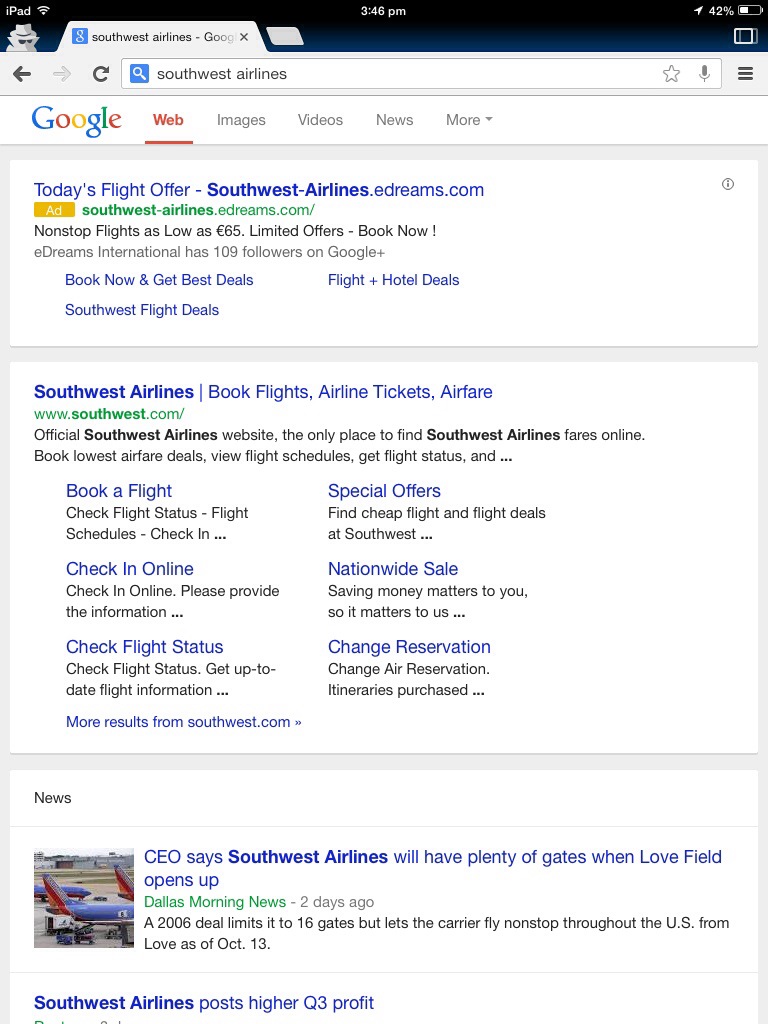
    First the Google Reader shutdown earlier this year showing that Google is not averse to shutting down services that have a significant user base. Then came the shared personal endorsement that was opt out by default and would have made Facebook proud. And now we have Google experimenting with banner ads. They sure had us fooled.

    With the search results already looking like below on the iPad, nothing much left to say other than the world probably ended in 2012, and we are living in an alternate version of reality.

    20131028-155243.jpg

    If you are a heavy user of their services, good luck trying to get out. Money makes not only people, but also organizations do funny things.

  • Apple doing to software what Microsoft did to hardware?

    Now that Apple has announced that OS X updates will be free going forward, and many of its first party apps like iWork are going to be free with new devices, Microsoft seems to have its task cut out. Many people seem to think that this move by Apple will really hurt Microsoft. In some ways Apple is trying to commoditize software the way Microsoft commoditized hardware over the last 2 decades. However, there are a few key points that not many have mentioned:

    1. Microsoft has given away major OS updates for free. E.g. Windows XP SP2. In a way, the Apple move was preempted by the free Windows 8.1 update.
    2. Microsoft is a past master of bundling free software with its OS. Remember Internet Explorer vs Netscape? Or more recently, Office being given away with Windows RT.
    3. Apple hardware remains luxury items, and free OS upgrades are not going to make budget conscious people switch from Windows to Apple devices. That said, the real threat comes when people realize that a tablet meets their requirements and is probably cheaper than a PC (desktop\laptop) when it is time to get a new device.
    4. The real threat to Microsoft comes from Android, as OEMs are gradually warming up to Android as an alternative for Windows for laptops. Since the market is undergoing a major shift in the kind of personal devices being used (desktops to laptops to mobiles & tablets), there is a big scope for a free OS. Android has been successful on mobiles while Linux failed on PCs due to this very reason.
    5. OS development has an associated cost even if you do not pay a third party for it. Apple is just subsidizing the software costs through hardware margins. Even if OEMs decide to opt for Android or Chrome OS, they will need an in house team to customize the OS. Of course, OEMs probably already have an in house team developing software for Windows given the typical bloatware that comes pre-installed on PCs.

    The bottom line is that Microsoft has to continue to woo its OEM partners who bring in the OS revenue, while at the same time transform its revenue source to hardware. The Nokia acquisition becomes even more important now.

  • The New Microsoft?

    Just replace Google with Microsoft and turn back the clock by 15-20 years in the below article and you will notice striking similarities in their strategies to capture the market:

    Google’s iron grip on Android: Controlling open source by any means necessary | Ars Technica.

    The decisions make perfect business sense and is possibly the easiest way for Google to maintain control over Android while taking care of the fragmentation issues that have plagued the platform over the last few years. As an end user this has both positive and negative implications. The good part is that we do not have to depend as much on OEMs and carriers for Android updates and features. The bad news is mainly for the open source fanatics who thought that Android was “open”.

    Of course, if you are an Android device maker, particularly one that is floundering in the face of the Samsung onslaught, then you are in a tough spot. Case in point is HTC that has been making pretty distinct devices that get good reviews, but doesn’t have any profits to show. Good acquisition target for Amazon it seems.

    Then, there is also Google’s strategy to suffocate the Windows Phone platform by ignoring it and depriving it of first party Google Apps. Another strategy that makes very good business sense, but not really in the spirit of “Don’t be Evil”.

    In a broader sense, the “Don’t be Evil” Google is long gone, having been replaced by a business savvy one which is a natural transition for maturing companies to survive in the marketplace. I just hope that Google Services don’t do to the internet what Microsoft did with Internet Explorer and Office…