Is Prism really an evolutionary step?
Author: Aditya
-
What does your city say?
Paul Graham’s latest essay “Cities and ambitions” touches upon the topic of the way a city can influence a person’s ambition. The post is US-centric, but there are quite a few interesting points in it.
No matter how determined you are, it’s hard not to be influenced by the people around you. It’s not so much that you do whatever a city expects of you, but that you get discouraged when no one around you cares about the same things you do.
….
Does anyone who wants to do great work have to live in a great city? No; all great cities inspire some sort of ambition, but they aren’t the only places that do. For some kinds of work, all you need is a handful of talented colleagues.
What cities provide is an audience, and a funnel for peers. These aren’t so critical in something like math or physics, where no audience matters except your peers, and judging ability is sufficiently straightforward that hiring and admissions committees can do it reliably.….
Some people know at 16 what sort of work they’re going to do, but in most ambitious kids, ambition seems precede anything specific to be ambitious about. They know they want to do something great. They just haven’t decided yet whether they’re going to be a rock star or a brain surgeon. There’s nothing wrong with that. But it means if you have this most common type of ambition, you’ll probably have to figure out where to live by trial and error. You’ll probably have to find the city where you feel at home to know what sort of ambition you have.
I was not able to entirely appreciate the points made regarding the various cities, having never visited any of them. However, I can draw some parallels with the Indian cities in which I have lived, mostly from a personal point of view rather than a professional one. I was born in Bangalore and spent the first 12 years of my life there. This was of course before the IT related growth, and the Bangalore of today is a lot more crowded and busy.
My next 10 years were in Chennai, one of the 4 Indian metropolitan cities. Chennai is a relatively serious and conservative city (my friends used to complain every time rock concerts bypassed Chennai and went to Bangalore). My last 3 years have been in Kolkata, my native place and another metro, and the lifestyle is quite relaxed. The weather of a city seems to have a considerable impact on the attitudes of its citizens (something my mother mentions quite often).
So, what quirks have you noticed about your city?
-
Extension compatibility status for Firefox 3
I was thinking about compiling my list for the compatibility status of extensions for Firefox 3, but it looks like the folks at lifehacker have already found a couple of sites that do the same:
Here’s 20 add-ons that are Firefox 3-compatible, and seven that aren’t yet.
Compatible ones (as on 28/5/2008 ) include Adblock plus, flashgot, StumbleUpon, Mouse Gestures among others, while some like Tab Mix Plus and Firebug are not compatible yet. There are some extensions missing from the lists though, like Greasemonkey and del.icio.us, so here’s my table for their status:
Extension name Status Notes Greasemonkey Compatible works with hack* (current release is compatible with FF3 betas, but not RC1)del.icio.us bookmarks Compatible beta versionFF3 compatible,
older version works with hack*Google Gears Compatible DownThemAll! Compatible IE View Lite Compatible MR Tech Local Install Compatible works with hack*Now (20/6/2008) known as MR Tech ToolkitPDF download Compatible Foxmarks Compatible Just updated on 27/5/2008 Tab Mix Plus Incompatible Developer version compatible with Firefox 3 available * – these extensions work using the extensions.checkCompatibility=false hack
One of the things I have noticed is that incompatible extensions that use the password manager in Firefox do not work properly even with the hack. This is likely due to the change in the password management system in Firefox 3.
Update: I thought such a list would make a good addition to wikipedia, and I have added a section on extension compatibility to the List of Firefox extensions page. I’ve added the some of the extensions listed above for the time being. Hope others add to it :).
Update (18/6/08): Updated compatibility status for Greasemonkey and Gears. Added Tab Mix Plus status.
Update (20/6/08): Updated compatibility status for MR Tech.
-
Productivity 2.0 (non-serious)
I came across a humorous post from thedailywtf.com on an “innovative” way to measure productivity through SVN check-ins, which of course met with expected results, with some employees increasing their productivity by over 600%. It also led to the development of a nice little reusable asset that could be used to increase productivity:
Still, it irked Milo that he wasn’t reaching his full productivity potential. He was wasting a lot of time writing code; time that should be spent checking code in….
…..
With his script, dubbed “PHLEGM” (Programmer’s Helper for Literally Engaging in General Machination, named by one of his colleagues), he could stretch what would usually be one checkin to 20-30 commits. It’s evolved like an open source project with his fellow team members adding new features.
The post also led me to an old Joel post on productivity related to Amazon’s attempt to measure customer service productivity based on number of calls logged:
“Thank you for calling Amazon.com, may I help you?” Then — Click! You’re cut off. That’s annoying. You just waited 10 minutes to get through to a human and you mysteriously got disconnected right away.
Or is it mysterious? According to Mike Daisey, Amazon rated their customer service representatives based on the number of calls taken per hour. The best way to get your performance rating up was to hang up on customers, thus increasing the number of calls you can take every hour.
Joel’s also been quite critical of productivity measurement and incentive based systems at work before. However, I can’t think of a better alternative to the usual rating systems used in companies, especially large ones with tens of thousands of employees. Can you?
-
Lies, leaky abstractions and children
I recently read the essay “Lies we tell children” by Paul Graham, in which he analyses the way in which adults create an abstracted and somewhat idealised world for children.
I’m using the word “lie” in a very general sense: not just overt falsehoods, but also all the more subtle ways we mislead kids. Though “lie” has negative connotations, I don’t mean to suggest we should never do this—just that we should pay attention when we do.
It is a lengthy, but thought provoking essay, and explores the different reasons for which real information is withheld from children. Reasons could range from just maintaining control to the difficulty of putting information in context.
Due to this, the world in a child’s mind takes a binary form consisting of absolutes – right and wrong, good and evil, black and white. This theme can also be seen quite clearly in movies for children (think of any of the Disney animations). However, during the transition from childhood to adulthood, this binary abstraction of the world begins to leak just like any computer related abstraction. Children begin to see the different shades between black and white, and general inconsistencies in the explanations given to them by adults. Some theories seem utterly illogical while others begin to make more sense. The real world also begins to test many of the ideals taught to them.
In this way, the journey to adulthood is somewhat like the transformation of a black and white world with two shades into a full colour world. Some misconceptions persist into adulthood, with inquisitiveness being the best tool to combat them.
Paul Graham’s conclusion from the same essay:
We arrive at adulthood with a kind of truth debt. We were told a lot of lies to get us (and our parents) through our childhood. Some may have been necessary. Some probably weren’t. But we all arrive at adulthood with heads full of lies.
There’s never a point where the adults sit you down and explain all the lies they told you. They’ve forgotten most of them. So if you’re going to clear these lies out of your head, you’re going to have to do it yourself.
Few do. Most people go through life with bits of packing material adhering to their minds and never know it. You probably never can completely undo the effects of lies you were told as a kid, but it’s worth trying. I’ve found that whenever I’ve been able to undo a lie I was told, a lot of other things fell into place.
Fortunately, once you arrive at adulthood you get a valuable new resource you can use to figure out what lies you were told. You’re now one of the liars. You get to watch behind the scenes as adults spin the world for the next generation of kids.
The first step in clearing your head is to realize how far you are from a neutral observer.So how many misconceptions have you been able to shake off?
-
Playing around with CHDK and HDR imaging
I had stumbled upon the CHDK firmware for Canon cameras through a Wired article some time back, and finally got around to trying it out on my PowerShot A630 today. I also discovered that it is possible to create HDR images by shooting images at different exposures and subsequent manipulation through appropriate software (tutorials: Photoshop / CS2, GIMP / GIMP using a script, Paint.NET or Photomatix).
So, the first thing I did was to download the CHDK build for my camera (I used the AllBest one – usage instructions). Then, I followed the instructions and copied the files to a spare SD card I had, and put it into the camera. I started the camera in play mode and used the menu to activate the CHDK firmware (this is only temporary, and needs to be activated every time the camera is switched on). Once activated, I could switch between the two versions using the Print button. There are a ton of options in the CHDK menu including support for scripts (written in uBasic), enabling additional shutter speeds and indicators among many others.
With the firmware nicely set, I went ahead and started shooting for making HDR images. Initially I tried an HDR bracketing script available to shoot some of the photos. The script seemed to have some problems focusing at times, but I managed to get some shots. I also discovered the ability to do exposure bracketing in the continuous shooting mode, which I also used to shoot a few photos.
I then used the trial version of Photomatix to create the HDR images as I was feeling too lazy to go through all the steps to create HDR images in GIMP (there is a contrast blending script which takes of this though) or Paint.NET. The only drawback of using the trial version is that it inserts a watermark into the end result. This is ok since I was experimenting with HDR imaging, and I’ll switch to GIMP or Paint.NET for serious photos. One of the things I noticed in the resulting HDR images is that they can tend to look a bit cartoonish or unnatural. Anyway, here are a couple of results.
I have created a collection on flickr for the HDR images (both sources and results are included). I’ll be adding to the collection as and when I get the opportunity. There are quite a few HDR groups on flickr too, and they do have some good looking photos. For something more interesting, have a look at this (not by me).
Update: Just discovered an open source HDR imaging software – Qtpfsgui. The output (sample on this post) appears to be a bit more cartoony due to a different algorithm being used. (via)
-
A pseudo IDE for Google App Engine – Komodo Edit
I signed up last week for the Google App Engine, and tried out the tutorial for creating a guest book. It is a pretty simple tutorial, but one of the things I noticed about the App Engine is that there is no add-on for any IDE/editor at the moment, unlike the Android SDK which has its own eclipse plug-in or even the Web Toolkit which has a utility to generate an eclipse project.
Initially, I tried using Notepad++ which I have installed as my basic text editor, but I didn’t get much support beyond basic syntax highlighting. It does have a built in run command, but is not very configurable. This is when I decided to give Komodo Edit a try (it is open source). It is a lightweight version of the Komodo IDE, but has support for a variety of languages along with a useful set of tools. Incidentally, it is based off the Mozilla code base, and has support for add-ons just like Firefox, Thunderbird and Flock.
You can organise files into projects, which comes in handy for the Google App Engine applications, which is typically composed of a set of files based in a folder. The editor also has some basic syntax checking in addition to syntax highlighting. However, the code intelligence/auto-complete is limited to the base Python installation, and so will not be able to help with the Google App Engine.
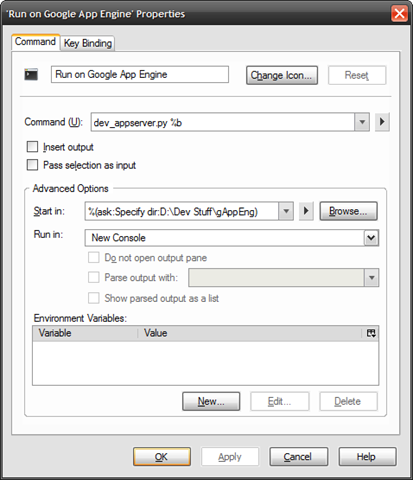
In addition to this, the editor also has a customisable run command, which can be used to launch the development server. Shown below is my customised run command which can be used on the main .py file of the application (E.g. helloworld.py form the tutorial), and launches the development server in a new console (set using the “Run in” option). The “Start in” parameter is also important as the server needs to be launched from the parent folder of the folder in which the application is stored, i.e., if the application files are stored in “D:\Dev Stuff\gAppEng\helloworld”, the server needs to be launched from “D:\Dev Stuff\gAppEng”. Here, I have used the “ask” option with a default value for the “start in” location, so that I am prompted for the path at the time of server launch.
There are quite a few other tools available in the editor, like file compare, spell checker, templates etc, which I haven’t tried out yet. Now, if I could only think of my own project for the App Engine. Suggestions anyone?
Update: Just noticed that another person has posted instructions for using Komodo Edit as an IDE for Google App Engine (on Linux it seems), including steps for setting up the uploader among others. (via)
-
The origins of "bug"
One of the commonly believed origins of the term “bug” (as used in the software context) is the anecdote of a dead moth being causing the malfunction of the Mark II computer in Harvard in 1947. Well, it turns out that the term bug is much older and predates the computer industry by a pretty big margin. I found this out while reading Robert Cringely’s weekly post on Apple’s HD strategy (it is an interesting article by the way) where he’s mentioned the incident and the possible origins as a side note:
It turns out that “bug” was a common term for hardware glitches and dates back to the 19th century and possibly before. Edison used the term in a letter he wrote in 1878. This is no earthshaking news, of course, but simply reminds me how self-centered we are as an industry and there really isn’t much that’s truly new.
Wikipedia also mentions more or less the same thing in the etymology section for software bugs:
While it is certain that the Mark II operators did not coin the term “bug”, it has been suggested that they did coin the related term, “debug“. Even this is unlikely, since the Oxford English Dictionary entry for “debug” contains a use of “debugging” in the context of airplane engines in 1945 (see the debugging article for more).
So that clears up some word origins I guess, but the computer industry can take consolation in finding the first “real” bug :-).
-
Some origami video to start with
Over the last week, I have been thinking about doing some video content creation, specifically some kinds of do it yourself videos. I have a liking for origami, and thought this should be a good starting point. I did have a youtube account, but there were also numerous other similar services.
I was wondering which service would be a good choice, and this is when I came across Andy’s post on his choices of online video services. He has given a nice comparison of some of the services like youtube, viddler and seesmic, finally favouring viddler:
Viddler is just so easy to use. It accepts a whole range of common video formats and will transcode them for you. You can tag your videos – and even better than that, you can add comments and tags at particular points in the video. I can embed the videos on my WP.com blog (which is not possible with Seesmic). It’s easy to find and connect with friends. There are groups. There are excellent stats which show where hits on your videos are coming from, including when a video is played through an embed on your site or another one…
The viddler features seemed quite attractive. So, I signed up for it and uploaded my first video (a flapping bird origami). I also did some digging to see how the Viddler videos could be embedded into a WordPress.com blog, and it seems there is a tag to do this:
At the Viddler site, if you click on Menu in the lower right of a video screen, a row of menu selections appear at the top of the video screen. Select “embed” and then click on the “wordpress.com” button and it will give you the code that will work with [WordPress].com.
Here’s the embedded form of the bird origami video (there’s also a flickr photo set for the step by step photos):
I’ll be creating more origami videos along with corresponding flickr sets (also an origami collection for the sets). The only problem for me right now is the slow upload speed (64 kbps), due to which I am uploading low resolution videos (320×240) without audio. As for the video creation, I used my digicam, a Canon Powershot A630 mounted on a Gorillapod to shoot the video, and VirtualDub to re-edit the video (re-encoding to DivX and removing audio).
-
IBM and Feb 14
Just discovered this bit from the Geekend blog:
Feb. 14, 1924, IBM is founded.
Also checked wikipedia:
On February 14, 1924, CTR changed its name to International Business Machines Corporation. At the helm during this period, Watson played a central role in establishing what would become the IBM organization and culture.