I recently ported my Reliance CDMA connection to Airtel GSM, and this called for a change of handsets. I was using a Samsung Galaxy Pop CDMA with Reliance, along with a Galaxy S III as my primary internet device. My requirements for the new phone were quite simple:
- Good battery life since this was to be my primary phone for voice – the Galaxy Pop used to serve me for 2-3 days (without a mobile data connection though)
- Price around Rs 15,000
- Smooth and reliable performance
Given the above constraints, Windows Phones seemed to be the way to go, and also give me some platform diversity. There were 3 options – the Lumia 520 (Rs 9500), 620 (Rs 13,000) and 720 (Rs 17,000) which have the same internals (CPU+GPU) thus having similar user experiences. I was pretty tempted by the 520’s price, but the lower quality screen, lack of compass (really important for navigation) and smaller battery was a downer. The 620 was pretty compact with a good screen and within budget, but the small battery was again a downer. The Lumia 720 was above budget, but its huge 2000 mAh battery with a well received camera, display and compact design clinched the deal in the end.
That’s enough of background, so let’s jump to the main review.
Specs, Design and Build
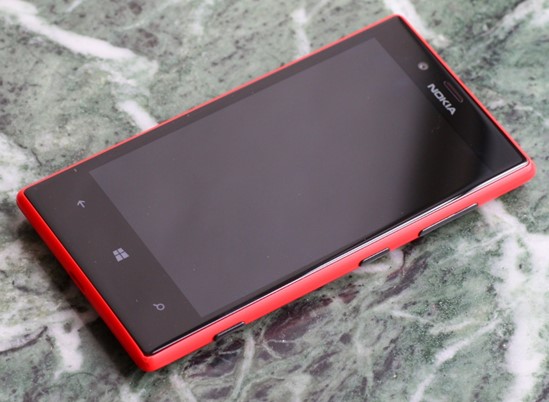
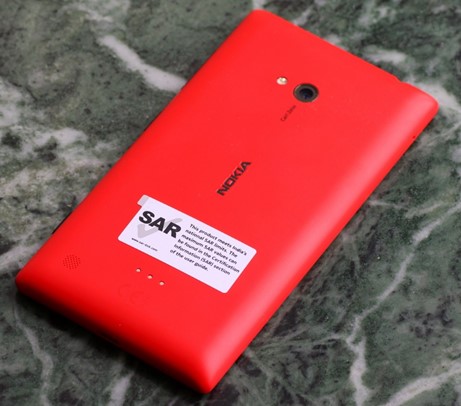
Yes, I got the red version (there’s also the cyan, yellow, white and black) which has a matte finish. It’s a unibody polycarbonate construction, so no removable battery but the thickness is pretty low. Wireless charging is also supported through special cases (not yet available in India at the time of writing).
The build seems to be quite robust as I had an inadvertent drop test from my pocket on a wet footpath in Mumbai within a week of purchase. It landed on the bottom right corner and ended up screen down – definitely not the kind of experience you’d want with a brand new phone. Thankfully, I got away with just a chipped corner as visible in the picture below. Looks like the Gorilla Glass 2 works.

The display is 4.3″ with 800 x 480 pixels in line with Android flagships from 2010-11. The black levels are quite good (not AMOLED levels of course), and outdoor visibility has also been pretty good thanks to Nokia’s coatings and polarizing filters. The ~220 ppi resolution is middling, but text is quite legible without much of aliasing. The display is also supposed to support super sensitive touch allowing it to be used with fingernails and through gloves. I have personally turned it off.

The LCD display’s RGB layout under a macro lens (in absence of the Anandtech review with the pic)
The buttons (volume, power & camera) are all placed on the right side of the phone, and I had to get used to the power button placed in the middle. The shutter button protrudes a little more than the other two, possibly due to it being a two-stage button. The micro-SIM tray is on top while the micro-SD card slot is on the left side. Both need to be ejected using a pin (supplied in the box). The micro USB charging slot rounds off the bottom edge.
Camera

My personal experience with the camera has been very good so far, in line with other reviewers. It is a 6.7 MP shooter with an f/1.9 Carl Zeiss lens and LED flash. The dedicated shutter button which doubles as a camera quick launch shortcut is really handy. The colours come out quite saturated, and I seem to prefer the resulting shots from the Lumia 720 to my Galaxy S III, particularly indoors. It also helps that the camera launches quicker on the Lumia 720 than on my year old Galaxy S III. The GSIII does hold a large advantage in the shutter lag and continuous shooting speeds. The Lumia 720 takes a couple of seconds to lock focus and capture the frame which can result in a somewhat different composition.
Shots taken indoors without flash under reasonable lighting conditions turn out really good on the Lumia 720, even better than the GSIII thanks to the large aperture (almost a stop faster). However, under dim light where you require the flash, the GSIII comes out ahead.
The default camera app on Windows Phone is pretty basic, especially when compared to the Android OEM camera apps, but gets the job done. You can always get hold of other apps (lenses as per WP terminology) to expand on the functionality. There’s a nice ProShot app (paid – just Rs 110 though) that gives you full manual control over the camera settings. Higher end Lumias (PureView branded 920 & above) of course get Nokia Pro camera app with the latest update, so this is the app to get for the lower models.
Video output is also pretty decent though it supports only up to 720p video. Then again, I don’t really shoot much video and have a good old DSLR if I want to do serious shooting.
User Experience
It has been almost a month since I got the Lumia 720, and so far the experience has been really good barring a few quirks that I’ll cover in the next section. A little bit of context in terms of my usage of the Lumia 720 – my primary internet device remains the Galaxy S III with its significantly larger screen. Plus, I’m pretty much locked into the Google ecosystem (Gmail, Maps, Keep, Contacts etc) and any platform that is not Android will be unable to give you the best experience (iOS included, though Google is trying its best for that platform while actively ignoring Windows Phone). Microsoft Exchange support is also not the best on Android with experience varying with the OEM in question (I found the HTC interface quite different from Samsung’s).
However, the Lumia is my primary phone for voice calls and SMS, and in this regard, the experience has been very good aided in no small way by the humongous 2000 mAh battery that gives me 2-3 days of service without a hitch (and that is with data services and email sync enabled). I have also configured my office Microsoft Exchange account (mail, calendar, tasks & contacts) on the Lumia and find the experience to be a lot more consistent than when I had it configured on my GSIII.
The interface is really smooth without any stutters that you find in Android handsets in this price range. The 512 MB RAM does make its size felt when you see the “Resuming” screen when launching apps, but once launched most apps have a very uniform experience. The Live Tiles Metro interface is quite handy with the People hub being one of the strong points in organizing and staying in touch with contacts.
The ability of apps to control the lock screen background out of the box is also a nice touch. For example, you can allow the facebook to cycle through your photo albums (you can choose the albums) for the lock screen. Notifications are however almost useless on the Windows Phone platform. The closest it has to a notification centre is the lock screen where you can see unread\new counts for up to 5 apps of your choice along with details for 1 app. Live tile counters also try to solve this issue, but still can’t match up to a dedicated notification centre. This is especially a big downer coming from the rich notification centre experience in Android.
On a positive note, the Lumia 720 came with a 6 month Nokia music subscription and the collection is quite good. The songs are downloaded in the form of 32 kbps MP3 files that can be transferred to a PC. So, if you have an iTunes Match subscription and re-encode the tracks to 80 kbps (minimum for iTunes Match to consider them) or higher, you can get hold of high quality 256 kbps versions for free.
The 8 GB phone storage can run out pretty quickly if you start clicking a lot of photos, videos & downloading music. Good thing that the phone supports up to 64 GB of SD storage (apps can’t be transferred to SD though), though I haven’t popped in one yet.
In terms of apps, some of my most used ones like Whatsapp, Kindle, Foursquare Facebook etc are present. But, the lack of the usual cloud backup apps like Dropbox and Google+ is also a downer, though you can backup photos and videos to SkyDrive.
The browsing experience is also ok, though the absence of alternatives like on Android can get in the way given that many sites don’t play well with Internet Explorer. E.g. Meru cabs presents their desktop site in mobile IE on the Lumia.
Sharing across apps also works quite well (better than iOS) with the ability to easily share photos and videos through apps like Whatsapp, facebook and email.
Maps and navigation is also pretty decent with the ability to download offline map packs for specific states in India. I am a Google Maps user on my GSIII and haven’t spent too much time with HERE maps and drive combo. The Lumia 720 has a built in compass (unlike the 520), and navigation shouldn’t be problem. Traffic information is also available on HERE maps.
I really miss the blocking mode that silences the phone at specified times of the day (typically for the night), and the absence of apps like Llama and Tasker available on Android, possibly due to OS limitations make it impossible to get third party solutions for automating tasks. I use Llama quite extensively on my GSIII to automatically silence my phone in office, during meetings, in movie theatres, switch on wifi at home etc. NFC, though available and supported, is not an option either due to the limited scope of actions. NFC can only be used to launch apps\settings and not automatically toggle them.
Quirks
Pretty all the issues I have had with the phone are due to the OS, i.e. Microsoft, and here they are briefly:
- Poor Google contacts integration – I have found many phone numbers missing from my contact list that show up nicely on my GSIII.
- No notification centre – it can get really tough to figure what your phone was buzzing you for.
- You can’t edit phone number in the dialler – can be a bit of a problem when you are roaming and need to prefix digits before dialling.
- NFC support is really limited – you can just launch apps\settings but not trigger any actions automatically.
- Quite a lot of apps are available, but many are not updated regularly.
- Google actively ignoring the Windows Phone platform – they dropped active sync support, haven’t introduced any official apps (barring search) and are trying their best to prevent Microsoft from creating any substitutes.
- The dedicated hardware search button is practically useless – I don’t use Bing (the lens is useful though, a la Google Goggles). In fact, even Google dumped the hardware search button in Android long ago.
Conclusion
I am quite happy with the Lumia 720, but that is largely due to the fact that my usage is split between the Galaxy S III and this phone. It would definitely be difficult to get by with the Lumia 720 as my primary phone, but it complements the Android phone perfectly. Why not just stick to the Galaxy S III you say? Battery life for one, and the general degradation in responsiveness of the GSIII over the last one year for another.
Nokia has lost out big in the smartphone race, but it has really introduced compelling choices in the Windows Phone 8 camp. If you are a first time smartphone buyer (no Google contacts baggage, app dependency), the Lumia 720 is a very good choice. In fact, for a new smartphone user with a budget below Rs 20,000, it would be very difficult to beat the Windows Phone triumvirate of the Lumia 520, 620 and 720 (especially the 520 below Rs 10,000) in terms of user experience (smoothness particularly). Then again, I have seen many of my friends and colleagues shy away from Windows Phone to the Android camp due to its radically different user interface. On the high end, Nokia PureView branded Lumia phones (920, 925, 928 and 1020) have the best cameras and the Lumia 1020 is practically a Point & Shoot replacement. So, if you are planning to replace your camera and have an old smartphone (or none at all), the Lumia 1020 is a really compelling choice.
As for Windows Phone, Microsoft really needs to up its game like it has with Windows Blue\8.1, and bring the platform up to speed in terms of must have features (notification centre, browser). Nokia is doing its best to stay in the game and introduce cutting edge features where possible (Lumia 1020), but is slowed down by Microsoft’s slow rate of platform updates.
Now that I’m a Windows Phone user, I can appreciate its merits vis-à-vis Android and iOS, and hope that Microsoft can up the game the way Mozilla did for Firefox in the last couple of years in face of Chrome’s rapid ascent. Microsoft’s iOS 7 moment can’t come too soon.