-
Run OpenOffice in your borwser
-
Work passes forward while complaints pass backwards
-
What I.Q. doesn’t tell you about race
Author: Aditya
-
links for 2007-12-13
-
links for 2007-12-12
-
What to eat to counter different moods
-
links for 2007-12-11
-
Try out cel phone interfaces online
-
FileMenu Tools lets customize the context menu of the Windows Explorer
-
-
To diigo or not to diigo – a del.icio.us dilemma
I had posted on my online bookmarking dilemma a couple of months back, and had decided to try out two services – diigo and del.icio.us – based on a basic evaluation of different bookmarking services. I tried out both services for about a month and a half in parallel, by using the diigo extension for Firefox to post simultaneously to diigo and del.icio.us. Last month I switched over to the del.icio.us extension for Firefox to post solely to del.icio.us, and I have continued with this primarily due to its better Firefox extension.
Following is a run down of my observations during the trial run with the two services:
Firefox extensions
I found the del.icio.us extension more handy to use with its suggested tags (your own plus from other users when available) for the bookmarks. The diigo extension on the other hand only had tag auto-completion from the list of tags already used, with no suggestions from tags used by others (it did show other users’ comments when available). Also, the del.icio.us extension provides a button to bookmark the page (something built into the browser Flock by the way) while diigo requires you to either use its toolbar which results in loss of screen real estate (similar to the StumbleUpon toolbar) or right click on the page and choose the bookmark option from the menu (also provided by the del.icio.us extension).
In addition to the ease of bookmarking, the del.icio.us extension also provides a sidebar to search through your bookmarks without having to visit the site.
Website experience
Currently, the diigo site is easily better than the del.icio.us site which has not undergone much of a change in recent times. diigo provides a much better interface. Also, the del.icio.us site is quite slow.
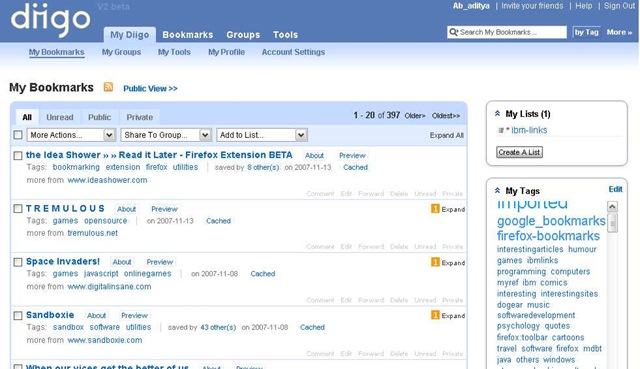
That said, this is due to change soon with both services running private betas for their new sites. Unfortunately I haven’t gotten an invite to either site though I put myself on the waiting list almost 3 months back. However, from what I’ve seen online, the new del.icio.us site looks similar to what is currently available on diigo. See if you have better luck getting into the beta sites:
del.icio.us beta (TechCrunch coverage including screenshots)
Truth be told, I have not had to visit the website of either service much other than to bulk organize some bookmarks and make some setting changes.
Special features
diigo has a much larger feature set than del.icio.us, like text highlighting, posting to other bookmarking sites (something I used throughout to keep in sync with del.icio.us), page caching (this seems to the USP for some users if you look at the TechCrunch post comments on the del.icio.us preview) etc. However, on last try, some features like posting bookmark list to a blog (I discovered that diigo was running on Rails due to the error pages I saw when trying to access this feature), seemed to be buggy. I gave up on the post to blog feature on diigo and switched to del.icio.us which seems to work quite well (though the site leaves much to be desired – the password is in plain text).
Final thoughts (at least till the previews are released)
del.icio.us seems to be serving my online bookmarking requirements quite well (too well if you look at my daily bookmark posts) for the time being. diigo has its uses especially if you are collecting bookmarks for some kind of research – the highlighting can be very useful for annotations (you can also see others’ highlighting if present) and the page cache (available but done manually) should ensure that the page is still available in some form even if the source goes down.
I’ll probably give both services another parallel trial run once the previews are released. And the fact that the import/export feature on both services is quite good, switching back and forth between them shouldn’t be much of a pain (though repeatedly typing “del.icio.us” like I did in this post is).
-
links for 2007-12-10
-
The Volta technology preview is a developer toolset that enables you to build multi-tier web applications by applying familiar techniques and patterns.
-
Feed Reader setup tips to prioritize reading
-
Impressive list of product names
-
Agile is like any other newly introduced popular concept. “…Everybody is talking about it. Very few are doing it and those who are, are doing it badly.” – James O. Coplien
-
Ouch!
-
-
links for 2007-12-07
-
The greatest batsman cricket has known
-
links for 2007-12-06
-
Mass balancing game
-
Simple Secure Screen Sharing
-
So, yes, the version after IE7 is IE8
-
links for 2007-12-05
-
An old piece of news from 1999 found via http://www.codinghorror.com/blog/archives/001008.html
-
Awesome graphics
-
-
Getting in sync with the latest game graphics
Game graphics seem to have progressed by leaps and bounds over the last few years. I thought that the Crysis graphics were awesome with realistic water effects and shadows, but the game Uncharted: Drake’s Fortune for the PS3 seems to take things up a notch further (while supposedly using only about 30% of the PS3 power).
I wonder where things will stand by the end of this decade. And just to see how game graphics have progressed, check out how the rendering of water in games has evolved over the last 2 decades (site in German).