-
Being a great returner is all about prob…
Being a great returner is all about problem solving
-
Has anyone tried playing this? https://t.co/mfsv36sFFJ
Has anyone tried playing this? https://t.co/mfsv36sFFJ
-
1/n Two interesting findings thus far from my analysis of Pe…
1/n Two interesting findings thus far from my analysis of Pew’s March 2020 COVID-19 survey. First, white (and especially ‘very’) liberals are far more likely than all other ideological-racial subgroups to report being diagnosed with a mental health condit
-
Day 6 of likely covid live tweeting. Energy finally returned…
Day 6 of likely covid live tweeting. Energy finally returned to almost normal levels. Feels good man.
-
American Trends Panel Wave 64 | Pew Research Center
17/n Link to original dataset https://t.co/VAMXl41SZj
-
You can’t vouch for your own bug. You wi…
You can’t vouch for your own bug. You will always see it as the most beautiful bug that ever did bug. Doesn’t matter if you’re the one who does the thing, or even if you’re right. If it needs a vouch, recuse yourself. It’s ok. It’ll hold up on its own,
-
Actually it has to do with the way your eyes perceive colors…
@TalbertSwan Actually it has to do with the way your eyes perceive colors and shadows. People seeing it as grey/teal are seeing it as the exact colors displayed on the screen (as seen by using a color picker) but people who see it as pink and white, their
-
For those who are interested in research…
For those who are interested in research-based solutions to stop police violence, here’s what you need to know – based on the facts and data. A thread. (1/x)
-
I think it’s time for a thread on the cu…
I think it’s time for a thread on the cultural history of this tweet. (1/?) https://t.co/qSIJ0IeRTZ
-
it pays to play video gamesesports is love, esports is lif…
it pays to play video games
esports is love, esports is life https://t.co/g6qt2nJDg1
-
This is how to graph likeability vs. realism. https://t.co/P…
This is how to graph likeability vs. realism. https://t.co/PgAuamPpRi
-
Steve Jobs in 1990: Interpersonal networked computing (through great software and UX) will give rise to decentralized orgs that allow people at every level work together remotely
Crazy how Jobs could see clearly 30 yrs into the future!
-
My mission director ‘s favorite piece of my memorabilia. My …
#TBT My mission director @Buzzs_xtina’s favorite piece of my memorabilia. My travel voucher to the moon. #Apollo11 http://t.co/c89UyOfvgY
-
People asking about my red fingernail. It’s for my mom. I we…
People asking about my red fingernail. It’s for my mom. I wear my dad’s ring and my mom’s nail polish. It reminds me of them. Momma’s boy.
Author: Aditya
-
Daily twitter archive 01/27/2022
-
Daily twitter archive 01/28/2022
-
Two complimentary takes on NFTs and landlords. https://t.co/…
Two complimentary takes on NFTs and landlords. https://t.co/meKoShr7qe
-
Corrected. 30 years of https://t.co/zXTnKONaUA
Corrected. 30 years of #Vishwatma https://t.co/zXTnKONaUA
-
-
Book quotes 01/26/2022
-
Quotes on introverts from Quiet
Interesting quotes from “Quiet: The Power of Introverts in a World That Can’t Stop Talking” by Susan Cain
-
Some interesting observations & tips from the evergreen book “How to Lie with Statistics” by Darrell Huff and Irving Geis
-
-

Building a stock market game in 2008
This is a post I meant to write almost 13 years back, on how I built a stock market game using Ruby on Rails for our B-school flagship event Quadriga (I did release the game source code on Rubyforge, but the site is no longer operational). Like they say, better late than never :). Below is a short screen capture of the game in action from the beta run I had organized, showcasing the different features to give you an idea of what it entailed:
The game itself was a very simplified version of a stock market designed to be played as individuals or as a team with the following features:
- Simple buy and sell transactions without any short selling, futures or options .
- The trading would be spread across a period of 12 sessions with the prices changing before the start of each. Each user would get a fixed set of shares for each of the stocks at the beginning of the game so that selling activity can be initiated from period 1.
- There was an element of randomization in the stock price movement from period to period partially influenced by a set of pre-defined events.
- A user login feature with public leaderboard to give everyone a view of how they are performing against the competitors.
- A transaction & stock price history section to view the changes over time.
I have fond memories of this game as it game me an opportunity to try out Ruby on Rails in a real world scenario (this video from 2005 was the inspiration). I had a lot of fun coding the game and consulting classmates & seniors on how the stock market should be simulated. Even more fun was the beta testing round we did over the hostel LAN (the video above is from the test run as you can in the message on the login screen), with most of my classmates participating. We have come a long way on the technological front, and one of the things I do find missing in the game is an element of visualization in the form of graphs. Mobile support was of course not relevant back in 2008, but today it would be a no brainer.
As for the actual event, we brought in an element of security/standardization where we had the competing teams using laptops borrowed from my classmates. To ensure that their personal files were not affected, we setup Linux virtual machines on top of the Windows environment, and the teams were using browsers to access the game running my laptop through a Wi-Fi network we had setup on a router borrowed from another of my classmates (it was 2008 after all).
This nostalgic post would not have been possible had I not backed up the files to an external hard disk and to OneDrive eventually. So, here’s a bit more of throwback with the event posters & other collaterals:
-
Sooryavanshi
Watched the movie a few weeks back with my family and what I took offense with is with the opening scene where not only is Sooryavanshi’s father using a colour monitor in 1993 in India, but it seems to be running Windows 9x (likely Windows XP with the silver theme going by the 3D taskbar look and green start button).

Digital India in 1993 As for the rest of the movie, it is typical Rohit Shetty affair, so expectations were set accordingly.
-
iOS to Android [P1]: Perks outside the walled garden
I had never used Android as my exclusive daily driver, and my last proper Android phone usage on the Mi 4 was in parallel with my iPhone 5s around 6-7 years ago. A lot has changed in this time, and a lot has also remained the same especially when it comes to the customizations possible.
Here’s a quick rundown of the key new features I’ve recently (re)discovered on this side of the fence.
Ad blocking with Blokada
Ad blocking apps are of course nothing new on the iOS side, but are largely limited to browsers & webviews at best. This is where Blokada for Android comes in. It sets up a local VPN on the device and does local DNS filtering a la Pi-hole to block ads across apps. There is going to be a slight performance & battery life penalty, but you get ad blocking on the go. You can sideload the full featured version, or just get the Slim version from the Play store. It’s also available for Android TV, in case you do not want to use Pi-hole.
You can get similar functionality on the iPhone side of things, but need to use cloud services to get similar features which add on subscription costs & connection latency.
SMS Organizer
Custom launchers, dialers & SMS apps have been around from the very beginning on the Android side and have also been one of the biggest attractions of the platform. That said, the way we use SMS has changed a lot and it has become more of a platform to get transaction notifications, esp. for OTPs. This of course means that you have to be really careful in which custom apps you choose as a rogue app could easily siphon off your identity or bank balance.
That said, the SMS Organizer app from Microsoft Garage is a really smart app that makes life much easier and feels like a breath of fresh air after having used the iPhone Messages app for the last several years.
Transaction messages don’t just get a separate tab, but the notifications are also designed to highlight the key portion. Promotional & personal messages get their own tab as well. Then there’s the tab for reminders, finance & offers – each of which intelligently parse the messages and put the key information in a usable or actionable form. So, you can glance your bank, credit card, EPF, PPF & other such accounts including a transaction list (not completely accurate at times due to duplicate messages), get a reminder of your upcoming bills & travel plans and also surface the coupon codes that get sent in umpteen promo messages.
Then there’s the simple but great QoL improvement due to the ability to mark all messages as read and delete old OTP messages after a certain period. It also backs up the messages to Google Drive in case you want to restore later.
I’ve also been using the Microsoft Launcher which neatly integrates with Outlook and makes it easier to glance upcoming work meetings.
Windows integration
Yet another point around a Microsoft feature for Google’s OS. When I had switched to iPhones in 2014, it was from a Lumia 720 and Microsoft was still making Windows Phones at that time. Now, Microsoft seems to have embraced mobile devices & the cloud and their apps have features to further this vision. The Microsoft Phone Companion app on Windows makes it easy to connect to any Android phone, and in my case, the Samsung Galaxy S20FE has the required apps pre-installed.

Microsoft’s Phone Companion app in action along with the Swiggy app running from the mobile on the laptop While it is not quite the kind of integration between macOS & iOS devices, there are many ways this is more fully featured as you can not just control basic settings like volume but also access your phone’s notifications, messages, photos & apps right from a Windows machine. This makes it quite easy to stay tuned to a single device, unless you are a Mac user, or are using a work laptop where this feature is restricted.
Working on large screens
This is a perk of Samsung devices with DeX support where you can connect to a larger screen like a monitor or TV (USB to HDMI dongle required) or to a PC (wirelessly or through a USB cable), and then get a desktop like experience.

I got a USB-C to HDMI adapter which also has a USB A port & USB C pass through charging, which allows me to connect a key + mouse combo along with the monitor to access the DeX mode. This mainly comes in handy when you need a larger screen to edit audio/video/images taken on the phone, or just want a larger screen to view content.
Also a quick mention of the split screen & hover apps feature on Samsung devices that has been supported since the earliest Galaxy Note devices, and has been available on iPads for a while but not on iPhones.
Automation
iOS devices have made great strides on this front with the Shortcuts app which started off as Workflow before being acquired by Apple. This largely pales when one compares to Android veterans like Tasker & Llama that have been around since the early days. Services like IFTTT & Zapier can also do more on Android than iOS. Then, there are the Shortcuts contemporaries like Google Assistant & Bixby routines which provide an easier interface.
Most of my automations deal with silencing & unsilencing the phone based on different conditions like location & time of the day. This is where the iPhone’s hardware mute switch gets in the way as automations can’t alter its state.
-
In praise of Samahan
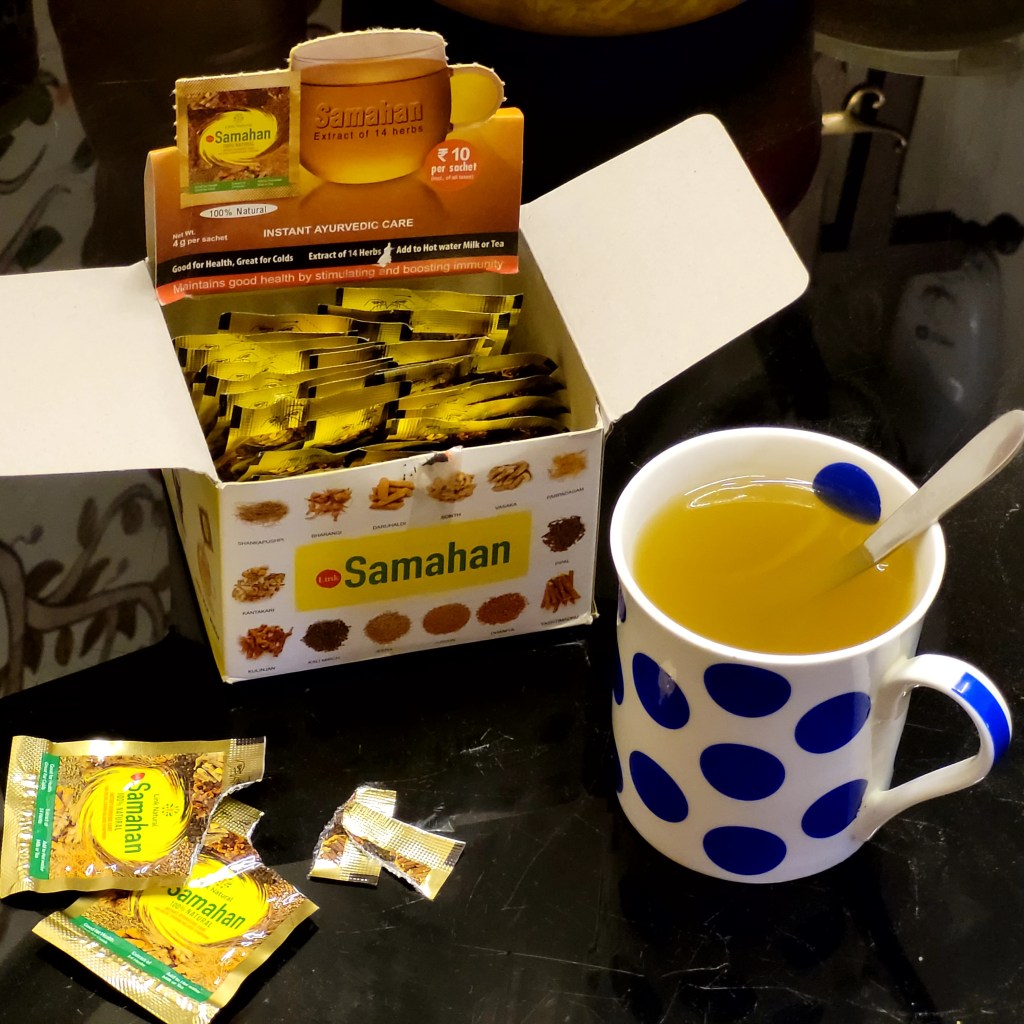
A couple of these little sachets in hot water makes for a soothing drink for the throat. Been using them even more regularly in the last couple of years and do feel the difference.
It’s quite popular in South India and it’s been really available on Amazon for the last few years. Incidentally it’s made in Sri Lanka.
-

Getting rid of ads with Pi-hole
I’ve been using Pi-hole running on a Raspberry Pi 3B+ for the past 2 1/2 years, and it has really spoilt me to the extent that I have forgotten what ads on web pages and mobile apps look like (the limited travel in the last couple of years has also helped). It’s pretty effective in getting rid of the pop-up mobile ads and the in page banner ads on all devices connected to the wifi.
The setup process is quite simple if you have your own router or at least change the DNS server on the home router:
- First off, get hold of a Raspberry Pi (even the model Zero is powerful enough for the Pi-hole), and the necessary peripherals like a case, SD card, charger & LAN cable. There are many readymade kits with the OS preinstalled sold online including Amazon, which saves a good deal of time.
- Initial setup is easier with a monitor & keyboard + mouse attached to the Pi. Once this is done you can connect it to your router using a LAN cable and access it through a Telnet client/mobile app like Putty on any of your devices in the home network.
- Next, you need to install Pi-hole on the Pi (you can do it during the setup itself), and configure the router to use the Pi as your DNS server. If you are stuck without admin access to your router, then you may need to configure each device to use the Pi separately.
- You can also install mobile apps to manage the Raspberry & Pi-hole quite easily through your phone. There are multiple apps available for both Android & iOS.
Once everything is setup, you should have an ad free experience on your devices (not all ads can be blocked of course). I’ve found about 10-15% of the queries on my home network getting blocked, and this includes devices like Android & iPhones, iPads, Android TV, Amazon Echo, Homepods & Windows laptops of course.
-
Harken back to the late 1990s with this re-creation of the dialup Internet experience #LinkBlog
For the times when you get nostalgic about “the good old days”, just take a look at this video.
It takes a full 3 minutes and 27 seconds to download an executable 120kb file for a simple software update. The whole video will make you grateful for all the technological advances over the last 20 years—especially for the comparatively vast amounts of bandwidth we enjoy today.
Source: https://bit.ly/3nt7HjS (via Pocket & IFTTT)
-
[LinkBlog] Blockchain-based systems are not what they say they are
Source: https://bit.ly/3frWf3A (via Pocket)
If you go out seeking to learn from their proponents why blockchains and the systems built atop them are apparently the future of our web, you’ll begin to see some common themes. Two of the ones I see most frequently are: These fall apart under further scrutiny.


