Here’s some gameplay footage that I put together where you can appreciate it in all its ASCII glory:
You can play it here – https://doompdf.pages.dev/. Note that it only works on Chromium based browsers (Chrome & Edge for ex.) for now, but supports loading your own WAD files if you want to try other variations.
I recently had the opportunity to share a fascinating online lecture to a group of MBA students about Pharmaceutical Analytics, specifically focusing on customer segmentation and engagement strategies.
I have created a summary podcast using presentation, sources and audio recording from the session which you can check out below:
It’s been a while since I posted about my photography activities and the phone reviews, and what better time than the new year to look back at some of the memories created over the last year.
Here’s a couple of moonshots taken last year with my current phone – the Samsung Galaxy S23 Ultra that I got back in 2023. I’ve put the 30x zoom versions first followed by the regular wide angle photo to give a sense of the zoom. All were taken during our 2024 summer trip to Kashmir (first set in Phalagam, second in Srinagar on the Dal Lake).
A playthrough of the new Doom parody that reimagines the first level as an art gallery with sections for different regions & eras like Greece, Egypt, Japan & Renaissance.
Health is literally wealth in this version, with armour replaced by cheese and a bunch of drinks to pick up & sip instead of guns. And yes, the Doom guy is wearing glasses.
I have been trying out Google’s NotebookLM over the last few days, and I thought of taking a shot at generating a podcast from the “What if” exhibit images that I had come across during my visit to the Birla Science & Technology Museum in Kolkata last month.
I had created a PDF from the images I had taken from the exhibit and uploaded it to NotebookLM as a source. Below is the audio overview from this file – just give it a listen.
This is nothing short of astounding given the way in which it is presented by the 2 hosts not just categorizing and covering each of the scientist’s contribution, but also explaining some of the key terms and providing context for their work. The last 4-5 min are even more interesting as it looks at the big picture and talks about nation building.
I also gave the interactive mode (currently in beta) a try wherein you can interrupt the hosts with your comments and questions. I brought in the family connection to Upendranath Brahmachari (my father had incidentally created the wikipedia page back in 2005), and also asked about potential conspiracy theories surrounding the lives of Homi Bhabha and Vikram Sarabhai. They seemed to do a good job of integrating my comments before bringing the discussion back on track, even sounding slightly vexed by the multiple interruptions.
Looks like 2025 is going to be another big year for the AI related developments given the plethora of announcements at the end of last year, and Google definitely has something interesting going on as always. Just hope that they don’t shut it down.
In case you are curious, here’s the PDF that I used:
And here’s the text summary that NotebookLM generated from the file:
Here is a list of all the scientists mentioned in the sources, along with their contributions:
Chemistry
Thiruvengadam Rajendram Seshadri: Awarded a fictional Nobel Prize in Chemistry for his research on plant chemistry, primarily in oxygen heterocylics, and his contributions to the isolation and structural elucidation of flavonoid pigments.
Prafulla Chandra Ray: Awarded a fictional Nobel Prize in Chemistry for his research on organic and inorganic nitrites and pioneering modern chemical research in India.
Asima Chatterjee: Awarded a fictional Nobel Prize in Chemistry for her contributions to medicinal chemistry, with a special reference to alkaloids, coumarins and terpenoids, alongside her advancements in mechanistic organic analytical chemistry and development of anti-epileptic and anti-malarial drugs.
Physics
Homi Jehangir Bhabha: Awarded a fictional Nobel Prize in Physics for explaining the scattering of positrons by electrons with exchange, his work on Dirac’s theory of the positron, the passage of fast electrons and the theory of cosmic showers.
Meghnad Saha: Awarded a fictional Nobel Prize in Physics for formulating the Saha Equation, which allows for the calculation of the degree of ionization in a gas, a concept important in analyzing the spectra of stars and nebulae.
Satyendra Nath Bose: Awarded a fictional Nobel Prize in Physics for his work describing elementary quantum particles, leading to Bose-Einstein Statistics which fueled the quantum revolution.
Jagadish Chandra Bose: Awarded a fictional Nobel Prize in Physics for his quasi-optical experiments on the properties of very short radio waves, leading to improvements in the coherer and contributing to the development of solid-state physics.
Physiology or Medicine
Upendranath Brahmachari: Awarded a fictional Nobel Prize in Physiology or Medicine for creating the drug Urea Stibamine, used to treat visceral leishmaniasis or black fever, a severe infection caused by the Leishmania parasite.
Dilip Mahalanabis: Awarded a fictional Nobel Prize in Physiology or Medicine for being one of the earliest practitioners of vital oral rehydration therapy, whose research into diarrhoeal diseases saved millions of lives, including vulnerable infants.
Other Sciences
Birbal Sahni: Awarded a fictional Nobel Prize in Paleobotany for examining evolutionary trends and geographical distributions, suggesting a separate order, Taxales, within the conifers.
John Burdon Sanderson Haldane: Awarded a fictional Nobel Prize in Evolutionary Biology for his work in relating Darwinian evolutionary theory and Gregor Mendel’s concepts of heredity.
Prasanta Chandra Mahalanobis: Awarded a fictional Nobel Prize in Statistics for formulating the Mahalanobis distance – a statistical measure of comparison between two data sets – and for his work on innovative techniques for conducting large-scale sample surveys.
Salim Moizuddin Abdul Ali: Awarded a fictional Nobel Prize in Ornithology for his systematic bird surveys across India and authoring books popularizing ornithology.
Edavaleth Kakkat Janaki Ammal: Awarded a fictional Nobel Prize in Botany for her contributions to plant breeding, cytogenetics, phytogeography and her development of several hybrid crop species, including varieties of sweet sugarcane that allowed India to cultivate its own.
Anna Modayil Mani: Awarded a fictional Nobel Prize in Meteorology for creating India’s first ozonesonde, making it easier for scientists to monitor the ozone layer.
Vikram Ambalal Sarabhai Jain: Awarded a fictional Nobel Prize in Space Science for initiating space research and helping develop nuclear power in India.
Verghese Kurien: Awarded a fictional Nobel Prize in Dairy Science for transforming India’s dairy industry by streamlining effective management and distribution strategies, making India the largest milk-producing country in the world.
Mankombu Sambasivan Swaminathan: Awarded a fictional Nobel Prize in Agricultural Science for his contributions to the Green Revolution in India by introducing high-yielding varieties of wheat and rice, further developing high-yielding varieties of wheat and rice, and spearheading mass movements with farmers and scientists. His work helped save India and Pakistan from certain famine-like conditions in the 1960s.
Manali Kallat Vainu Bappu: Awarded a fictional Nobel Prize in Astronomy for jointly discovering the Wilson-Bappu effect with astronomer Olin Chaddock Wilson.
Vijay Pandurang Bhatkar: Awarded a fictional Nobel Prize in Computer Science for architecting India’s national initiative in supercomputing, where he spearheaded the development of India’s first supercomputer PARAM in 1990.
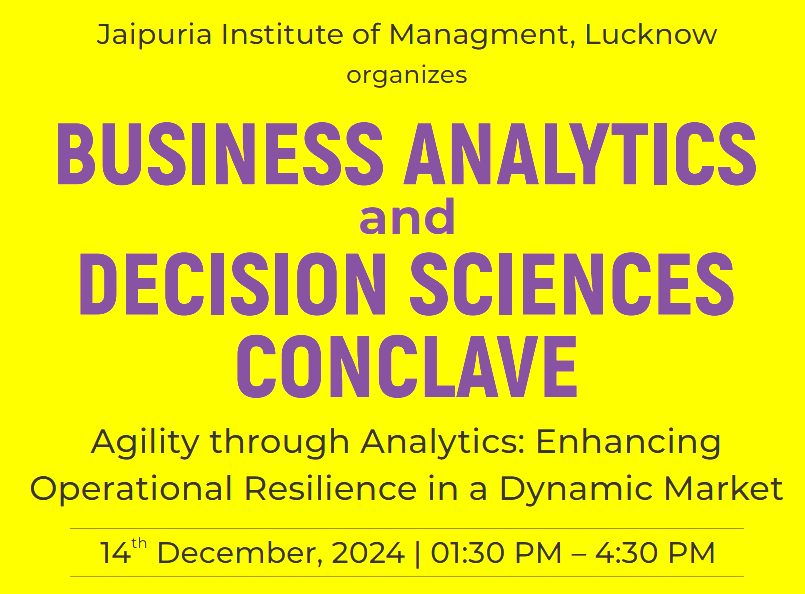
I recently had the privilege of presenting online at the Business Analytics and Decision Sciences Conclave to a group of enthusiastic MBA students. The session, titled “From Data to Decision: AI Assistance in the Agile Workplace,” focused on how AI and analytics are revolutionizing the workplace and how students can prepare for these changes.
Key Takeaways from the Session
Data Literacy
One of the core ideas we discussed was the importance of data literacy. In today’s data-rich world, it’s not enough to simply collect data; we must understand and interpret it effectively. I used the analogy of looking for lost keys under a streetlight to illustrate how we often focus on easily accessible data, even though the true insights might lie in harder-to-reach places. This highlights the need to measure what truly matters, rather than what is easy to quantify.
Deep Analytics
We also explored the concept of deep analytics. It’s crucial to go beyond surface-level data and understand the context and intricacies behind the numbers. For example, understanding the difference between correlation and causation can prevent misleading conclusions. I emphasized the importance of domain expertise in providing context to data and avoiding biases in AI-based decision making.
Practical Examples
To make these ideas more tangible, I shared practical examples from the pharmaceutical industry:
Follow-up Email Campaigns: We discussed why data literacy is important for new channel activations and how AI can help launch and optimize follow-up email campaigns by incentivizing the right behavior, monitoring customer satisfaction, and adjusting campaign content based on performance. The Rule of 80 – 80 – 40 was highlighted as a guideline to ensure campaign effectiveness.
Next Best Action (NBA) Solutions: I showcased how AI can determine the next best actions for the field force by analyzing customer preferences, transaction history, and available content. This approach helps in personalizing interactions and driving better outcomes.
Agility
The session also covered the importance of agility in today’s fast-paced business environment. AI plays a crucial role in speeding up decision-making processes by providing actionable insights, enabling rapid hypothesis testing, and offering predictive analytics. Embracing agility allows businesses to adapt quickly to market changes and stay competitive.
Preparing for the Future To conclude the session, I offered practical tips for students on how to prepare for the future workplace. I also recommended three impactful books for those interested in diving deeper into these topics:
“How to Lie with Statistics” by Darrell Huff
“Weapons of Math Destruction” by Cathy O’Neil
“Data Science for Business” by Foster Provost and Tom Fawcett
The session was an enriching experience, and I’m excited to continue the conversation on how we can better leverage AI and analytics to drive operational resilience and innovation.
Feel free to check out the attached presentation slides for a more detailed look at the session.
If you are a regular user of Chrome on Windows like me and have the auto-fill password manager enabled, you may be getting the Windows sign in prompt every time that you try to auto-fill any forms.
Looks like it is the “Use Windows Hello” setting in the Google Password manager (accessed from Settings -> Autofill and passwords -> Google Password Manager) which was causing this. Turned it off and no more prompts. You would want to leave it on if you are sharing the Windows account with others of course.
Was thinking of rewatching the Bollywood classic Chhoti si Baat last night, and discovered that it was a remake of the British comedy School for Scoundrels. This piece of information had somehow eluded me over the years it seems.
Found the British original on archive.org, and gave it a watch. It was quite entertaining, and it is easy to see the inspiration for many of the iconic scenes in Chhoti si Baat ranging from the restaurant scene to the table tennis match (lawn tennis in the original) to the bike sale (car in the original) to the climax and ending scene.
The core message of sincerity winning out at the end remains the strong point for both, though the colonel’s character is not as sympathetic in the original. Ultimately, both movies are classics in their own ways.
Incidentally, the 2 memorable restaurant scenes in Chhoti si Baat were actual restaurants in Bombay/Mumbai. The “Peter se kaho” restaurant was the cafe in Jahangir Art gallery, while the Chinese one was Flora near Worli sea face. I had wanted to visit and dine in both during my time in Mumbai. Unfortunately both closed down before I got the opportunity, so have to make do with the movie scenes.
I have been using Inoreader as my main feed reader for quite a while now after having tried feedly for a few years. I even upgraded to their Premium plan for the power user and additional newsletter limits.
I subscribe to a few newsletters as it is easier to get all the content in one place. There had been one rendering issue that I had been facing with Matt Levine’s Money Stuff newsletter ever since the recent update to Inoreader where the last few characters in each line would get cut off in the pop up reader view, like so:
I tried reaching out to support, but they were not able to do much. So, I did a bit of research and found that Inoreader has a custom CSS feature in its power user setting that some folks have used to personalise the interface. The newsletter contents were being rendered in an HTML table which I discovered by inspecting the source (hit F12 on the browser or go to the dev tools).
I did a bit of experimentation in the custom CSS settings, and found that setting the table width to 85% fixed the issue:
table {
  width: 85%;
}
I’m sure this is a very obscure issue which is for users like me who have subscribed to a particular newsletter in a feed reader, but documenting it in case others face something similar.
You could of course just read the newsletter in your email inbox or through a service like NewsletterHunt, or just change the view to full article in Inoreader.
I previously wrote about the second device that I got about coming to Dubai, but not much about the first one which was a gaming laptop. So here’s a bit about the laptop which also doubles as a local AI driver thanks to the Nvidia GPU (the RTX3060).
Soon after getting it back in 2022, I tried running the Stable Diffusion models and it was quite a bit of an upgrade over my original attempt on a plain GPU-less Windows machine. The generation times came down to 10s or so, and has gotten even faster as the models and tools have been optimised over the last couple of years. There are quite a few projects available on GitHub if you want give it a try – AUTOMATIC1111 and easydiffusion are among the more popular options. Nvidia has also got a TensorRT extension to further improve performance.
With that out of the way, I also discovered LM Studio which allows you to run LLMs locally with a chat like interface thrown in, and you can access a bunch of models like Meta’s LLama. The response times are of course not as fast as the freely available online options like ChatGPT, Claude, Gemini and the likes, but you effectively get unlimited access to the model.
Here’s an example from a conversation I had with LLama regarding the coffee meme from Ace Attorney game series: