
I finally got the Amber update for my Lumia 720 yesterday (check availability here), and it brings a few visible features like Data Sense (data usage monitor) and Glance (show clock when the phone is locked) along with some under the hood tweaks like Bluetooth LE support. On the whole, the experience doesn’t seem to have changed much, but the phone seems to respond to touches a bit oddly after performing certain operations like switching off Bluetooth and taking a screenshot.
The update process took about 45 minutes including the download, and in true Windows fashion, the phone restarted then did some data migration and prompted for another restart. iOS updates do take a similar amount of time, but there at least no restart prompts. One of the first things I did was use a workaround to install the Nokia Pro Cam and the Nokia Smart Camera on my phone. Instructions in brief:
1. Change your phone region to United States (Setting->Language+Region)
2. Connect to a WiFi network
3. Under Settings – WiFi, click on the WiFi network you are connected to
4. Switch ‘Proxy’ to on. Now type “117.135.139.179” into “Server/URL”. In “Port”, type in “8888”, then click on the tick at the bottom of the screen
7. Go to the Store and click on ‘Nokia Collection’
8. Download Nokia Pro Cam (after disabling the proxy)
9. Turn Proxy off, set your phone region back to normal, and Restart.
They seem to work without much of an issue and can even be set as the default camera app (they require you to enter the PIN though if you have one set, unlike the default camera app). The on screen controls do seem a tad small on the 4.3″ screen of the Lumia 720, but this should be tweaked once we have the official launch on the lower end devices (non PureView branded ones). There doesn’t seem to be any technical barriers for this.

As for Data Sense, it works as promised and the usage meter filled was up to date right from the initial configuration indicating that the underlying hooks were already in place before the update.

My display on the first use also seemed to be a touch more saturated than before, and I tweaked it in the new Lumia Colour Profile option under the Display setting. A touch of warmth with neutral saturation seems to be my preference (having the crimson theme on a red Lumia 720 is probably the reason for the low saturation preference).
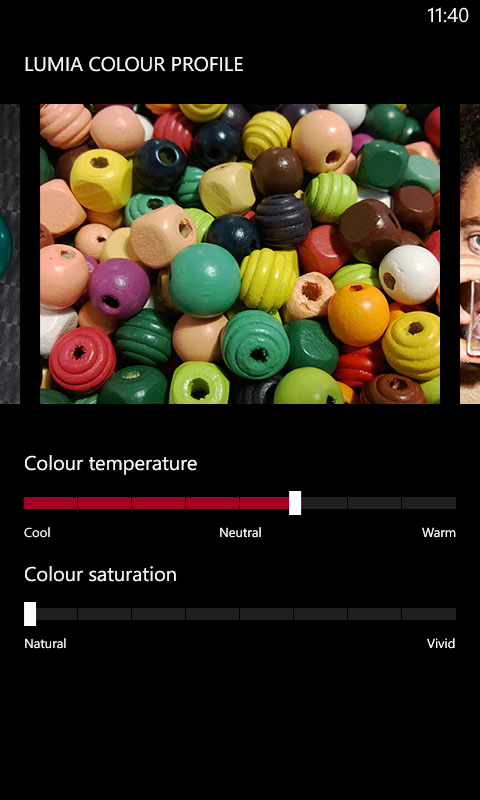
Let’s see if this solves the Bluetooth freeze issue I have been facing, or leads to any new ones.

Comments
10 responses to “Amber (GDR2) update on the Nokia Lumia 720: First impressions”
The process which u told for instalng pro cam is not working..
LikeLike
hey the process u told for pro cam is not at all working
LikeLike
how come u did it
LikeLike
r u just bluffing,if not tell me how u did it
LikeLike
dude he just gave the steps, follow them, if not google for a solution, n yeh it works, m using it n its an awesome app 🙂
LikeLike
[…] good news is that the Bluetooth freezing issue seems to have been ironed out after the Amber update on my Lumia 720. Originally, the phone used to freeze upon disconnecting my Bluetooth headset, but after the Amber […]
LikeLike
Hey how to get nokia smart cam on my 720. Can u help me
LikeLike
guys he just gave the steps, follow them, if not google for a solution, n yeh it works, m using it n its an awesome app 🙂
LikeLike
SO??
should i upgrade my 720 to amber or leave it with the older version??
LikeLike
Go for the upgrade as it fixes most of the issues.
LikeLike