
I finally got an MTNL broadband connection at home (Mumbai). Since I decided to get my own TP-LINK modem+wi-fi router (a good value for money model that I plan to review after a couple of months of use), I had to do the modem settings on my own. The settings for some models are available on the MTNL site, but it was missing for my particular model. The modem’s default PPPoE dialer settings did not seem to work, so I decided to check out one of the MTNL documents, and here’s the configuration that I found:
Username: <phonenumber> OR <phonenumber>@a E.g. 12345678 OR 12345678@a
Password: <CA number> (you can find this from your bill, or by calling 1500 from the landline) E.g. 4567890123
VPI: 0
VCI: 32
(The VPI & VCI settings chosen by my modem were different due to which it failed to connect & I had to change them manually to the above settings)
Connection Type: PPPoE LLC
MTU: 1400 bytes (another setting that had a different default on my modem)
MRU: 1492 bytes
Default route: Enabled
NAT: Enabled
Firewall: Disabled
You can also set the DNS servers manually to point to OpenDNS (208.67.222.222/208.67.220.220) or Google’s DNS servers (8.8.8.8/8.8.4.4) which should prevent ISP level DNS blocking of sites, and most likely provide better lookup speeds.
Below is the D-Link modem settings from the MTNL document from where I have picked the settings.
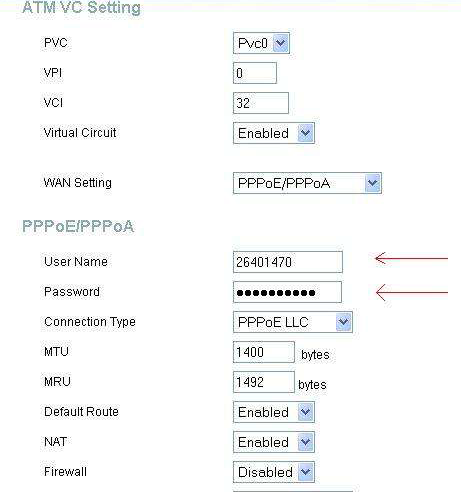
As for the wi-fi settings, you can stick to the defaults – just don’t forget to secure your network using a passkey to keep away free riders.

Comments
7 responses to “Modem settings for MTNL broadband”
Hi Aditya. I am thinking of picking up the same modem which you have mentioned here in the article. How is your experience been in the last few months with the TP Link hardware. Any issues? Would you recommend another model instead?
LikeLike
It’s been working quite well for me, and the latest model has some upgrades as well. I continue to recommend it as very good value for money.
LikeLike
Thanks Aditya for the prompt response. Your article will help me setup my modem later this week.
LikeLike
[…] it to your router blocklist. In my case, I found the IP this way, and then enabled the firewall on my TP Link router and added a rule to block this IP (use add WAN host to add the […]
LikeLike
I have noticed you don’t monetize your site, don’t waste your traffic, you can earn extra cash every month because you’ve got hi quality content.
If you want to know how to make extra $$$, search for: Boorfe’s tips best adsense alternative
LikeLike
Would like to add Mtnl settings for “Sanscord Modem”
In addition to all the above ,
You select pvc1
Since pvc0 has vci 35 and it will not connect
LikeLike
A BIG THANK YOU ! APRIL 2021
LikeLike