I signed up last week for the Google App Engine, and tried out the tutorial for creating a guest book. It is a pretty simple tutorial, but one of the things I noticed about the App Engine is that there is no add-on for any IDE/editor at the moment, unlike the Android SDK which has its own eclipse plug-in or even the Web Toolkit which has a utility to generate an eclipse project.
Initially, I tried using Notepad++ which I have installed as my basic text editor, but I didn’t get much support beyond basic syntax highlighting. It does have a built in run command, but is not very configurable. This is when I decided to give Komodo Edit a try (it is open source). It is a lightweight version of the Komodo IDE, but has support for a variety of languages along with a useful set of tools. Incidentally, it is based off the Mozilla code base, and has support for add-ons just like Firefox, Thunderbird and Flock.
You can organise files into projects, which comes in handy for the Google App Engine applications, which is typically composed of a set of files based in a folder. The editor also has some basic syntax checking in addition to syntax highlighting. However, the code intelligence/auto-complete is limited to the base Python installation, and so will not be able to help with the Google App Engine.

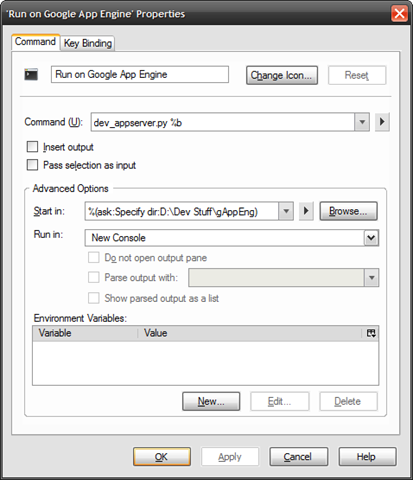
In addition to this, the editor also has a customisable run command, which can be used to launch the development server. Shown below is my customised run command which can be used on the main .py file of the application (E.g. helloworld.py form the tutorial), and launches the development server in a new console (set using the “Run in” option). The “Start in” parameter is also important as the server needs to be launched from the parent folder of the folder in which the application is stored, i.e., if the application files are stored in “D:\Dev Stuff\gAppEng\helloworld”, the server needs to be launched from “D:\Dev Stuff\gAppEng”. Here, I have used the “ask” option with a default value for the “start in” location, so that I am prompted for the path at the time of server launch.
There are quite a few other tools available in the editor, like file compare, spell checker, templates etc, which I haven’t tried out yet. Now, if I could only think of my own project for the App Engine. Suggestions anyone?
Update: Just noticed that another person has posted instructions for using Komodo Edit as an IDE for Google App Engine (on Linux it seems), including steps for setting up the uploader among others. (via)

Comments
19 responses to “A pseudo IDE for Google App Engine – Komodo Edit”
[…] AB show you at his blog over here. « Django Helper for Google […]
LikeLike
Interesting read. I followed the instructions in the post you mention in your Update on a windows install of Komodo Edit (4.3.2) and the auto-complete for the Gooogle AppEngine API works a treat.
Instead of Steve’s instructions for step “c. Add the Google libraries to the code completion path”, use Edit>Preferences>Languages>Python and under Additional-Python-Import-Directoies, click “+” and choose the root of your GoogleAppEngine install (eg: c:\program files\google\google_appengine\).
LikeLike
Any one get code intelligence xml for google appengine?
LikeLike
Thank you
LikeLike
Thanks! However I use the command :
dev_appserver.py %d/
instead
dev_appserver.py %b
LikeLike
Interesting to know.
LikeLike
Thank you. interesting and useful.
LikeLike
A bit hard, but thanks 🙂
LikeLike
Thanks you, crazy google !
LikeLike
your blog’s highly informative and cool! le roi du casino en ligne
LikeLike
have a nice day!
i adore your style… casino en ligne sérieux
LikeLike
thanks for this good tuto!
LikeLike
i like your website thanks for sharing!
LikeLike
Je n’arrive pas encore à bien cerner Google App Engine mais en étudiant un peu je suis sur que je peux arriver a faire quelque chose avec ^^
LikeLike
Thank you for this presentation.
LikeLike
Very interesting.
LikeLike
[…] startup tutorials – both of which are conveniently linked from this blog post (direct: here and […]
LikeLike
[…] Update: it seems the original blog post is down, but I found another similar posting. […]
LikeLike
[…] Update: it seems the original blog post is down, but I found another similar posting. […]
LikeLike