The top 3 are quite diverse, mind bending and bare the limits of our perception in their own ways. Embedded below for your scrutiny:
via The Best Optical Illusions of the Year
More at the contest site

The top 3 are quite diverse, mind bending and bare the limits of our perception in their own ways. Embedded below for your scrutiny:
via The Best Optical Illusions of the Year
More at the contest site

Got my first smart speaker, the Amazon Echo Plus yesterday and it seems to be nicely Indianised. It seems to be using the Raveena voice based on Indian English or a variant thereof from Amazon Polly (AWS’s text to speech service). The Alexa app itself is also pleasantly adapted for India with the appropriate command suggestions and services available.

I had pre-ordered the device and it was delivered within a day of the dispatch. The setup process was quite smooth and once done, I promptly went about installing a bunch of skills ranging from the utilitarian to the time pass ones.
As a music player, the sound quality is decent but nothing spectacular as many reviewers have noted. As for the music catalog, it seems to be using Saavn exclusively though it does Amazon music as one of the options in the app. Saavn itself has a decent catalog and Alexa has again been Indianised sufficiently to understand some Hindi song names. I tried “Play the song ek main aur ek turn” and it actually started playing the song from Saavn though it did pronounce “main” the English way.

The flash briefing skill is quite handy to get a quick bulletin of your areas of interest once you have set it up with your desired sources. It can also give you cricket score updates without any skill installation as I tried out during today’s India – New Zealand match.
The alarms and timers work pretty well too and I conveniently set a sleep timer to stop playing the music while going to bed.
Then of course there’s the whole reason why I got the plus instead of the regular model which is the smart home hub built into the device. A solo Philips hue bulb is what I ordered next and setup today. It was again a pretty simple process with the Echo detecting the bulb in a few seconds. Controlling the bulb by voice is also quite easy right from switching it on and off to changing the colour and brightness. The app however has just the on/off switch and brightness control at the moment and as many reviewers have noted, the functionality of the smart devices using just the Echo Plus is considerably limited when compared to using the devices with their respective hubs. This is definitely one area of improvement and given the kind of coverage you see for smart homes on the Amazon Alexa pages, it should improve sooner rather than later.
One thing I couldn’t find is the voice profiles option that lets Alexa identify the person speaking and customising the responses accordingly. Possibly a feature not yet rolled out to the Indian market as it seems to depend on the Amazon app that didn’t seem to have this option in my case.
A smart speaker is a family device but my wife is not very enthused by the idea while my 4 year old daughter would like to play with Alexa but hasn’t yet gotten out of her initial shyness phase to begin talking freely to her. It didn’t help that Alexa couldn’t answer many of her queries and also the fact that she was trying to get Alexa to identify the colours of the crayons she was holding in front of the device – a perfect case for Google Lens and Assistant.
This is of course just what I’ve been able to check out in the first 24 hours with the Echo Plus and I’m sure there’s lots more already available and also coming in the near future.
Remember the classic restaurant scene from Lady and the Tramp set to the track of “Bella Notte”?
And here’s the “inspired” scene from Hot Shots 2:
Things do seem very easy to compare & contrast with youtube, don’t they?
I was going through Engadget’s review of the nook and it reminded me of a youtube video I had seen a few years back titled “Medieval help desk”. With so many e-book readers on the market today like the Kindle, nook & Sony Reader, we’re definitely seeing a paradigm shift in the way most of us consume books. The whole user experience is transforming, and I’m quite sure that we could easily upgrade this video spoofing the introduction of books to the introduction of e-book readers. No matter what happens, enjoy the video 🙂
I created the above video as an introduction to HarIT, the Green IT event of Avenues 2009, the annual B-school fest of SJMSOM, my B-school. I used the text to movie service – Xtranormal. It is a handy and innovative service that allows you to make movies by literally placing words in the mouths of characters. It has been around for a few months now and it recently launched a desktop software for making movies called State.
So, there are now two ways to make movies – one using the online service and two using the State software. The service is available in a basic and premium version. The basic version limits the number of actors, scenes & voices available. There are numerous worlds available online (see pic below) while the desktop software limits the worlds available but provides more actors, scenes & voices. The software is in beta and so is likely to change to be consistent with the online version.

The desktop software, State, requires you to have an account on Xtranormal and login before you can start using it. This is likely to regulate features available to free and premium members. It can be a bit of a problem to use the software if you are behind an authenticated proxy like me, as it does not load without logging in. It seems to use the proxy settings from Internet Explorer, but doesn’t prompt you for authentication. Due to this, it almost became a non-starter. However, I managed to find a workaround using a HTTP tunnel client that removes the need for authentication and sets up a local proxy address instead.

Since the software is in beta there are frequent updates, and upon logging in, you may find yourself facing an update window. When I was using the software the day before, it was prompting me for updates, but failed to download any of the files and later on, the prompts went away.
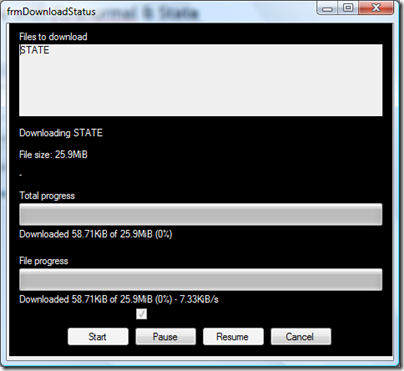
However, the software is quite easy to use (though pretty unstable – crashed many many times) and I managed to put together the video you saw on top in half a day. Not bad for a first time user eh? 🙂 It seems to support movie exports in 3 formats as of now (I used only the AVI option). It has support for background scores, character expressions, postures, movements, looking and lots more. There also seem to be a few placeholder elements in the interface indicating that there’ll be support for inserting videos and pictures along with the option of recording audio (or are those premium features?). In absence of these features as of now, I just exported an AVI file and then did some editing in Windows Live Movie Maker (another easy to use & handy product) to create the final piece.
Here’s a screenshot from the software:

One of the things that struck me while making the video was the level to which text to speech has progressed. Earlier, I remember the text to speech convertors spelling out words in case it did not have it built in. In State however, the words were handled phonetically. There were some limitations of course with the default spellings for some of the Indian words, but I solved them easily by going in for phonetic spellings. For example, HarIT was being pronounced as Har-I-T rather than Har-eet, and the latter is the spelling we used in the script to get the desired result. Similarly we also had to split facebook to “face book” to get the right pronunciation.
Overall, the service holds a lot of promise and if you look into the future, it’s only a matter of a few years before we’re able to create high quality animated movies from our personal machines. Just imagine directing well known characters yourself. That said, the online version seems to be having load issues as the number of users seems to have expanded quite a bit. The desktop version does addresses the availability problems of the online version, but the feature sets are not same across the two.
You can also check out the Xtranormal youtube channel to catch their latest movies.
It has been a while since I dwelled on the University 2.0 topic. In fact, I had given a presentation in one of the Systematics club (our Systems club) meetings in SJMSOM. We managed to grab a video of the session, and here it is.
Here’s the presentation I used for the session.
Over the last week, I have been thinking about doing some video content creation, specifically some kinds of do it yourself videos. I have a liking for origami, and thought this should be a good starting point. I did have a youtube account, but there were also numerous other similar services.
I was wondering which service would be a good choice, and this is when I came across Andy’s post on his choices of online video services. He has given a nice comparison of some of the services like youtube, viddler and seesmic, finally favouring viddler:
Viddler is just so easy to use. It accepts a whole range of common video formats and will transcode them for you. You can tag your videos – and even better than that, you can add comments and tags at particular points in the video. I can embed the videos on my WP.com blog (which is not possible with Seesmic). It’s easy to find and connect with friends. There are groups. There are excellent stats which show where hits on your videos are coming from, including when a video is played through an embed on your site or another one…
The viddler features seemed quite attractive. So, I signed up for it and uploaded my first video (a flapping bird origami). I also did some digging to see how the Viddler videos could be embedded into a WordPress.com blog, and it seems there is a tag to do this:
At the Viddler site, if you click on Menu in the lower right of a video screen, a row of menu selections appear at the top of the video screen. Select “embed” and then click on the “wordpress.com” button and it will give you the code that will work with [WordPress].com.
Here’s the embedded form of the bird origami video (there’s also a flickr photo set for the step by step photos):
I’ll be creating more origami videos along with corresponding flickr sets (also an origami collection for the sets). The only problem for me right now is the slow upload speed (64 kbps), due to which I am uploading low resolution videos (320×240) without audio. As for the video creation, I used my digicam, a Canon Powershot A630 mounted on a Gorillapod to shoot the video, and VirtualDub to re-edit the video (re-encoding to DivX and removing audio).
